
clkgbfddfgfmgijnngloebmkjkjghkco
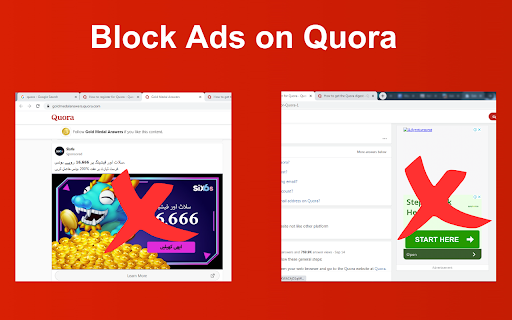
Block ads on Quora for clean, distraction-free reading. Remove annoying ads and popups from Quora questions and answers instantly. Quora AdBlock delivers an uninterrupted reading experience on Quora by efficiently blocking and hiding ads. Designed for simplicity and effectiveness, our extension ensures you can focus on content that matters to you without distractions. Features - Ad-Free Browsing: Automatically hides all forms of advertisements, including sidebar promotions. - Improved Readability: Enjoy a cleaner interface on Quora, making it easier to read and navigate through answers and questions. - Lightweight and Efficient: Runs smoothly in the background with minimal impact on performance, ensuring a seamless browsing experience. - Privacy-Focused: Operates without collecting or sharing any personal information, respecting your privacy and data. Why Quora AdBlock? Quora is a vast platform full of insights, knowledge, and diverse viewpoints. However, ads can often interrupt your reading flow and make it harder to find the information you're looking for. Quora AdBlock is here to enhance your Quora experience by removing these distractions, allowing you to focus solely on the content. Easy to Use Simply add Quora AdBlock to your Chrome browser, and it will automatically start working. No complicated setup or configuration required. Enjoy a cleaner, ad-free Quora immediately after installation. Disclaimer Quora AdBlock is an independent project and has no affiliation with Quora Inc. It is developed to enhance user experience on the Quora website by removing advertisements.

Ad Blocker: Stands AdBlocker
Stands AdBlocker – it's a free ad blocker for YouTube, Twitch, Pop-Ups, Video Ads, and websites. Block ads everywhere with Stands! Stands is the best free adblocker for Chrome that eliminates ads on YouTube, Twitch, pop-ups, video ads, and banners. Download the top-rated adblock Chrome extension and enjoy faster, interruption-free browsing today! 🚀 Why Choose Stands adblocker for Chrome? ✅ Block ads – pop-ups, video ads, banners, and auto-playing videos disappear from every site you visit. ✅ Watch YouTube and Twitch without interruption – no pre-roll, mid-roll, or live stream ads ever again. Skip ads automatically with our built-in ad skipper. ✅ Faster page loading – blocking ads reduces data usage and makes sites load up to 50% faster. ✅ Protection from malicious ads – Stands blocks dangerous ads carrying viruses, malware, and phishing attempts that could harm your device. ✅ Auto-hide cookie banners – say goodbye to annoying pop-ups asking you to accept cookies on every site. ✅ Customize your blocking preferences – you decide which sites can show ads to support your favorites, and which can't. 🎯 What does Stands AdBlocker block? 🎥 YouTube ads – removes all video ads instantly 🎮 Twitch ads – watch streams without interruptions 🍪 Cookie banners – automatic blocking of cookie notification pop-ups 📱 Social media ads – block ads on Facebook, Instagram, Twitter, and LinkedIn 🌍 Pop-ups – a true website blocker for pop-ups across every site 📥 How to remove ads? Install in 3 steps: 1. Download Stands from the Chrome Web Store 2. Install with one click 3. Done! Your Google Chrome ad blocker activates automatically – block ads for free from the very first second Also available for Microsoft Edge, and Opera. ⭐ Why is Stands the best adblocker for Chrome? Stands starts blocking the moment it's installed, letting you browse free from annoying interruptions. As a trusted adblock Chrome extension, it stands out for stability, effectiveness, and fast performance: 🔹 Lightweight – won't slow down your browser 🔹 Regular updates – always up-to-date protection against new ad formats 🔹 All-in-one protection – one extension instead of multiple add-ons 🔹 No hidden costs – completely free, forever Stands delivers superior performance compared to alternatives like Adblock Plus, AdGuard, and uBlock Origin. ❓ Frequently Asked Questions What is the best adblocker for Chrome? Stands AdBlocker is the superior choice when considering top add blockers like Adblock Plus, AdGuard, AdBlocker Ultimate, uBlock Origin, and the Pie Adblock extension. Stands effectively blocks ads and speeds up page loading times. How to enable ad blocking? To enable Stands, simply install it from your browser’s extension store. Once installed, access the settings through your browser’s menu to customize your preferences. Can I choose which ads to block? Absolutely! You can customize your settings and add exceptions for specific sites you want to support. 🔐 Your Privacy What personal information do we collect on our users, and how do we collect it? We will collect information about the websites visited by our users, search engine results pages, click stream data, and information about the content that you viewed in order to ensure the ad-blocking, and anti-malware protection are all working properly. We also provide Browsing Data to third parties for their own use, such as for market analytics purposes. All Browsing Data is filtered to remove any personal data before it is processed and provided to third parties. For detailed policies on privacy and user terms, please refer to the Privacy Policy and End User License Agreement available on the website. PRIVACY POLICY: https://www.standsapp.org/privacy-policy/ END USER LICENSE AGREEMENT: https://www.standsapp.org/end-user-license-agreement/ These documents ensure transparency and trust by choosing Stands, demonstrating our commitment to efficiency and protecting your online privacy. 📧 Support For additional support or feedback, users are encouraged to visit the Support Center or contact via email at support@standsapp.org. Get started with Stands and join millions of users worldwide!

Adblock for Youtube - skip ads
Adblock to remove all ads from Youtube. Experience YouTube ad-free with ad blocker extension. Auto skip Youtube ads. Adblock for Youtube offers users the power to block annoying ads on videos. It blocks out pre-rolls, bumper ads, overlay ads, mid-rolls and post-rolls. You can enjoy an ad-free streaming experience without any distractions. Are you tired of YouTube being constantly littered with ads? Do you feel like it interrupts your viewing experience and makes following a video almost impossible? Well, now there is a solution to this problem. The extension is easy to use: ✔️ Easy Toggle: Click the extension icon in the top-right toolbar to turn Adblock for YouTube on or off. ✔️ Status Indicator: When disabled, the icon turns gray to show it is inactive. ✔️ Ad Counter: When active, the icon displays the number of blocked ads in real-time. Keep your online experience free from annoying and unwanted ads with our powerful Chrome extension. Skip Ad allows you to skip ads while watching video. This extension detects ads and clicks the skip button instantly, instead of completely blocking ads preventing channels from earning any ad revenue. Safe, Lightweight, and Private: ◾️ No Tracking: We respect your privacy. We do not track your browsing history or collect any personal data. ◾️ Ultra-Lightweight: Optimized code that uses minimal CPU and RAM, keeping your browser fast. ◾️ Works Out of the Box: No complex configuration needed. Install it once and enjoy an ad-free YouTube forever. Disclaimer: YouTube is a trademark of Google LLC. This extension is an independent project and is not affiliated with or endorsed by Google or YouTube. Your suggestions can make Ad Block even better. Share your ideas through feedback on extension web store.

Ad-Blocking - YouTube & Websites
Ditch annoying ads and enjoy uninterrupted, ad-free browsing and YouTube videos. 🌐 Ad-Blocking – YouTube & Websites Smart, Customizable Adblock for a Clean Browsing Experience Ad-Blocking – YouTube & Websites is a modern browser extension built to help users reduce distractions, improve page loading speed, and enjoy a cleaner web experience across websites and video platforms. Designed for flexibility and control, it combines effective ad filtering, privacy-focused features, and an advanced dashboard suitable for both everyday users and power users. ✔ Website and video ad filtering Reduce banners, pop-ups, overlays, tracking elements, and unwanted content on websites and media platforms. ✔ Per-site control Enable or disable protection for individual websites with a single click. ✔ Industry-standard filter lists Support for widely used rule lists such as EasyList, EasyPrivacy, regional lists, and security-focused blocklists. ✔ Profiles and presets Create custom profiles (for example: work, browsing, gaming) and switch instantly. ✔ Quick settings panel Control behavior such as auto-reloading tabs, rule application, and visual indicators. ✔ Diagnostics and logging tools Optional tools for troubleshooting and understanding how filtering rules are applied. This extension is designed with privacy in mind: All filtering happens locally in your browser. It does not act as a proxy or VPN, but it can be used alongside privacy tools, password managers, and security extensions. By reducing unnecessary network requests and visual clutter: CPU and memory usage can be reduced Focus and productivity improve 🧠 Built for Modern Browsers Ad-Blocking – YouTube & Websites is suitable for: everyday browsing, streaming, work, and study Ad-Blocking – YouTube & Websites puts control back in your hands — without misleading claims or unnecessary complexity.

Ad block & Adblocker - No Ads extension
Block ads and popunders on social websites. Removing ads makes websites work faster. Youtube Adblocker for pre-roll, banners Adblock is the extension is essential in your browser as it will let all the sites you enjoy browsing without advertisements and unwanted ads. Install now and watch the magic happen :) Block annoying and intrusive ads while browsing We will block advertisements from all sites, but you can refer to us sites to the extension not to block either. Websites are prone to an abundance of ads and distract from important content, to avoid this you have to install and use an extenssion called No ads - adblock. It's all very simple. Ad blocker blocks ads, popunder, banners advertisements, adult & gambling websites and malicious websites. It can also prevent advertisers from tracking your behavior, improves privacy and data protection. Remove annoying ad to stay focused on content you was looking for. Website blocking intrusive ads minimizes the risk of “malvertising” infections. Ad block disable known malware domains and makes protecting yourself from malware easy. This Chrome extension ad blocker is the solution to block and remove all ads. You don't need to change your favorite browser for private and secure browsing. This extension runs on all your favorite chromium based browsers. The best features at a glance: - The application supports every chromium based web browser and adblock everything in. - Blocks sites that distribute malicious content, viruses and fraudulent websites. * Safe browsing * Some websites may contain hidden links that force you to click and may lead you to suspicious Virus and Malware installations. So we also block these links and act as a kind of extra protection with algorithms built into adblocker. *Element block* After installing the extension, simply click on the extension icon. You can then hover the cursor around, and the extension will highlight all blockable elements within a page. Click on an undesirable element, and the extension should block it immediately. Adblock ON mode - when green color in UI Ad block OFF mode - when red color in UI Types of ads it blocks: - Pop-up ads blocker - Banner adblocking - Video adblock - Tracking cookies - Text advertisement - Animation ad blocker - Facebook ads blocking - Makes YouTube banners unseened - YouTube pre-roll ads block* - Webmail advertisement block - Overlay ads block - Other types of annoying ads - Webpage element blocking *Extension speeds up playing video ads on YouTube and/or skip it after 5 sec playing. It do not block it permanently. It uses only allowed on YouTube service methods. The most compatible ad blocker on the market! The extension can track the URLs you visit in order to collect and analyze information about ads that are blocked automatically and/or by using an element blocker. By installing the extension, you are giving your consent to these actions and agreeing to our policy.
