
clhkbghopdclagfplhknlhcpnjefpacd
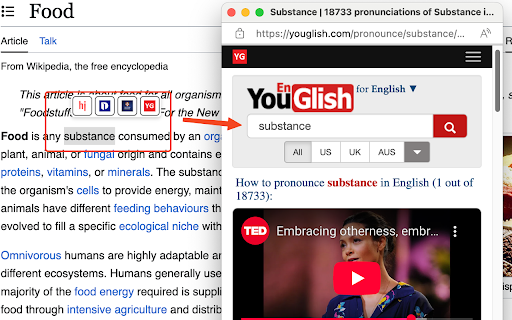

Look up words instantly while you browse. Highlight text to see popups from multiple dictionaries – simple and fast. Feel free to leave your feedback here: https://forms.gle/6SCyfAc3jKCKhyPb6 I will reply in 3 days if an email is provided! Current Features - Floating dictionary buttons appear when text is selected - Support for four dictionary websites: - Dictionary.com - Howjsay.com - Cambridge Dictionary - Youglish.com - Individual dictionaries can be enabled or disabled - Configurable timing options: - Option to show buttons immediately or after holding mouse - Adjustable delay duration to prevent accidental triggers - Compact UI with website icons as buttons - Privacy-focused with minimal permissions - Small popup window for dictionary lookups Change log: v1.0.9 - Users can now choose whether popup buttons appear immediately or after holding mouse for a customized duration v1.0.7 - Rename the extension from Dictionary Search to Popup Dict v1.0.4: - Used website icons as buttons to reduce the menu size.

Dictionary Anytime
AI powered Dictionary Anytime is a versatile and user-friendly Chrome extension designed to help you instantly access definitions, synonyms, antonyms, and pronunciations for any word while browsing the web. No need to navigate away from the page or open a new tab—Dictionary Anytime is always there to enrich your reading and writing experience. 🔵 Instant definitions: Simply enable the Dictionary Anytime checkbox to activate the feature, and then select a word to see its definition in a tooltip. 🔵 Verbose meanings: Enable the verbose checkbox to access detailed definitions, synonyms, antonyms, and pronunciations for the selected word. 🔵 Pronunciation support: Improve your spoken language skills by learning the correct pronunciation of words alongside their definitions. 🔵 Recent tab: Keep track of the words you've looked up with a handy list of brief meanings, organized from most recent to oldest. 🔵 Easy toggling: Quickly turn on or off dictionary features to suit your browsing needs, right from the extension popup. Dictionary Anytime is perfect for students, professionals, and anyone who wants to improve their vocabulary and language skills while browsing the web. Install Dictionary Anytime today and enjoy the convenience of having a dictionary at your fingertips, anytime and anywhere.

Spell Book (Visual English dictionary)
Spell Book is a companion will leverage your English understanding with Cambridge Dictionary as source of truth and powerful widget. 🔥 Features • Looking up word via selection on web page • Learning via text, images, voice • Stacking multiple words • Original source URL 🔎 User manual • Select word on web page • Click Spell Book's icon or right click and choose "Cast spell on " with Spell Book's icon 💌 Some message from Spell Book • If you found me, It's right time for magic • Don't delay the excitement and curiosity anymore cast your own magic right now

All-in-One Cambridge Dictionary
All-in-One Cambridge Dictionary – Your Complete Language Companion Stop switching tabs to look up words! This extension brings the full power of Cambridge Dictionary right to your fingertips, making language learning effortless while you browse. ━━━━━━━━━━━━━━━━━━━━━━━━━━━━━━━━━━━━━━━━ 🔔📢 CHANGES – – – – – – – – – – 📌 VERSION 1.1.0 ] – – – – – – – – – – 🚀 New Features ✓ Keyboard Shortcut: Press Ctrl+Shift+X (Mac: Cmd+Shift+X) to instantly look up the selected word - no need to click! ✓ Auto-close Popup: Dictionary window automatically closes when you click outside or switch to another window. Stay focused on your reading! ✓ Smart History: Recently searched words are moved to the top of the history list for quick access. ✓ Settings Button - Quick access to extension settings directly from the popup header. ✓ Configure keyboard shortcut at chrome://extensions/shortcuts ✓ Toggle auto-close feature in extension Options page ━━━━━━━━━━━━━━━━━━━ *** ━━━━━━━━━━━━━━━━━━━ ━━━━━━━━━━━━━━━━━━━━━━━━━━━━━━━━━━━━━━━━ 💥 FEATURES ✓ Floating Icon – Highlight any word on any website, and a sleek lookup icon appears instantly. One click, instant definition! ✓ Right-Click Menu – Select text → Right-click → "All-in-One Cambridge Dictionary" → Done! ✓ Extension Popup – Click the extension icon and search directly from the popup window. ✓ Search History – Your last 20 lookups are saved for quick reference ✓ Customizable Popup – Adjust window size to your preference ✓ Toggle Floating Icon – Show or hide the floating icon as needed ✓ Language Direction Swap – Instantly reverse translation direction (e.g., EN→FR to FR→EN) ✓ Works Everywhere – Look up words on any website: news, social media, blogs, PDFs, you name it! 📚 30+ Cambridge Dictionaries at Your Fingertips Choose from a comprehensive collection of dictionaries: - English Dictionary - Learner's English - Essential British English - Essential American English - English ↔ French, German, Spanish, Portuguese, Italian, Polish, Japanese - English → Vietnamese, Chinese (Simplified/Traditional), Korean, Thai, Indonesian, Arabic, Russian, Turkish, Norwegian, Malaysian, Dutch, Danish, Czech, Catalan ━━━━━━━━━━━━━━━━━━━━━━━━━━━━━━━━━━━━━━━━ 🚀 Why Choose This Extension? ✔ All-in-One Solution – No need for multiple dictionary extensions ✔ Lightning Fast – Instant lookups without leaving your current page ✔ Privacy-Focused – No data collection, no tracking, all processing happens locally ✔ Lightweight – Minimal resource usage, won't slow down your browser ✔ Free Forever – No subscriptions, no hidden fees ✔ Regular Updates – Continuously improved based on user feedback ━━━━━━━━━━━━━━━━━━━━━━━━━━━━━━━━━━━━━━━━ 👨🎓 Perfect For - English Learners – Build vocabulary while reading online content - Students – Quick reference while studying or researching - Translators – Fast access to bilingual dictionaries - Professionals – Verify terminology on the fly - Language Enthusiasts – Explore word meanings and usage ━━━━━━━━━━━━━━━━━━━━━━━━━━━━━━━━━━━━━━━━ 🔒 Privacy & Security ✓ No Data Collection – We don't collect, store, or transmit any personal information ✓ Local Storage Only – Your preferences and history stay on your device ✓ No External Servers – All processing happens in your browser ✓ Transparent – Clear about what we do and how we do it ━━━━━━━━━━━━━━━━━━━━━━━━━━━━━━━━━━━━━━━━ 📖 How to Use 1. Highlight any word on any website 2. Click the floating icon or right-click → All-in-One Cambridge Dictionary 3. Get instant word meanings in a popup window! Your successful lookups are stored locally and appear in the popup for quick access. Pro Tip: Customize your experience in the Options page (click to Setting icon on the popup header or right-click extension icon → Options) ━━━━━━━━━━━━━━━━━━━━━━━━━━━━━━━━━━━━━━━━ 💬 Support & Feedback Love this extension? Please leave a ⭐⭐⭐⭐⭐ review! Found a bug or have a suggestion? I'd love to hear from you! ☕ Support Development: If you find this extension helpful, consider buying me a coffee! Your support is a huge motivation for me to keep developing, refining, and adding new features to this project. ━━━━━━━━━━━━━━━━━━━━━━━━━━━━━━━━━━━━━━━━ 🌟 Start Learning Smarter Today! Install now and transform the way you learn languages online. Every word is just one click away!

Cambridge Dictionary
Look up selected text in 'Cambridge Dictionary' page. Look up selected text in https://dictionary.cambridge.org, using predefined dictionary. While in Cambridge Dictionary page, automatically focus on search box when typing. When popup tab is closed, previous active tab will be active again. This is very helpful if you are in middle of handful of tabs.
