
cleopomnamfenlfpglofnooemoakdgef
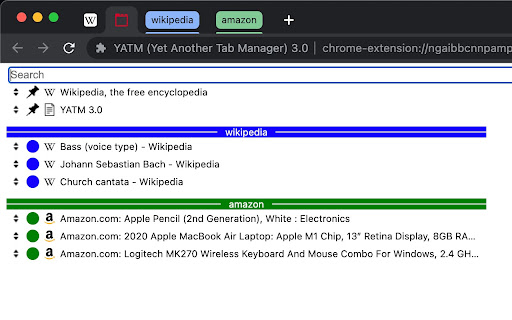
Preview, Rename, Reorder and Search for your tabs from a central location Tired of clicking on all your Chrome tabs one by one to find the one you want? What if you could manage all of them from a central location using yet another tab manager? Well, you found the right extension my friend! Using YATM you can: - See all your tabs from a central location with their full title - Reorder tabs using drag'n'drop - Search for tabs by name - Close tabs - Identify duplicate tabs ... including support for pinned tabs and tab groups! v3.0 - removed the capacity to rename tabs - replaced the "side panel" view mode with the "tab" view mode - added support for tab groups - duplicate tabs are now highlighted in red - (internal) migration to manifest v3 v2.1 - Added buttons to access the configuration dialog & the help video - Added ability to switch between popup mode (the default) or side panel mode - Fixed a nasty bug that was causing the side panel to randomly close when previewing tabs - Removed the capacity to close YATM when clicking anywhere in the main browser window (this was buggy anyways) v2.0 - YATM now opens as a side panel: -- click on a tab in YATM to preview it -- double click on a tab in YATM to close YATM -- click anywhere in the main browser window to close YATM - Side panel width is adjustable using your mouse - Removed sort button v1.5 - Renamed extension from "Tab List" to "YATM"

Tab Sorter 2
Enhance your browsing experience, one click at a time Introducing TabSorter2 - the browser extension designed to revolutionize the way you manage your tabs! Say goodbye to tab clutter and hello to seamless organization with just one click. 🅴🅵🅵🅾🆁🆃🅻🅴🆂🆂 🆃🅰🅱 🅼🅰🅽🅰🅶🅴🅼🅴🅽🆃 [FREE]: • 💫 Quickly sort your tabs by domain and title for easy navigation. • 🔄 Merge all your windows into one streamlined interface. • 🎲 Spice things up by shuffling your tabs for a bit of fun! • 💥 Collapse: Create groups of domains with more than 2 tabs opened [NEW] 🅰🅳🆅🅰🅽🅲🅴🅳 🅵🅴🅰🆃🆄🆁🅴🆂 🅵🅾🆁 🅿🅾🆆🅴🆁 🆄🆂🅴🆁🆂: • ↔️ Split your window vertically or horizontally to tailor your browsing experience. • 🏷️ Take control with Domain Uniting, perfect for grouping or isolating tabs from the same domain. • 🧠 Optimize your memory usage with Memory Optimization, freezing and unloading tabs to save valuable resources. • 🧹 Say goodbye to clutter with Domain Cleanup, closing all tabs from a specific domain across all windows. • 🚫 Eliminate duplicates with Tab Deduplication for a cleaner browsing experience. 🅲🅾🅼🅱🅰🆃 🆃🅰🅱 🅰🅳🅳🅸🅲🆃🅸🅾🅽: • 🎯 Dive into Focus Mode to eliminate distractions and boost productivity with a clear canvas. • 📚 Easily return to your tabs with Unfocus when you're ready to dive back in. 🅾🆁🅶🅰🅽🅸🆉🅰🆃🅸🅾🅽🅰🅻 🅱🅻🅸🆂🆂 🆆🅸🆃🅷 🆂🆃🅰🅲🅺🅸🅽🅶 🅼🅾🅳🅴: • 🗂️ Keep your windows neat and clutter-free after a domain split with Stacking Mode. • ✨ Tidy up: Feeling overwhelmed? In one clean sweep, tidy up your messy tab life 🧹 [FREE - Experimental for 50+ tabs opened] Why wait any longer? Embrace the essentials for free indefinitely or subscribe to support continuous development and unlock all current and forthcoming features 🙌. Seize control of your browsing journey today with TabSorter2. Your tabs will thank you for it 😉!

Awesome Window & Tab Manager
Displays a list of all windows and tabs open in Google Chrome. Allows filtering, sorting, refreshing, bookmarking, and saving. Awesome Window & Tab Manager does the following: (1) - Tells you how many Chrome windows and tabs are open. (2) - Displays all the windows and tabs. (3) - Allows text filtering (searching) on the windows and tabs. (4) - Allows alphabetic sorting of tabs. (5) - Categorizes tabs by window, domain, or category. (6) - Categories are determined by your own bookmark structure. (7) - Window, domain, or category groups can be refreshed or closed. (8) - All windows and tabs can be saved and restored later. (9) - Window, domain, or category groups can be saved and restored later. (10) - Unbookmarked tabs can be bookmarked. Note: Google Chrome version 16 or higher is required for tab refreshing functionality.

Super Focus Tabs
Quickly find out tab/page. Reduce much more time while working with multiple tabs/pages. + Quickly find out tabs. + Quickly closing current tab by pressing double esc + Quickly find the page in your bookmark/history. + Quickly save the page by using shortcut key. + Quickly go back to previous active tabs by shortcut key. + Quickly go to latest created tab. + Support auto close unused tabs. + Support real time update. + Support page screenshots. + Support list view, thumbnail view and tree view, preview. + Support tabs, bookmarks, history, saved pages. + Support sorting, filtering, grouping, etc. + Support many functions such as saving and closing all tabs, merging windows, closing the duplicated pages, etc. + Many options for you to customize. Reduce much more time while working with chrome. Let try and experience.

TabPlus
The most feature-packed tab manager. Save & organize your tabs, sync across devices! Tab++ allows you to save your tabs for later. You can organize, categorize, and name them, then restore individual tabs or tab groups at any time. You can even sync them across devices! Tab++ is inspired by similar extensions like OneTab, only with WAY more features... Like folders, cloud-syncing, easy backup and restore, and more! # Note: Usage help can be found in the options page. # NEW IN v1.7.3 - Dark mode, woot! - Implemented more settings in the options page - Confirmation prompt before clearing all data - Don't save pinned tabs by default (configurable) - Bug fixes & improvements to automatic corruption recovery
