
clajbgjkgllmbijnnmgmmhhnolpdblnf

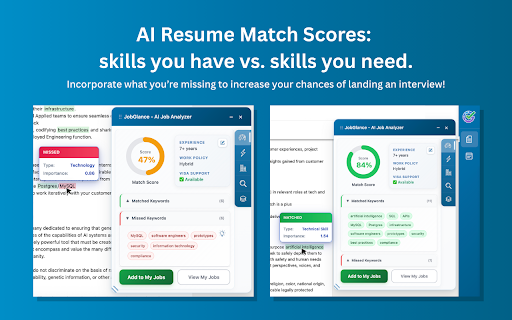


Instantly analyze jobs, detect visa and globally remote roles, match your resume, and track applications — across every job board. Find out in seconds if a job is worth applying — and track applications across every site. JobGlance works directly on supported job pages, extracting key details and clearly highlighting what matters most — saving you hours of scrolling through irrelevant job posts. Built by an international job seeker for job seekers. No account. No subscription. No paywalls. ► Why You’ll Love JobGlance (Key Features) ⚡ Instant Resume Match – Upload your resume once and instantly see a compatibility score for each job, with lists of skills you already have and ones you’re missing. 🌍 Visa Sponsorship Detection – Automatically detects mentions of visa sponsorship and recognizes companies with a history of sponsoring visas globally. 🌎 Globally Remote Detection – Identifies roles that can be performed from anywhere in the world, without location restrictions. 📊 Quick Insights at a Glance – Salary range, location, work policy (globally remote / remote / hybrid / onsite), company type, industry, and more — extracted and displayed instantly. 🚀 Works Everywhere – Dedicated support for LinkedIn, Indeed, Glassdoor, Wellfound, and JobStreet, plus intelligent extraction across ANY career site. 🎯 Job Tracking Made Simple – One click to save interesting jobs, add notes, and manage statuses — all from a personal sidebar workspace. 📈 Career Gap Analysis – See the most common skills you’re missing and matching across all saved jobs, so you know what to focus on learning next. 🔍 Smart Highlighting – Job descriptions light up with green (skills you have) and red (skills you need). Hover for keyword-level insights and focus your application strategy. 💾 Privacy First – Your resume never leaves your browser. We don’t store your data, and no account is required. ► How It Works • Skim – Extract what matters from any job posting: visa sponsorship, globally remote, experience required, work policy, company, location, and more. • Analyze – Instantly see your resume match percentage and missing skills. • Improve – Get color-coded highlights showing strengths and gaps in your resume vs. the job. • Track – Save and organize jobs with notes, statuses, and reminders, right inside your browser. ► Getting Started 1. Install JobGlance for free. 2. Visit any job posting on LinkedIn, Indeed, Glassdoor, Wellfound, JobStreet, or elsewhere. 3. Upload your resume once (stored locally in your browser). 4. Watch JobGlance instantly transform how you browse, compare, and apply for jobs. ► Perfect for International & Remote Job Seekers JobGlance is designed for candidates who face extra challenges in the global job market. By highlighting visa sponsorship availability, identifying globally remote opportunities, and parsing job location details, the extension helps you focus on opportunities that truly match your situation. Stop wasting time scrolling through job posts. With JobGlance, you’ll know in seconds if a role is worth applying. 👉 Ready to save hours on your job hunt? Click Add to Chrome and start your smarter job search today. ► Terms and Conditions By installing JobGlance, you agree to and acknowledge: www.jobglance.app/terms-of-service/ www.jobglance.app/privacy-policy/

CareerFlex: AI Job Analyzer, Resume Matcher & Auto-CV Builder
Instantly analyze job descriptions, check ATS match scores, detect Visa sponsorship, and auto-generate CV in one click. Stop just analyzing jobs—start landing them. CareerFlex is the only AI Job Analyzer that doesn't just score your resume; it rewrites it for you. 🚀 WHY CAREERFLEX? Most "analyzers" just tell you what keywords you're missing. We fix it. CareerFlex analyzes the job description on LinkedIn, Indeed, Glassdoor, and more, then uses advanced AI to generate a perfectly optimized, job-specific CV ready for download. ✅ Instant Match Score & ATS Checker Know if you qualify in seconds. Our AI compares your resume against the job description to give you a percentage score based on skills, experience, and keywords. ✅ Visa Sponsorship & Remote Detector Don't waste time reading. We instantly flag if a job offers "Visa Sponsorship" or is "Remote" right at the top of the screen. Perfect for international job seekers. ✅ Auto-Create Job-Specific CVs The game-changer. Click "Auto-Create" to generate a PDF resume that integrates the missing keywords and skills while keeping your experience authentic. ✅ Missing Keyword Scanner See exactly which hard skills, soft skills, and certifications the recruiters are looking for (and which ones you forgot to list). ✅ Privacy First Your data stays in your browser. We never sell your information. 🌟 WORKS ON YOUR FAVORITE SITES: • LinkedIn, Indeed and more. Check our page to see supported portals. 💡 WHO IS THIS FOR? • Job Seekers tired of "ghosting" • International candidates looking for Visa Sponsorship • Remote workers needing to filter huge lists quickly • Anyone who hates rewriting their CV manually Stop applying blindly. Get the match score, find the visa signal, and let AI write the perfect CV. Download CareerFlex for free today.

AI Resume Job Fit & Autofill Job Forms
Analyze resume fit and export job details in seconds. Includes smart auto-fill for Workday, Greenhouse & more. Tired of sending resumes into a black hole? Rapidly discover how well your resume matches any job before you apply and automate the tedious application process. Resume Captain is your AI-powered co-pilot for the modern job search. Our Chrome extension combines a powerful Job Fit Checker with a smart Auto-Filler, helping you stop guessing and start getting interviews. In today's competitive market, you need speed and precision. Resume Captain gives you both. 🤖 Rapid AI Job-Fit Analysis: With one click, our extension reads the job description on your screen and analyzes your resume to provide a "Resume-Job Fit Score." Know where you stand in seconds. ⚡ Smart Form Auto-Fill: Stop manually re-typing your work history! Our Auto-Fill tab detects application forms on major ATS platforms (including Workday, Greenhouse, iCIMS, Lever, and SmartRecruiters) and automatically maps your resume data to the correct fields. 📥 One-Click Job Import: Found a job you love? Quickly import the full job description directly into your Resume Captain account. From there, access our full suite of tools to generate tailored resumes, custom cover letters, and interview prep guides specific to that role. 🎯 Actionable, Expert Feedback: Don't just get a score. Our AI gives you clear, concise feedback on your strengths and, more importantly, the critical areas you need to improve to catch a recruiter's eye. 🌐 Works Everywhere You Hunt for Jobs: Compatible with LinkedIn, Indeed, Glassdoor, ZipRecruiter, and thousands of career pages across the web. ✨ Get Started Today: Gain the competitive edge you need without paying for expensive career coaching. For Job Fit Analysis: 1. Navigate to any job listing online. 2. Click "Check Resume-Job Fit" to see your score and feedback right in the browser. 3. Need more help? Click "Full Analysis" to send the job details to your main account for a complete upgrade. For Auto-Filling Applications: 1. Open a job application form (e.g., on a company career site). 2. Switch to the "Autofill Job Forms" tab in the extension. 3. Click "Scan & Fill Form" to populate fields with your resume data automatically. Who Is This For? ✓ Active Job Seekers tired of customizing resumes manually for every application. ✓ Professionals who want to speed up the repetitive application process. ✓ Career Changers who need to reframe their experience for a new industry. ✓ Anyone who wants to use the power of AI to apply for jobs more intelligently. ⏹️ Stop wondering if your resume is good enough. Know it is. Install Resume Captain today and take control of your job search!

Breeze Apply - Auto Apply to Jobs with AI Resume Optimization
Automate your job search with AI. Bulk apply on LinkedIn & Indeed and optimize your resume per application. Tired of spending hours filling out the same job applications over and over? Breeze Apply automates your entire job search. Upload your resume, click one button, and watch as AI fills out, optimizes, and submits your applications — automatically. ✅ Apply to dozens of jobs in minutes — not hours ✅ AI rewrites your resume per application — matching keywords, skills, and summaries to each job description ✅ Never fills in wrong answers — smart AI field matching uses your profile to answer every question correctly ✅ Works where you already search — full support for LinkedIn, Indeed, Workday, Greenhouse, Lever & more 1️⃣ Sign in with Google and upload your resume — we build your profile instantly 2️⃣ Upload up to 3 resumes for different roles you're targeting 3️⃣ Go to LinkedIn, Indeed, or any supported job board 4️⃣ Click "Start Applying" and Breeze Apply takes over ⭐ Full Automation (LinkedIn & Indeed) Click "Start Applying" on any job search page. Breeze Apply continuously fills and submits applications — end to end, hands-free. 📄 Smart Resume Routing & Optimization Upload up to 3 resumes. We automatically pick the best fit for each job and rewrite your headline, skills, and summary to match the job description. We focus on relevant keywords and inference, we never fabricate your experience. 🪄 Magic Fill (Workday, Greenhouse, Lever & more) On other job boards, click the Breeze Apply button to instantly fill entire application forms with one click. 📊 Application Tracker View your full application history, see every question and answer, and download each optimized resume — all from your dashboard. 🤖 Powered by Latest AI Models Breeze Apply uses cutting-edge AI to understand job descriptions, match your experience, and generate tailored responses that get you interviews. 🔒 Privacy & Support Your data stays yours. Read our Privacy Policy: http://www.breezeapply.com/privacy Need help? support@breezeapply.com Note: Breeze Apply is not affiliated with LinkedIn, Indeed, or any other sites listed.

Kloser
Close all tabs and open default tab Simple extension for closing all tabs in active window and opening New Tab Page or your selected page. You can edit settings of this extension, such as you can choose preferred tab which will be opened after using the extension and you can set will be extension close pinned tabs. Use the shortcut: Ctrl + Q
