
ckmdmkehfjmcdfnepokgihljkmgekjed


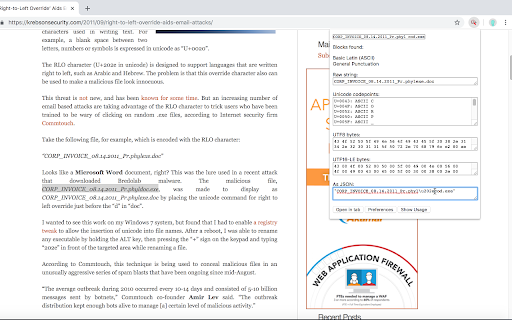
This extension is intended for people who look at strings on web pages and need to know what those strings really contain. (e.g., someone using a web-based computer forensics tool looking at potentially deliberately tricky command lines) This rips apart any highlighted text into its component Unicode code points, and shows how that text would be written in UTF-8 or UTF-16LE (UTF-16LE is what the Windows kernel uses for strings). It also allows one to edit UTF-8 or UTF-16 bytes and shows what strings they become. The byte representations can also use base64. To cut down on memory use, this extension loads Unicode names (pulled from the Unicode® Character Database) into memory as needed on a block-by-block basis, so there may be a tiny delay when looking up the first character of a given block. Preferences are saved with "Chrome sync"; the most recently viewed string is saved locally.

utf-8 and unicode characters
☞ utf8 characters is an extension that contains a list of cool characters ☆ ✪ ✰ to copy and paste into your messages ❀ on sites that use utf, like twitter or wordpress ☺ ✓ ➩ I ❤ ☕ with chrome in the ☔ ☺☻ Warning: only for modern Operating Systems. Approximately 80% of the characters appear in Windows 7 and 10% on Windows XP. 100% in most Linux distributions. code: http://github.com/codexico/UTF-8-Chrome-Extension Firefox Extension: https://addons.mozilla.org/firefox/addon/utf8-characters/ These are only a sample, it's really hard for the device to render so many fonts! They appear depending on the fonts installed on the system, if you want more you can try to download this fonts: BabelStone Han http://www.babelstone.co.uk/Fonts/Han.html Quivira http://www.quivira-font.com/ Deja Vu http://dejavu-fonts.org/wiki/Main_Page Unicode Fonts for Ancient Scripts http://users.teilar.gr/~g1951d/ Code2000 http://www.fontspace.com/james-kass/code2000 WAZU JAPAN's Gallery of Unicode Fonts http://www.wazu.jp/gallery/views/View_MPH2BDamase.html All about utf: The Unicode Consortium http://www.unicode.org/

UnicodePlus - Search for Unicode characters
Just search for any Unicode character either by typing it directly in the search field (Σ for example), or its codepoint (U+03A3), name (Greek Capital Letter Sigma), and HTML code (Σ | Σ | Σ). UnicodePlus will then: - Display the basic properties of Σ (name, block, version, codepoint). - Check the bidirectional data of Σ (Left to Right). - Check the character case of Σ and find its lowercase/uppercase counterpart (σ -> U+03C3).

Breakbot
Quickly add disruptive unicode, naughty strings, and more to your clipboard. Save yourself from googling for RTL characters, Zalgo, general unicode naughtiness, the EICAR string, and more - Breakbot makes them available for quick copying to the clipboard. With a fast search and one-click copy, fuzzing and pen testing is just a little bit easier (and no more copy-paste-type-paste-type to check if you got that RTL character copied correctly!) Just search and click the one you want to copy, or strike enter to copy to top result. Launch the popup with +B. Add your own strings at https://github.com/jkingsman/Breakbot.

Character set fixer
Modify the default encoding of the website, the garbled webpage needs to modify the encoding, UTF-8 encoding conversion This is a browser plugin designed to solve the problem of character encoding on web pages. Its main functions include: Change website default encoding: Allow users to manually select character encodings that are suitable for specific websites. May provide a list of common encoding options, such as UTF-8, ISO-8859-1, GBK, etc. Fix garbled web pages: Automatically detect and correct web pages displaying garbled text. Heuristic algorithms or predefined rules may be used to identify and fix coding issues. Convert to UTF-8 encoding: Convert non UTF-8 encoded web content to UTF-8. Ensure consistent display across platforms and devices. Possible additional features (based on common features of similar tools): Save user preferred encoding settings. Create custom coding rules for specific websites. Provide a shortcut for quickly switching codes. Display the encoding information used by the current webpage. This plugin aims to improve the user browsing experience, especially when accessing websites that use non-standard or outdated encoding. However, we should note that automatic encoding detection and conversion are not always 100% accurate and may require manual adjustment by users in some complex situations.
