
ckkhcgikplgdginlidcaomgjahmddjgb
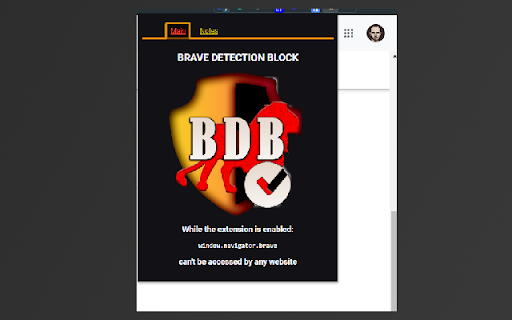
This extension blocks the most common method to detect you use Brave browser, is efective only on Brave browser. Brave Detection Block BDB (open source extension to block websites detecting you use Brave Browser) Brave is a privacy-oriented browser, but unfortunately, there is a common method to check you are using Brave. Some websites will block you based on that. This extension will remove access to`window.navigator.brave` and stop many websites from detecting you are using Brave. https://github.com/andrei0x309/Brave-Detection-Blocker-Chrome-Extension/blob/main Note that some websites may try more aggressive techniques to detect your browser. In such rare cases, be sure to check the repo to find additional ways you can defeat websites blocking you. https://github.com/andrei0x309/Brave-Detection-Blocker-Chrome-Extension/blob/main/PRIVACY_POLICY.md

Brave Search (official) - Private Search Engine
Configures Brave Search as the default search engine. The smarter way to search Configures Brave Search as the default search engine in your browser. Get real answers. Faster. AI-powered answers to almost any question, lightning fast and incredibly accurate. An independent index delivering actually useful results, without big tech’s SEO spam. All in the same sleek results page. Search without a trace. Search that puts you first. Brave Search doesn’t profile you. It’s impossible for us to share, sell, or lose your personal data, because we don’t collect it in the first place. Innovative An easy way to customize your results rankings. AI-powered answers to almost any question. Forum discussions right in the results page. Powerful local results. Independent Even supposedly “neutral” or “private” search engines rely on Big Tech for results. Brave delivers results from its own, built-from-scratch index. No secret methods or algorithms, and no bias. Answering more than 45 million queries every day, for millions of users around the world, Brave Search is the real choice for private, independent, useful search results. Get it now for Chrome or any other browser, with dozens of available languages.

Open in Brave™ Browser
Send the current website, link, or all open tabs to the Brave web browser The "Open in Brave" extension simplifies opening the current tab or links within the Brave browser. With this extension, you can send links to the Brave browser without the hassle of manually copying and pasting links. Additionally, it can open all tabs in the destination browser with a single click. You can also close the tab opened in the destination browser if prefer so. If Brave is already running, the link opens in a new tab; however, if Brave is not running, a new instance is launched, then the link is directed there. Remarks: 1. To enable this extension to open links in the Brave browser, you'll need to install a native client. Installation instructions are provided upon requesting link opening. For visual guidance, there are two short video tutorials available in the screenshot section, covering installation steps for Windows, Linux, and macOS operating systems. 2. Currently, the native client only supports macOS, Windows, and Linux operating systems. Support for other operating systems is not available at this time.

오토 치지직
치지직 광고차단/스트리밍 오류발생시 자동 새로고침/5초간 마우스 움직임 없을 경우 팔로우 목록 자동 새로고침 내가 불편해서 쓰려고 만든건데 왤케 많이씀? 치지직 전용 광고 주소기반 응답 날라오기도 전에 차단 혹시라도 광고 노출시 스킵버튼 자동 클릭 마우스 움직임 5초간 없을 경우 팔로우 목록 1초마다 자동 갱신 미디어 재생 오류 어쩌고 뜨면 자동 새로고침 네트워크 오류 어쩌고 떠도 자동 새로고침 를 모두 chzzk.naver.com 도메인 내에 있을때 동작하게 적용 2.4 업데이트 - 검은화면 제거 2.3 업데이트 - User-Agent 강제 설정방식 제거 2.2 업데이트 - API 추가 광고 차단 2.1 업데이트 - 추가 광고 차단 2.0 업데이트 - 1.7 업데이트로 팔로우 새로고침 안되는 문제 수정 - 비효율적인 코드 일부 개선 1.7.0 업데이트 - 통나무 자동 클릭 * PIP 모드로 다중 방송을 시청할때 팔로우 갱신을 지속적으로 날리면 쓸데없는 사용자 및 치지직 양측 모두 자원낭비라 일시중지 적용 (PIP 해제시 다시 동작)

AdBlock Detector Bypass by CPE
Tired of "AdBlock detected" messages blocking your browsing? AdBlock Detector Bypass automatically removes anti-adblock popups, overlay warnings, and script blockers that interrupt your web experience. KEY FEATURES ✓ Auto-Bypass AdBlock Detection Automatically detects and removes "AdBlock Detected" popups, overlays, and warning messages on thousands of websites. ✓ Smart Execution Mode Choose how your extension runs: - All Sites Mode (Default): Activates on every website for complete protection - Selected Sites Mode: Runs ONLY on sites you choose - perfect for focused browsing or when you only need it on specific websites Visual icon indicator shows your current mode at a glance (✓ green = all sites, ✪ yellow = selected sites) ✓ Advanced Element Picker Tool Visually select and permanently hide any unwanted elements with our intuitive point-and-click interface: - Click elements to select them - Preview before saving - Automatically hide on future visits - Minimize/restore picker interface - Modern, easy-to-use UI ✓ Smart Auto-Detection Engine Intelligent pattern recognition finds and removes adblock detection popups even on sites the main script doesn't cover. ✓ JavaScript Blocking Block JavaScript on aggressive anti-adblock sites for ultimate bypass protection. - Best for sites that function normally without JavaScript but rely on it to detect ad blockers and redirect users. Perfect for sites that function normally without JavaScript but rely on it to detect ad blockers ✓ Hidden Elements Manager View, manage, and remove all your hidden elements across different websites from one central location. ✓ Site Whitelist Management Easily whitelist websites you don't want the extension to run on while active. ✓ Import/Export Your WhiteList Backup and share your whitelist configurations across devices. ✓ Selected Sites List Build a custom list of sites where the extension should run when in Selected Sites Mode: - Add current site with one click - Import/Export your Selected sites lists PERFORMANCE - Lightweight and fast - Minimal resource usage - No slowdown to browsing speed - Only runs where you want it HOW IT WORKS 1. Install the extension 2. Enable it with one click 3. Choose your Execution Mode (all sites or selected sites (all sites as default)) 4. Browse normally - popups automatically removed 5. Use Element Picker for custom blocking 6. Save configurations for future visits WORKS ON POPULAR SITES Tested and working on thousands of websites including news sites, video platforms, blogs, and more. ADVANCED FEATURES - Execution Mode with visual indicators - Custom CSS selector blocking - Per-site configuration - Auto-detection site list - Dynamic rule management - Real-time element hiding WHY CHOOSE ADBLOCK DETECTOR BYPASS BY CPE? - Multiple bypass methods for maximum coverage - Visual element picker for precise control - Active development and regular updates - No learning curve - works automatically - 100% free with no limitations - NEW: Execution Mode with All Sites/Selected Sites options - NEW: Visual icon badges (✓ green / ✪ yellow) - NEW: Selected Sites List with import/export - NEW: RTL support for Arabic - NEW: Now Available in 21 language translations RATE US If you find this extension helpful, please leave a 5-star review! Your feedback helps us improve and reach more users. LOCALIZATION AdBlock Detector Bypass now speaks your language! Available in 21 languages including English, Spanish, German, French, Portuguese, Russian, Chinese, Japanese, Italian, Polish, Indonesian, Hindi, Turkish, Korean, Vietnamese, Bengali, Tagalog, Thai, Dutch, Swedish, and Arabic. Your browser language is automatically detected.
