
ckgjflmajkijpaipoijlpleihipnpjma

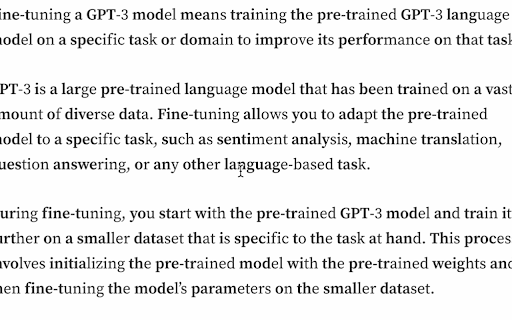
BeBold extension alters text on webpages bolding first half of every word.Which may benefit those who find it challenging to focus. The BeBold extension aims to offer a unique visual aid that may help improve focus while reading text on webpages. It works by bolding the first half of each word, providing a distinct anchor point that could help readers follow the content more easily. Although the extension is designed with the idea that it may be helpful for individuals who find it challenging to concentrate, such as those who self-identify as having Attention Deficit Hyperactivity Disorder (ADHD), it has not been clinically tested or approved for the treatment or diagnosis of ADHD or any other medical condition. By inheriting the color of the parent element, the bold text preserves the original appearance and design of the webpage. Try BeBold and see if this innovative approach to reading suits your style! Please let me know if any sites you use malfunction while using this extension. If it cannot be fixed, I will promptly remove them from the sites supported by this extension. For bug reports, please email me at cdukedrums@gmail.com Subject: BUG REPORT BEBOLD Version 1.3 Bug Fixes -- Improved enable and disable functionality -- Removed the extension while using pages that did not function properly while using. Version 1.4 Bug Fixes -- Disabled the extension within Text Input areas such as emails and messaging.

Bold It
Control the boldness of text on any website. * Easily adjust font-weight on any webpage. * User-friendly interface with simple controls. Features: * Real-time font-weight adjustment. * Save preferred settings. * Enhance readability. * Compatible with all websites. * Users have the flexibility to define a global default font-weight, as well as specify unique, additional font-weights for individual domains. How to Use: * Install from the Chrome Web Store. * Click the extension icon. * Adjust the font-weight slider. Support and Feedback: https://forms.gle/BK9xADEk7enopuQz8 Buy me a coffee ☕: https://buymeacoffee.com/yardenporat Contact: yardenporat@gmail.com

ADHD Reader
ADHD Reader is a chrome extension that helps you read faster by highlighting beginning of every word on the websites. CHANGELOG: - [2023-09-18] Error handling optimization - [2023-09-18] Performance enhance for infinite scroll sites - [2023-09-18] Performance optimization for longread sites - [2023-08-04] Add bug report link - [2023-08-04] Fix performance issues - [2023-04-12] Feature for keeping ADHD Reader always active - [2023-04-12] Support for SPAs (page change inside website) - [2023-04-12] Support for infinite scroll pages - [2023-04-12] Fixed for Refresh (remembers if activated)

Half Bold: Speed Reading & Dyslexic Font for ADHD
Speed reading extension with dyslexic-friendly fonts. Helps with ADHD, dyslexia, and focus. Highlights text for faster reading. Boost reading speed and focus. The ultimate ADHD reader and speed reading tool with Dyslexic friendly fonts (Open Dyslexic) and Half Bold text conversion. Elevate your online reading journey with the Half Bold Chrome Extension — your ultimate aid for speed reading and a seamless, accessible experience! This extension refines digital text, catering to the needs of those with Dyslexia and ADHD. By highlighting the first part of every word, our tool acts as a powerful speed reading aid, guiding your eyes smoothly through the text. 🔡 Discover the Brilliance of Half Bold & Speed Reading ➤ Effortlessly increase reading speed with our smart bionic-style highlighting. ➤ Customize your experience with dyslexic friendly fonts. ➤ Receive gentle guidance while reading complex text, perfect for reading with ADHD. 💻 Break Barriers: The Ultimate ADHD Reader Struggling to focus? This tool transforms your browser into an effective ADHD reader. 1️⃣ Interactive design: A game-changer among ADHD apps for adults and students. 2️⃣ Improve focus: Uses speed reading techniques to keep your brain engaged. 3️⃣ Enhance comprehension: Proven method to help you read quickly and retain more. 📚 Dyslexia Friendly Fonts & Tools We understand the challenges of neurodiversity. That's why we integrated support for the Open Dyslexic font. - Dyslexic Font: Switch instantly to the best font for dyslexia to reduce visual stress. - Inclusive Space: Works as a comprehensive dyslexia reading program right in your browser. - Boost Fluency: Say goodbye to struggles with our dyslexic friendly fonts. 💡 Enlighten Your Reading: How to Read Quickly You can leverage the benefits of speed reading, a mode that facilitates a faster pace without compromising comprehension. This innovative feature breaks down complex texts, allowing you to retain more information. Whether you are looking for how to improve reading speed , a student researching, or someone looking for dyslexia reading tools, this feature empowers you to conquer any challenge. 👁️ Empower Your Reading with Focus Tools ➤ Enhance fluency with our ADHD reading extension. ➤ Experience the power of bold first letter technology. ➤ Transform your journey with one of the best apps for ADHD. 1.Speed Reading Practice: Turn any website into a training ground to develop speed reading. 2.Comfortable Reading: Reduce eye strain with half bold chrome extension features. 3.Accessibility: A true dyslexia font google docs alternative for the entire web. 🔍 Dive Deeper into Functionality The unique functionality of this tool not only enables individuals to stay focused but also makes content easier to digest. For people seeking apps for ADHD or dyslexia apps, this can be a game-changer. It’s not just a tool; it's a bridge to information. The Half Bold Chrome Extension ensures that no one is left behind. 🤔 FAQs About Our Chrome Extension How can I become a faster reader with this tool? 🔹 By highlighting the initial letters of words, the extension minimizes eye movement, effectively acting as speed reading software. This is a proven technique on how to read quickly. Does this support Dyslexic Friendly Reading? 🔹 Yes! Our extension includes the Open Dyslexic font and serves as one of the best dyslexia reading tools available for Chrome. Is this good for ADHD? 🔹 Absolutely. Many users rate it as one of the best adhd apps for productivity. It helps maintain focus and prevents "drift" while reading. Can I use this extension on any website? 🔹 Yes! Unlike some speed reading apps, our extension is designed to work across all websites. Want to enjoy reading even in low light conditions? 🔹 Absolutely! Our extension comes with a Dark Mode feature. Simply navigate to the extension settings and switch on the Dark Mode for an eye-friendly interface. Transparency Note: This extension may use affiliate links. If you click on a link and make a purchase, we may receive a small commission at no extra cost to you. This helps support the development of this free tool. This application is independently developed and has no affiliation with Bionic Reading AG or any of its subsidiaries. This application is not endorsed by, directly affiliated with, maintained, authorized, or sponsored by Bionic Reading AG. All product and company names are the registered trademarks of their original owners.

Bionify | Read faster!
Open source text converter designed to help you read faster! Read any kind of public website faster with Bionify! Bionify converts any public website into Bionified format, which alters texts so that the most concise parts of words are highlighted. This guides the eye over the text and the brain remembers previously learned words more quickly. This extension is 100% free and open source, and you may find the source code here: https://github.com/Cveinnt/bionify. As Bionify is open source and free, it is NOT associated with the paid Bionic Reading® APIs. We use our own highlighting algorithms and do not violate their copyrights. If this extension helped you, feel free to leave a star! Please note that the extension currently don't support any kind of locally uploaded contents, such as PDFs. INSTRUCTIONS * Pin the Bionify extension to your Chrome extension bar * Go the the public website you want to read * Click on the extension icon * Click on the toggle button to start reading with Bionic Reader! If you have any questions or comments, feel free to submit an issue on the GitHub repo. This is in early development and improvements, features, and fixes will be soon to come!
