
cjmjgijhapgicbhmniemjkjeaedanank


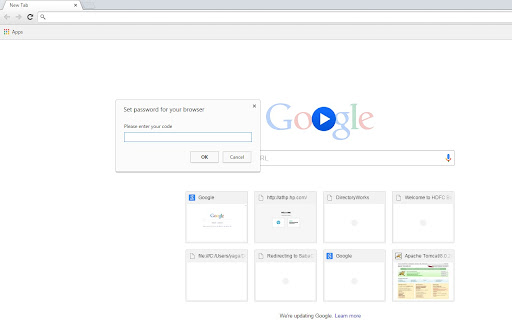
This extension will allow users to set password for the browser to avoid unauthorized access. Prompts for password on chrome startup This ultra light weight extension will prompt for password on chrome startup which users have to set after installing the extension... Please don't forgot to enable extension in incognito mode.(refer screenshots). https://addons.opera.com/en/extensions/details/set-password-for-your-browser-opera-lock/?display=en

Free VPN for Chrome - VPN Proxy 1clickVPN
Free VPN for Chrome, Unlimited Data, Fast Speeds, Secure Encryption, No-Logs Policy. Install 1clickVPN to protect your privacy 1clickVPN - Free VPN for Chrome | Fast, Secure & Unlimited Access Install 1clickVPN, a free VPN for Chrome that lets you hide your IP address, unblock websites, and browse privately with fast, secure servers worldwide. Get instant access to a powerful extension built for speed, privacy, and unrestricted internet access - no registration required. Free VPN - Use a fast and secure connection for Chrome with no cost and no hidden limits Premium Upgrade - Unlock more servers, higher speeds, and advanced features Fast Connection - Connect to the best server instantly with one click Secure Encryption - Protect your internet traffic with advanced SSL (TLS) encryption No Logs Policy - Your browsing activity and IP address are never stored Unlimited Bandwidth - Stream, browse, and download without limits AdBlock Protection - Block ads, trackers, and malware while browsing IP Address Changer - Hide your IP and change your virtual location anytime Chrome Extension - Lightweight and optimized for Chrome WebRTC Leak Protection - Prevent IP leaks and keep your connection secure User-Agent Switcher - Control how websites detect your browser Cross-Platform Support - Available on Windows, macOS, iOS, Android, Linux, and more 24/7 Support - Get help anytime from the support team What You Can Do Unblock Websites - Access restricted websites and services from anywhere Browse Privately - Keep your activity hidden with a secure connection Hide IP Address - Protect your identity and location online Bypass Censorship - Access the open internet in restricted regions Secure Public Wi-Fi - Protect your data on public networks Stream and Download - Enjoy unlimited access to content Block Ads - Improve speed and remove ads while browsing Advanced Features and Benefits Access Blocked Content Bypass geo-restrictions and censorship with global servers and unrestricted access Unlimited Usage Enjoy unlimited bandwidth for streaming, browsing, and downloading Privacy Protection Protect your personal data with encrypted traffic and avoid tracking One-Click Setup Install the extension and connect instantly to the fastest available server Public Wi-Fi Security Secure your connection on public networks and protect sensitive information High-Speed Performance Connect to fast servers worldwide and improve page loading speed Advanced Encryption All traffic is protected with strong encryption protocols No Logs Policy Your browsing history, IP address, and activity are never stored Multi-Device Access Use one account across multiple devices with consistent performance Install and start using instantly Free access with fast and stable servers AdBlock included in one extension Built for Chrome with Manifest V3 compatibility Designed for privacy, security, and unrestricted browsing Privacy and Security 1clickVPN does not collect or store personal data. Your activity, IP address, and browsing history remain private and protected. 1clickVPN (also known as 1 click VPN, Chrome extension, or VPN proxy for Chrome) complies with Chrome Web Store policies and supports Manifest V3.

Chrome Password Setting
This extension is designed to enable you to set secure passwords for Chrome users. Protect your Chrome credentials with a password extension! This simple utility will help you generate a master password and store your bookmarks, history, and saved logins. Search “Chrome password setting” extension in the Chrome Web Store for the list of the most reliable providers and continue surfing without worries! You can do this quickly, making your online privacy a lot better. Some key Features of Chrome Password Setting Chrome Extension Easy Password Generation: It is very easy to generate powerful and distinctive passwords within a few clicks. Secure Storage: Restore, history, and saved login credentials with encrypted storage. Master Password Protection: This means you need to safeguard all your credentials using this one master password. Quick Setup: Easy to install and set up in a matter of minutes to protect you instantly. Type Chrome Web Store in your browser, look for the “Chrome password setting” app and click the “Add to Chrome” button. Step 2: Setting Up the Master Password It is advisable to install the extension and form a secure master password to access the extension. This will protect all the stored credentials. Step 3: Save Your Credentials Start storing your bookmarks, histories, and login information inside the extension. For your security all your data will be encrypted. To create new passwords, you can use the extension and when you next log into the websites, the extension will safely input the passwords for you. Q1: What can I do if I forgot my master password? No, the master password cannot be recovered for security measures taken against a hacker or a malicious individual. Either it must be remembered, or it should be kept safely. Q2: This extension works on other browsers? It also will not work in other browsers as the extension is made for Google Chrome only. Q3: Is my data saved in cyberspace? No, all your data is stored locally on your device and your data is encrypted to prevent unauthorized access.

Browser Lock - Chrome Lock Browser | Browser-Lock.com
Lock your Chrome with a password to protect privacy. Auto-lock after inactivity and parental control for safe browsing. Keep Your Browsing Private, Secure, and Truly Yours – Effortlessly with Browser Lock Every time you walk away from your computer—at home or at work—you leave your most personal information just one click away from prying eyes. Your browsing sessions contain your emails, confidential work, private photos, and sensitive conversations. In shared spaces, busy households, or unpredictable office interruptions, relying solely on device locks or OS profiles doesn’t always shield your privacy. Browser Lock gives you seamless, always-on control—letting you safeguard your unique online world. **Why Privacy Matters: Day-to-Day Realities** How often do you step away from your laptop for just a minute, only to realize your open tabs are exposed? Whether it’s family sharing a computer, coworkers walking by, friends borrowing your device, or simply grabbing a drink—your web content can be seen by anyone. OS-level locking is clunky and sometimes impossible; Browser Lock fills the gap, letting you secure the browser instantly and automatically. **What Makes Browser Lock Different? Your Smart Security Partner** - Password-protect your Chrome browser—no complex setup required. - Auto-lock after inactivity: set your own timer for peace of mind. - Parental control mode: keep kids safe from unwanted content when you’re not around. - Locks without closing your work: resume right from where you left off after unlocking. - No cloud required, no sensitive data leaves your device—privacy by design. - Supports families, home offices, students, and professionals alike. **Everyday Scenarios: Real Benefits for Real People** - At home, you walk away to cook, and your emails/tabs remain private from other family members. - In the office, stepping out for a coffee, Browser Lock automatically secures client documents and private correspondence. - Public spaces—coworking or libraries—ensure strangers can’t snoop if you’re briefly distracted. - For parents, childproof your browser with one click—gain peace of mind when sharing devices. **Why Choose Browser Lock? The Clear Value** - Prevents information leaks, accidental clicks, and curious eyes - Saves time—no need to log out or reset sessions each time - Works quietly in the background, giving you seamless privacy - Distinct advantage over generic OS locking or user switching (quicker, more targeted, no session loss) - Extremely lightweight, no drain on system resources **Ready to Take Control? Install Browser Lock Now** Safeguard your browsing world—whether you care about confidentiality, parental oversight, or just peace of mind. Join thousands who trust Browser Lock for hassle-free, always-on web privacy. Install now and experience security without compromise!

Google Chrome Password lock
Use Google Chrome Password lock to protect your browser. Add this extension, set Chrome password, and lock your browser and tabs. 🛡️ Protect your browsing activity with Google Chrome password lock – a simple but powerful extension that allows you to secure your browser. Whether you share your computer with family, colleagues, or friends, this extension ensures that your tabs and bookmarks, and browsing sessions remain private until you enter your secret code. 🛡️ This tool will help you set a password in Chrome browser to block access to all its features until the correct code is entered. A full-screen overlay will cover every tab, settings menu, history page, and favorites section until you unlock. This makes it impossible for anyone to bypass protection. 🛡️ It is simple. Once the extension is installed, a popup appears, asking you to enter your Chrome password twice. Your сode word input is always masked, so no one can see it while typing. After setup, the extension activates every time browser starts. 🟢 Full screen lock Chrome overlay on startup 🟢 Secure Chrome browser password entry with hidden characters 🟢 Bookmarks hidden during lock and restored after unlock 🟢 Open tabs closed on lock and restored after unlocking 🟢 Initial double setup for security 🟢 Protection against disabling without entering your passphrase 🛡️ You no longer need to worry about someone opening your browsing history or saved sessions. The system closes all tabs during lock and automatically restores them after successful login. 🌟 Why use Chrome password lock? 1. Protects sensitive data when sharing your device. 2. Ensures no one can access private bookmarks or sessions. 3. Simple interface to set password for your browser, no complex setup. 4. Runs automatically every time you open Chrome, asking for your password for Chrome lock. 5. This extension is a reliable way to ensure that your tabs remains closed to unauthorized access. 6. Your browsing experience stays the same after unlocking. 7. Fast, lightweight, and designed for real users who need privacy. 🛡️ This tool ensures all tabs are safe, favorites are hidden, and no menu is accessible until the correct Chrome browser password is typed. 💡 How it works: 1️⃣ Install the extension from Chrome Web Store 2️⃣ Set your chrome browser password with the startup popup 3️⃣ Every time you launch Chrome, a web browser lock screen appears 4️⃣ Enter the password and instantly restore your session 👥 Who needs this Google Chrome Password lock? 🔸 Students who share PCs in dorms 🔸 Families with kids who should not access the browser 🔸 Offices and workplaces that need to limit access 🔸 Personal laptops with confidential tabs and bookmarks 🛡️ With just one tool, you can lock your Chrome with another password and secure all internet browser activity. 📌 Why choose this tool: 1. Lightweight, secure, no unnecessary permissions 2. Tabs and bookmarks are restored after unlock 3. Simple design but effective password protection 4. Works with every update of browser 5. Reliable Chrome lock extension secures your browser 🔒 If you need to secure your browser, this extension is the fastest and most effective solution available. 🛡️ This extension is made for users who want peace of mind and control. 🛡️ When you activate it, the entire interface is shielded until you unlock it. 💡 With its browser lock functionality, it provides the digital equivalent of a door key. 🛡️ This is not just a simple password for google Chrome, but a fully functional extension lock that blocks all activity. 🔒 With Chrome password extension, you no longer need to worry about strangers or colleagues peeking into your online activity. If you want strong control and simplicity, this product is the right choice. 💡 FAQ ❓ Q: How to set a password Chrome browser tool to lock Chrome homepage? ✅ A: Install this tool and the how to lock Chrome homepage problem is solved – a secure screen appears before anything loads. ❓ Q: How does it work? ✅ A: It is the concept of locking your browser session until a passphrase is provided, and this extension brings that feature to you. ❓ Q: Can the extension really lock browser completely? ✅ A: Yes, it covers all tabs and menus with a full overlay until the right secret word is typed. 🔐 Consider this set password extension for an added layer of browser security.
