
cjkanapmiefcfnhpfpcfickcjeehipgi
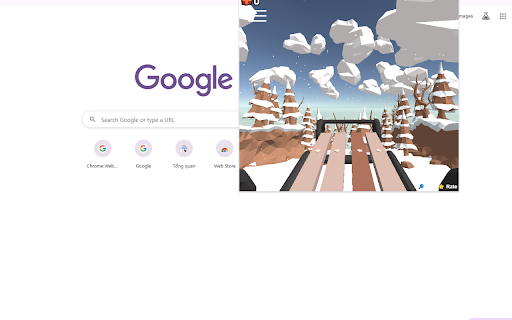
Play Snow Rider 3D - Unblocked & Free as a Chrome extension - Also can Play without Internet, Try it now! 🥊 Big Shot Boxing - Unleash the Power of Your Fists! 🥊 Dive into the thrilling universe of boxing with the 'Big Shot Boxing - Unblocked' Chrome Extension. This extension brings the ultimate boxing experience directly to your Chrome browser, allowing you to step into the ring and prove your boxing prowess. Featuring an easy-to-navigate interface, this retro-styled boxing game lets you climb the ranks, strategize your punches, and become a knockout sensation. 🌟 Retro Graphics, Timeless Fun: Immerse yourself in the world of pixelated, retro graphics that add a touch of nostalgia to your boxing escapade. The classic aesthetics transport you to the golden era of gaming, creating an immersive experience that pays homage to the timeless appeal of boxing. Click 'Add to Chrome' next to the 'Big Shot Boxing - Unblocked' extension. A pop-up window will appear; simply click 'Add Extension.' Witness the extension install, and an icon materialize in your browser's toolbar. 🚀 Uninstalling Made Simple: Click the three-dot menu icon in the top-right corner of Chrome. Navigate to 'More tools' > 'Extensions.' Locate 'Big Shot Boxing - Unblocked' in your list of extensions. Click 'Remove' and confirm the action in the pop-up for a hassle-free uninstallation. 🎮 More Games, Endless Fun: Explore a variety of games easily accessible from the left menu of the extension. Delve into boxing-themed games and other genres for a gaming experience tailored to your preferences. Note: 'Big Shot Boxing - Unblocked' is designed to enhance your boxing gaming experience with a user-friendly interface, providing a straightforward and enjoyable environment without overwhelming features. Ready to prove your boxing mettle? Click 'Add to Chrome' now and let the Big Shot Boxing action begin! 🏆🥊 Play other games on the top-left menu. On clicking fullscreen it opens the game in full screen page

Snow Rider 3D Unblocked
Play Snow Rider 3D Unblocked as a Chrome extension - Get ready for an exhilarating ride! Jump straight into the fun with Snow Rider 3D Unblocked, now available through the Chrome Web Store so you can play effortlessly at school or anywhere else. This extension lets you access the popular snow-boarding arcade runner instantly, even on networks that normally block gaming sites. Whether you’ve looked for snow rider 3d unblocked 66 or 67, snow rider 3d unblocked games, or versions for Google classroom, this extension brings them all together in one easy click; no setup needed. Designed for classrooms and restricted networks, our optimized launcher works seamlessly with snow rider 3d unblocked classroom and classroom 6x,. Powered by lightweight, fast-loading tech, it functions similarly to github io builds, 66 ez, freezenova, Google Sites, and html5 mobile world playgrounds, without needing to visit any external pages. Prefer fullscreen gameplay? This extension includes direct, uninterrupted snow rider 3d unblocked 66 full screen style access so you can enjoy smooth performance whether you’re using a Chromebook, desktop, or school device. Perfect for quick breaks, classroom downtime, math periods using platforms like hooda math, or anyone who wants easy access to their favorite runner game. 🚀 Instant play, even on restricted networks 🏂 Works with classroom environments like Google classroom and at school games 🔒 No external site visits required: stable, secure, and fast 🖥️ Built-in fullscreen mode for immersive gameplay 🕹️ Supports all major unblocked mirrors: 67 games, 76 games, 66 games, 6x, github io, freezenova, Google sites, 6x ez, and more Q: Where to play Snow Rider 3D unblocked for school? A: Right here! Install the extension and launch it from your browser—no blocked URLs, no hassle. Q: Does this work on school Chromebooks? A: Yes. It is designed for at school games environments and works through the Chrome Web Store launcher. Q: How to play Snow Rider 3D unblocked? A: Click the icon in the toolbar → Press “Play” → Enjoy fullscreen, fast HTML5 gameplay.

Stickman for Chrome
Play Free Stickman for Chrome as a Chrome extension - Also can Play without Internet, try it now!! Introducing Stickman for Chrome! 🕹️🏌️♂️It is a free game. Click to Swing your way through the Stickman adventure in this exciting Chrome extension game! 🚀 Unleash your precision and timing as you control Stickman's epic swings with just a click. 🖱️💨 Master the art of swinging and navigate through challenging obstacles. How far can you go? Test your skills and challenge your friends in Stickman for Chrome! 🌟👾 Let the swinging fun begin!

Tag Game
Now you can Play Tag Game right on Chrome™ Browser! Offline and Popup Version, without internet required! TAG is a thrilling local multiplayer game of catch! Gather your friends and square up against them in an exciting chase around one of three unique levels. Use your skills to outmaneuver and escape the chaser. There are clever shortcuts that can launch you away from your pursuer, and a sneaky teleportation ability that can be used strategically to mislead them. However, be aware that the teleport disappears after a single use! It's a test of speed, agility, and tactics. Who will emerge victorious in this heart-pounding game of TAG? Play for free on the website https://leveldevil.net/. *Note: We have added "Poki Unblocked Games, Tag Unblocked" button, making it easy for players to quickly access the games on our website! https://classroom-6x.org/

Helix Fruit Jump Arcade Game
Play Helix Fruit Jump Arcade Game as a Chrome extension - Also can Play without Internet, try it now! Helix Fruit Jump is a casual arcade game where you control a ball that bounces through a platform made of fruit and cake slices. The goal is to reach the bottom of the platform without falling into the gaps or touching the blue areas. The game is played with the mouse. To move the ball, click and drag the mouse left or right. The ball will bounce off the walls of the platform. Be careful not to fall into the gaps or touch the blue areas, or you will lose the game. Try to stay in the center of the platform as much as possible. Be careful not to bounce too high, or you might fall into a gap. Use the blue areas to your advantage. They can help you bounce to higher platforms. - Play others games on the top-left menu
