
cjjljbmeindbfhkgomcnnmfmjodjeche

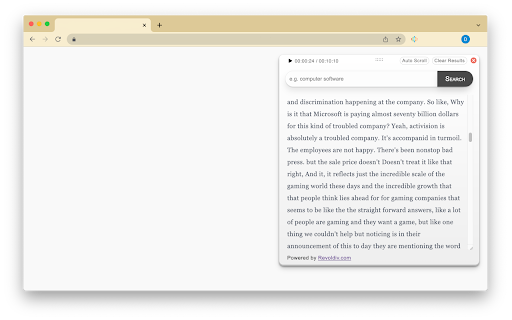
Convert video or audio, podcasts and more to text. Transcribe video/audio and follow along the subtitle/transcription in real time. Revoldiv chrome browser extension converts (transcribes) audio or video in your browser to text. You can follow along with the audio and read the transcribed text while the audio is playing. you can search for spoken content in a podcast or other compatible video/audio content in your browser. version 1.1.0 update: - The AI used to convert speech to text has been improved drastically - paragraph separation now uses AI to better group topics together Features or Uses? - Audio/voice to text conversion - Video to text transcription - Subtitle/caption transcription - Follow along: real time audio and text sync up - Podcast Keyword search - jump to a specific spoken content Limitations: - audio/video files longer than 1 hour are not guaranteed to be transcribed - Service is not compatible with some streaming service e.g. Spotify for the full product and more information go to revoldiv.com

Transkriptor Transcribe Audio to Text
Convert audio to text. Automatically record and transcribe your meetings, and other conversations with Transkriptor. Transkriptor: AI-Powered Chrome Extension that Converts Speech to Text Transkriptor provides the best automatic transcription experience for your meetings. Transkriptor takes automatic notes for you in more than 100 languages and dialects, including English, French, German, Spanish, Chinese, and Portuguese. Transkriptor Chrome extension is easy to use. Press record before any virtual meeting, and let Transkriptor work its magic. You can use Transkriptor for any meeting in Google Meet, Microsoft Teams, and Cisco Webex. Transkriptor is also available across Web, iOS, and Android. How to Use Transkriptor? 1. 📥 Download the Transkriptor Chrome Extension 2. 🔕 Turn off all other sounds and notifications on your computer 3. 🎧 Use a headset with a boom to speak directly into the mic and avoid sound echo 4. 🎙️ Test your microphone by talking and ensuring it picks up sound 5. ▶️ Press the record screen button in the extension 6. 📑 After the meeting, press "Transcribe" and get your transcript 7. ✍️ Edit your transcription by fixing punctuation and grammar mistakes Use Transkriptor For: ★ 📄 Taking Automatic Notes for Remote Meetings ★ 🎓 Online Classes/Lectures ★ 📜 Transcribing Video Calls into Google Docs ★ 📊 Summarizing a Speech File ★ ⚡ Running Effective Scrum Meetings Transkriptor is a transcription service that provides secure transcriptions. All transcriptions are securely stored in your browser or Google Drive. Transkriptor is the best transcription software and also offers a subtitle generator and voice-to-text online. 🎥 Transkriptor Extension Transcribes Your Audio and Video Recordings Transkriptor is an AI-powered Chrome extension that converts speech to text files. It's a free online tool developed to make transcription faster and more efficient. The goal was to create something easy-to-use, affordable, reliable, and, most importantly - quick. Transkriptor does not require additional software or hardware for audio conversion; it can be used as soon as you install the extension in your browser. 📝 How to Record Meetings and Transcribe with Transkriptor Chrome Extension? 1. Download and install the Transkriptor Chrome Extension 2. Press the record button before starting your meeting 3. After the meeting ends, press “Transcribe” 4. Edit the transcription for punctuation and grammar 5. Export your transcription in your preferred format ❓ Why Should You Transcribe Your Recordings? Transcriptions are often required by those who are deaf or have difficulty hearing. Manual transcription can be time-consuming, especially for lengthy recordings. Transkriptor simplifies the process by providing an automated solution that requires no human effort, making it faster and more efficient. Transkriptor saves you time by providing an automatic solution that generates transcripts instantly. It eliminates the need to wait for a human transcriptionist and reduces the manual effort required to convert speech into text. It's a cost-effective option for individuals and businesses. 💼 Best Features of Transkriptor ★ 99% transcription accuracy ★ Supports all file formats (.mp3, .wav, .aiff) ★ Voice commands and keyboard shortcuts for faster editing ★ Works with any microphone; no additional hardware needed ★ Online transcription, no installation required 🧠 How to Make the Most of Transkriptor’s Intelligent Features Make sure your recordings are clear and crisp for the best transcription accuracy. Transkriptor’s intelligent word detection automatically detects pauses and breaks in the recording, making the transcription easier to edit. Transkriptor is ideal for students, meeting participants, journalists, and anyone who needs an accurate and fast way to transcribe audio to text. It helps users convert their presentations, interviews, and lectures into text effortlessly. Transkriptor allows you to transcribe audio or video files, making it an invaluable tool for content creators. It offers a highly accurate solution for generating written content from spoken words, even for users with different accents or speaking speeds. 📋 The Full List of Features of Transkriptor ★ Speech-to-text transcription for meetings, classes, and interviews ★ Supports over 100 languages ★ Convert audio and video files to text ★ 99% transcription accuracy ★ Integrated note-taking and in-line commenting ★ Subtitle generation and export options ★ Zapier integration for automated workflows ★ Secure storage in-browser or in the cloud ★ Available across Web, iOS, and Android ★ Collaborative editing for team projects ★ Free trial with 90 minutes of transcription ★ Export to TXT, SRT, and Word formats

Speech To Text Engine
For your browser, there's an easy-to-use speech synthesis and analysis program! "Speech To Text Engine" is a plugin that aids in the conversion of speech to text. It is capable of recognizing a wide range of languages and dialects. Simply select the big microphone symbol to begin converting your voice to text after opening the addon's UI. Please note that, when the add-on is launched for the first time, it will request microphone access. Please allow this software to function properly. In the UI, all captured text is displayed in the top text area. To copy the content, use (Ctrl + C) on your keyboard. When this add-on is closed, there are no additional activities taking place. Furthermore, it does not require an internet connection to function.

Get YouTube Transcript by CakeAI - Free
Get transcripts, captions and subtitles for YouTube videos and download them as CSV, SRT or text file. Unlimited and free of charge. Download transcripts, captions and subtitles for YouTube videos and download them as a CSV, SRT or text file. Do you ever want to just get the text transcript of the video rather than watch the whole video. With this extension you can download the complete transcript of any YouTube video in text, CSV or SRT formats. See image for samples of transcripts in different file formats. ✨Features ✔️Fast, lightweight and private by default ✔️Download subtitles, captions and transcripts from YouTube - Download a video's transcript and quickly search through transcript text to see if it contains the information you are looking for. Use CSV format to know exactly which part of the video you want to watch. - Download your own video's transcript and then use it as a starting point to make your video transcripts even better. - It will help you save time and improve comprehension. You can also use these transcripts to learn new languages - You can use the transcripts for educational or business purposes as well It's totally free for 1 video a day! You can donate to us at https://buy.stripe.com/bIY3et4Iw6lqeQgbII. For unlimited use, you can subscribe using https://buy.stripe.com/eVa02h7UIbFK6jK14f 1. Install the extension from Chrome Web Store. 2. Simply open a YouTube video and you will see the download transcript icon close to the video publish date. 3. Transcript will be downloaded - It doesn't work for livestream videos, yet. If you have any issues or have feedback for us, feel free to reach out to us on twitter at https://twitter.com/CakeAI_

SpeechAgent - Live Voice Typing
Speech to text converter to fill active text area with your voice using the built-in speech recognition engine of your browser This browser extension brings native speech-to-text recognition to any webpage. It accurately converts voice to text in many languages. Select a text area or input box on the current page, then click on the toolbar button to open the interface. The extension converts your speech to a transcript and inserts it directly into the input box on your behalf. This extension uses the built-in API for speech recognition. There is no server interaction related to this extension. It is also possible to copy the recognized text to the clipboard. Features: Recognizes speech with one click Uses the built-in engine (no server code related to this extension) No background activities whatsoever (only works when the interface is open) Select the preferred language for the recognition engine Select the maximum number of alternative results used during text recognition Shortcuts: Open the interface: chrome://extensions/shortcuts Close the interface: Escape Select the next language: Ctrl + K or Command + K Select the previous language: Ctrl + J or Command + J Search for a language: Ctrl + F or Command + F What is Speech to Text extension? This extension provides continuous speech recognition that helps you create long notes, dictations, essays, posts, and reports. How does speech to text work? In general, the engine breaks your speech down into tiny, recognizable parts called phonemes. In its database, the software then fits the analyzed words with the text that best matches the words you spoke. Machine learning is used to weight the phonemes and to improve matching.
