
cjeoaidogoaekodkbhijgljhenknkenj
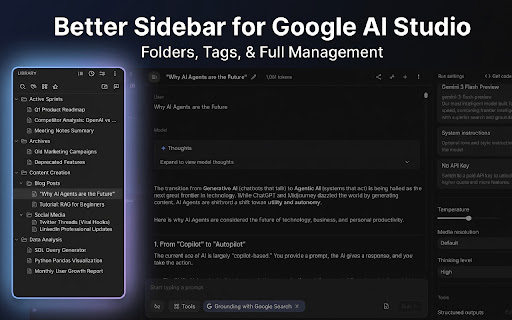

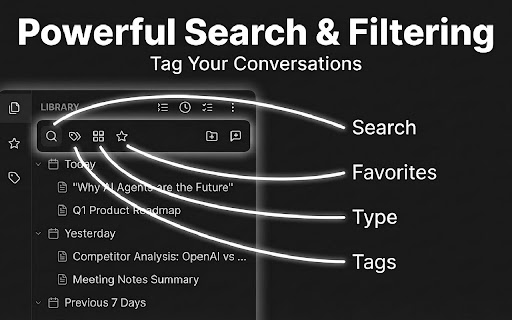


Is your Google AI Studio prompt history becoming a mess? Struggling to find that one perfect prompt you wrote last week? Meet BETTER SIDEBAR FOR GEMINI & AI STUDIO — the ultimate workflow booster for developers, prompt engineers, and AI enthusiasts. We transform the default AI Studio interface into a powerful, organized knowledge base. Stop scrolling endlessly and start organizing your ideas efficiently. 🔥 WHAT'S NEW (v2.6.0) • 🎛️ AI Studio UI Controls: Configurable sidebar width, auto-hide input box, and auto-hide run settings panel. • 💬 Quick New Chat: Set the title before the chat is created — instant entry for a smoother workflow. • 🎨 Gemini UI Settings: New Gemini UI configuration options in the settings panel. • 🖼️ Image Watermark Removal: Re-enabled watermark removal for Gemini image downloads. • ❤️ Supporter Pack: 3 exclusive themes available. All core features remain 100% free. 📂 Folders & Colors Drag and drop your chats into nested folders. Assign custom colors to folders and tags for visual clarity. 🔍 Search & Filter Full-text search across every message in your history. Combine multiple conditions — title, tag, type — for laser-precise results. Search within the active chat for immediate context. 🏷️ Smart Tagging Assign custom tags to conversations, visible directly in the chat header. Filter instantly by tag. ⭐ Favorites & Pinning Pin your most important chats or prompts to the top for quick access. 📊 Timeline View Visualize your workflow with "Today", "Yesterday", and "Last Week" groupings. 🗑️ Batch Delete Batch-delete conversations with real server-side removal. No more ghost chats. � Conversation Export Export conversations as Markdown, Plain Text, or JSON for documentation or backup. Gemini: • Adjust sidebar, chat content, and input box widths • Focus Mode — hide unnecessary elements (logo, disclaimer, upgrade button) • Smart Scrollbar — jump directly to any message in long conversations • Watermark-free image downloads (including Pro HD images) 💎 Gem Management Full Gem integration — browse, filter, create, and start Gem conversations right from the sidebar. 📓 Notebook Integration Full notebook support for Gemini — browse, organize, and manage your notebooks from the sidebar. 📝 Prompt Library Build your personal library of reusable prompts. Supports option variables, prompt composition, and system prompt imports. ☁️ Google Drive Auto Sync Automatically sync your settings, prompts, and config data to Google Drive in the background. Always backed up. 🌟 Multi-Platform Support Manage conversations across both Gemini and Google AI Studio in one unified sidebar. � Multi-Account Profiles Create separate profiles for work or personal use. Each maintains its own independent database. 💾 Data Control Your data is yours. Export your organization structure (SQL dump) anytime for backup. We take your privacy seriously. • 100% Local: We use an embedded SQLite database running entirely within your browser. • No Cloud Sync to Our Servers: Your folders, tags, and notes are NOT sent to our servers. • No Training: We do not read your conversations to train any AI models. WHY DOES THE EXTENSION NEED PERMISSIONS? We require access to aistudio.google.com and gemini.google.com solely to inject the enhanced sidebar interface and read chat titles for organization. We do not access your other browsing history. Disclaimer: This extension is an independent project and is not affiliated with, endorsed by, or sponsored by Google. 🔗 LINKS • GitHub: https://github.com/Paper-Crane-Devteam/better-sidebar-for-google-gemini-and-ai-studio • Discord: https://discord.gg/FRzesxaGAx

Gemini Chat Folders
Adds collapsible panels and folder management (including nested ones) for chats, with drag-and-drop sorting. Updated for full compatibility with the new Gemini interface. (May 2026 update). Unleash the full potential of your Gemini conversations! Are you tired of endlessly scrolling through your "Recent" chats to find that one important project, idea, or piece of research? Gemini is a powerful tool, but its lack of organization can quickly turn your workspace into a chaotic list. Gemini Chat Folders solves this problem by seamlessly integrating a robust, feature-rich folder system directly into the Gemini interface. Go beyond a simple list and build a structured, searchable, and safe library for your AI-powered work. ✨ Supercharge Your Workflow with Powerful Features ✨ 🧠 Smarter AI-Powered Organization: Let AI organize your AI chats! With our exclusive client-side feature, use your own Gemini API key to automatically categorize uncategorized chats into a clean, multi-level folder structure. NEW - Full Control: You decide the rules! Instruct the AI to use only your existing folders for perfect consistency, and set a default folder for any chats it can't classify. Selective Analysis: A preview panel lets you choose exactly which chats you want the AI to organize. 🚀 Core Features for Maximum Productivity: 📁 Unlimited Folders & Sub-Folders: Create a clear hierarchy for your projects, topics, or ideas with any level of nesting you need. 🖐️ Complete Drag-and-Drop System: Effortlessly reorder your chat bookmarks and folders. Simply drag any chat from the "Recent" list and drop it into a folder to instantly create a bookmark. 🔎 Powerful Search: Instantly find any folder or chat bookmark. The search bar filters your entire structure in real-time. ✨ NEW - Active Chat Highlighting: Never lose your place. The extension automatically highlights the bookmark for the chat you are currently viewing and expands its parent folders to make it visible. ** NEW - Cross-Device Data Loss Prevention**: Work across multiple computers with confidence. The extension detects if your data is out of sync and enters a read-only mode to prevent you from accidentally overwriting newer changes made on another device. ** NEW - Automatic Local Backups & Restore**: Peace of mind, built-in. The extension automatically saves compressed backups of your folder structure locally after every change. You can easily view and restore any of the last 5 versions directly from the settings. ** NEW - Orphaned Chat Cleanup Tool**: Keep your structure clean. A dedicated tool scans all your bookmarks, finds those pointing to chats that no longer exist, and lets you selectively remove them in bulk. Smart Duplicate Handling: The extension intelligently detects if a chat is already bookmarked and asks for confirmation before creating a duplicate, telling you exactly where the original is. Cross-Device Sync: Your folder structure is automatically and securely synchronized using your Google account's storage across all Chrome browsers. Robust Backup & Restore: Export your entire folder structure to a single .json file and import it anytime. Native Feel: Designed to feel like a part of Gemini, with full support for both Light and Dark themes. 🔒 Your Privacy is Our Priority Your data is yours, period. 100% Client-Side: The extension operates entirely within your browser. We never see, collect, or have access to your chat data or folder structure. Secure Storage: We use Chrome's built-in chrome.storage.sync and chrome.storage.local services. Your data is securely stored and managed within your own Google account's cloud space. API Key Security: If you use the AI organization feature, your API key is stored exclusively in chrome.storage.sync. It is only used to make direct calls from your browser to the Google API and is never transmitted to any other server. Take control of your Gemini workflow. Install Gemini Chat Folders today and spend less time searching and more time creating!

AI Studio Prompt Library
Supercharge your workflow in Google AI Studio. Manage and instantly insert your favorite system prompts without leaving the page. Tired of endlessly copying and pasting the same system instructions in Google AI Studio? Supercharge your workflow with the AI Studio Prompt Library! This is a lightweight, privacy-first Chrome extension designed to give you a powerful, reusable library for your system prompts. Never type the same instructions twice. What's new (v0.3.0): - MRU sorting: last-used prompts float to the top for instant access. - Improved auto-close: reliably closes the System instructions dialog after insertion (Material Angular friendly). • 🚀 ONE-CLICK INSERTION: Instantly add prompts to the System instructions field. Supports replacing, appending, or prepending text. • ✅ MRU SORTING — Your most recent prompts are surfaced first for faster workflows. • 🗂️ EFFORTLESS MANAGEMENT: A clean options page lets you create, edit, delete, and organize all your prompts. •⚡FAST ACCESS: Launch a quick-search palette with a keyboard shortcut (Ctrl+Shift+L) or right-click to use your last prompt. • 📂IMPORT & EXPORT: Easily back up your library to a JSON file or import prompts from a shared file. • 🔒100% PRIVATE BY DESIGN: Your prompts are your own. The extension works entirely offline and makes absolutely no external network calls. All data stays on your computer. • 🛠️RESILIENT: An advanced custom selector option ensures the extension remains functional even if Google updates the AI Studio layout. • 🌗THEME AWARE: Automatically adapts to your system's light or dark theme. WHO IS THIS FOR? AI developers, researchers, writers, and power users who want a faster, repeatable prompt workflow in Google AI Studio. Our goal is simple: to make your time in AI Studio more productive and creative. Have feedback or a feature idea? We'd love to hear from you! Use the "Feedback" link on the options page.

Voyager
Supercharge your Gemini™ experience: timeline, folders, prompt vault, and chat export. Voyager - Chat Navigator for Gemini™ & AI Studio Enhance your experience with Gemini™ and AI Studio through powerful organization and navigation tools. Navigate conversations effortlessly, organize chats intelligently, and boost your productivity. ★ Interactive Timeline Navigation • Visual timeline shows all messages as clickable nodes • Hover to preview any message instantly • Star important messages with long-press (syncs across tabs) • Auto-scrolls and stays perfectly aligned with your chat ★ Smart Folder Manager • Drag & drop conversations into folders and subfolders (AI Studio supported) • Right-click for quick actions: rename, duplicate, delete • Auto-detects Gem types with unique icons (Learning Coach, Coding Partner, etc.) • Switch between chats instantly - no page reloads • Syncs across all your Gemini™ accounts (u/0, u/1, etc.) ★ Prompt Library • Save and organize your favorite prompts with tags • Quick search to find prompts instantly • One-click copy and reuse • Import/Export as JSON for backup and sharing • Works on both Gemini™ and AI Studio ★ Deep Research Export • Markdown export supports "Thinking" content from Deep Research sessions, preserving the reasoning process. ★ Export Chat History • One-click export to clean JSON format • Preserves starred messages • Includes metadata and timestamps • Perfect for backups and local revise > Since the extension is not currently listed on the Chrome Web Store, it does not have a legal plugin ID. Therefore, the backup function maybe is temporarily unavailable. ★ Adjustable Chat Width • Customize reading width from 400px to 1400px • Real-time preview as you adjust • Settings persist across sessions ═══════════════════════ PERFECT FOR ═══════════════════════ • All data stored locally in your browser • No external servers, no data collection • Open source - inspect the code yourself

Google AI Studio Chat Optimizer
Optimizes Google's AI Studio Chat pages and Stream page by automatically trimming conversation history. Enhances the user experience on Google's AI Studio Chat pages and Stream page by automatically trimming the conversation history. It keeps a user-configurable number of the latest messages visible and removes older ones, which helps to reduce browser memory and CPU usage, leading to a smoother and faster chat experience, especially in long conversations. This extension is an independently developed and has no affiliation with Google.
