
cinncpjcejdnoafflljjmgibkkgkigag
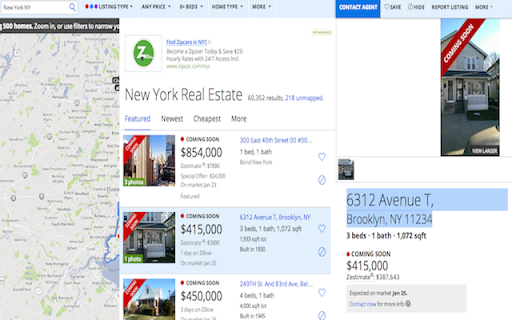
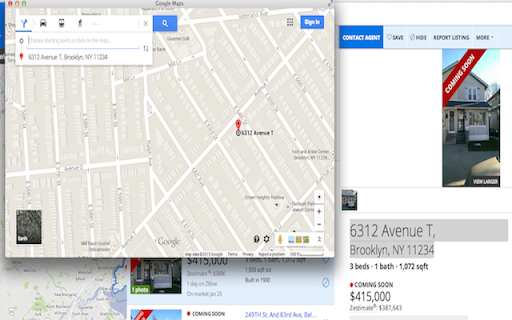
Real Estate plugin for Chrome. Users can open selected addresses in Google Maps directly from the same page. This extension let you open addresses in Google Maps without having to go to google maps in a separate tab. Helps a lot if you are looking at real estates websites and want to quickly lookup addresses. How to use - 1 - Install the plugin 2 - Highlight or select the address 3 - Click on the red map pin in the right top corner

Earth 3D View Map
Search and View Map on 3D Explore the virtual world by looking at maps of cities and popular attractions. Travel virtually around the Earth. On the popup of the extension you will find list of popular attractions to view. When you click a location on this list, you'll get a bird's-eye interactive map. A bird's-eye view is an elevated view of an object from above, with a perspective as if the viewer were a bird. It looks like a 3D model of a city. When you click the "Open larger map" button, the map opens on an external website.

Street View Maps
Street View Maps app features quick search to find Street Level Maps. Zoom In & Explore the World. Street View Maps new tab features Street Level Map Search, Web Search, Weather, Custom Shortcuts with Time/Date. The Installation of this extension will configure your New Tab Page to Street View Maps. Street View Maps extension is all you need to start browsing with quick access to street maps & web search. New Tab: This permission allows the extension to replace the page you see when opening a new tab

Best Free Maps
Use the Best Free Maps extension to search for relevant information about a location through your browser's search box. Use the Best Free Maps extension to search for relevant information about a location through your browser's search box. Best Free Maps Search sets your default search engine to Yahoo. By installing this extension you agree to the data protection regulations (https://bestfreemaps.com/privacy.html). By installing this extension you agree to the main principles in order to use our service: https://bestfreemaps.com/terms.html

Map Overlays
Provides an easy way to change the satellite images displayed in Google My Map and Waze Map Editor. There's several international maps available and some country specific (Romania, Poland, Check Republic, France). After installing the extension, you'll need to pin it to your Chrome toolbar. This will make its icon appear at the top of your browser window. Once pinned, you can use the icon to interact with the layer selection menu and other extension features. There is a shortcut, default Alt+L, to switch between the default layer and selected layer. You can change the keybinding in the chrome settings chrome://extensions/shortcuts Do not use layers for editing the maps unless you comply with the terms of use specific to each layer provider.
