
chfanlbndjhbjjbacpcjbogknncaadnc
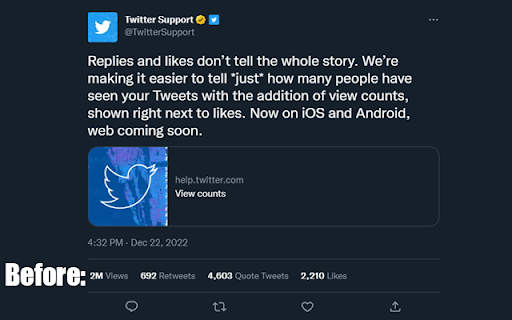

A chrome extension to remove the Views count from Twitter Tired of seeing the new Views counter on Twitter posts? This extension finds all instances of the Views counter and hides them on any Twitter.com page, restoring the previous interface consisting of only likes, replies, and retweets. What's new: Fixed bug affecting extension with no usernames in whitelist Option to move views to after likes

ChatGPT Bulk Delete
A Chrome extension to bulk delete ChatGPT conversations This Chrome extension is designed to help users quickly and efficiently delete conversations in the ChatGPT’s left sidebar. With the extension installed, users can add checkboxes to each conversation in the sidebar, select multiple conversations to delete or archive, and accomplish this with just a few clicks. Hold Shift and click to select multiple conversations for efficient bulk actions. This extension is particularly useful for users who frequently use ChatGPT and need to manage their conversations efficiently. Instead of deleting conversations one by one, users can remove multiple conversations at once, saving both time and effort. Additionally, this extension now offers a “bulk archive” feature for a one-time fee of $0.99 USD. This paid feature allows users to archive multiple conversations simultaneously, further enhancing the tool’s utility and convenience. The extension popup includes a small advertisement labeled “Ad” in the footer, linking to TubeVocab (https://www.tubevocab.com/), a third-party language-learning product. This ad helps support the continued development and free distribution of ChatGPT Bulk Delete. Clicking it is entirely optional and does not affect any of the extension’s core functionality.

Remove Twitter Views
After Elon Musk completely destroyed Twitter, extensions like this are needed. The focus of this one is, for now, removing the "views" button from the web app.

TikTok All Liked Videos Remover For Chrome
A Chrome extension to remove all liked videos on TikTok. 🌟 TikTok All Liked Videos Remover For Chrome 🌟 TikTok All Liked Videos Remover For Chrome is a powerful browser extension designed to simplify the way you manage your liked videos on TikTok. With just a few clicks, you can effortlessly remove all your liked videos, saving time and streamlining your experience ✨ Key Features 🔹 Remove all liked videos with one click No need to manually “unlike” videos one by one; the extension automates the entire process. 🔹 User-friendly interface Simple and intuitive design makes it easy for anyone to use without technical knowledge. 🔹 Fast and efficient operation Optimized for speed, allowing you to quickly clear your liked video history. 🔹 Safe and secure Your personal data remains private, and no information is stored or used outside the task. 🛠️ How to Use Install TikTok All Liked Videos Remover For Chrome from the Chrome Web Store. Log in to your TikTok account on the browser. Open the extension and click the Remove All Liked Videos button. Wait for the process to complete automatically. 🎯 Who Is It For? ✅ Users looking to clean up their TikTok liked videos quickly. ✅ Anyone who wants to manage their TikTok account more efficiently. 🚀 Download TikTok All Liked Videos Remover For Chrome today and experience a smarter, faster way to manage your liked videos! 🎥✨

Export Tweet From Any Account
TwExtract is a Chrome extension for Twitter that allows you to export & download tweets from any account into a CSV file. TwExtract - Export Tweets allows you to quickly extract and export tweets from any account as a CSV file with one click. 🏆 Advantage Our extension can export more data, as we comply with Twitter's rate limits. 👨🏻💻 Features ✓ Extract and export tweets from a user to CSV ✓ Extract and export tweets from a user to CSV within a selected date range ✓ Supports exporting longer tweets ✓ Automatically managing Twitter's rate limits 🟢 indicates the normal time interval for requests 🟠 indicates the cooldown period's time interval 🔴 indicates the time interval for request errors 🗂️ What You Get? - ID - Text - Tweet URL - Language - Type - Author Name - Author Username - View Count - Bookmark Count - Favorite Count - Retweet Count - Reply Count - Quote Count - Created At - Source - Hashtags - URLs - Media Type - Media URLs 📃 How to Start Exporting? - Enter the Twitter username or open the extension on the Twitter user’s profile, and the extension will automatically fill in the username. - Click the Start Exporting Button. ❓FAQ How Can I Export All the Tweets From a Specific User? - By default, if the date option is not selected, all of the user's tweets will be exported. In theory, this extension can export all of a user's tweets, but when exporting a large amount of data, it may trigger Twitter's limits, causing the export to be interrupted. If this happens, you can use the date option to resume exporting tweets from where the last export was interrupted. ⚠️ Caution To avoid being flagged by Twitter's risk control for frequent data exports, we suggest creating a dedicated Twitter account for exporting data. 📬 Contact If you have any questions or suggestions to improve the extension, please feel free to contact us at jfl913@gmail.com. 📃 Terms Each time, you are entitled to export up to 150 data entries for free. To export more, you need to upgrade to Pro. 🔒 Data Privacy All the data you process stays on your local computer and never goes through our servers. ℹ️ Disclaimer Twitter is a trademark of Twitter, LLC. TwExtract - Export Tweets is not affiliated with, endorsed, sponsored, or otherwise related to Twitter, Inc. or any of its affiliates or subsidiaries.
