
chdhnbnldkfnogfnmgocpblnafmhpkmj

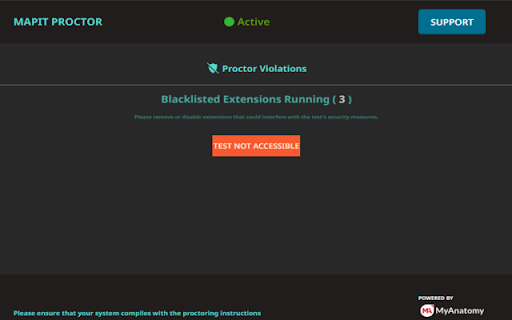
Extension by MyAnatomy designed to elevate integrity and security of online assessments MAPIT Proctor serves a distinct purpose within the online assessment environment, primarily focused on ensuring the security and integrity of test-taking processes and offers several tangible benefits for educational institutions, recruiters, test-takers. Its primary objectives as follows: Robust Test Security: MAPIT Proctor significantly enhances test security by actively monitoring and identifying potential security threats related to unauthorized extensions or manual added scripts to reduce the circumvention of proctor. This robust security feature ensures the credibility and fairness of the assessment process. Vulnerability Verification: The extension’s ability to verify the status of installed extensions and help detect violated extensions that have an unfair advantage during the test. This proactive approach by blocking violated extensions through complete test adds an extra layer of protection. Test Integrity Assurance: By blocking the start of a test until any unwanted extensions are disabled, MAPIT Proctor ensures that all candidates take the test under consistent and fair conditions, reducing the likelihood of cheating or unauthorized aids.

NeoExamShield
Prevents malpractice by blocking unauthorized extensions and websites during tests on the Iamneo portal. NeoExamShield is designed to support the integrity and fairness of the IAMNEO assessment platform. This extension helps maintain a secure examination experience by monitoring and restricting the use of unauthorized browser extensions during assessments. In addition to extension monitoring, NeoExamShield also enforces exam-specific access rules by blocking access to certain external websites as defined in its configuration. These restrictions are applied using pre-defined JSON rules included in the extension to ensure a controlled and distraction-free testing environment. NeoExamShield operates solely within the IAMNEO exam platform and does not collect personal data or monitor user activity outside the scope of exam security requirements.

Hive - Extension Detector
Detect enabled Chrome extensions to ensure a fair and secure Hive Smart Interviews assessment. 🧩 **Extension Detector — Secure Your Hive Smart Interviews Environment** Hive Smart Interviews ensures **fair** and **distraction-free** coding assessments. However, certain Chrome extensions can interfere with the coding interface, provide shortcuts, or affect exam integrity. **✨ Extension Detector** was built exclusively for **Hive Smart Interviews** to prevent such issues. It helps candidates and admins identify which Chrome extensions are currently enabled and alerts them if any might compromise the assessment environment. ### 🚀 Key Features for Hive Users - 🔍 **Detect Enabled Extensions:** Lists all active Chrome extensions while using Hive Smart Interviews. - ⚡ **Real-Time Monitoring:** Instantly detects when an extension is enabled or disabled during an assessment session. - 🛡️ **Maintain Exam Integrity:** Ensures only approved tools are active, keeping the coding environment fair for all candidates. ### ⚙️ How It Works When a candidate accesses **Hive Smart Interviews**, the extension locally checks enabled extensions using Chrome’s **management API**. It securely communicates the status only with the Hive platform. ✅ No personal data, browsing history, or sensitive information is collected. ### 🧠 Why Hive Needs It Online coding assessments require a **controlled environment** to ensure fairness. Extension Detector empowers candidates to **self-check** their browser setup and helps admins **maintain exam integrity** during Hive assessment sessions. ### 🔐 Permissions Explained - 🧩 **management:** To detect which extensions are enabled. - 🪟 **tabs:** To communicate with Hive assessment tabs and refresh them if necessary. - 🌐 **Host permission:** Required to run only on Hive Smart Interviews pages (`https://hive.smartinterviews.in`) for secure communication. 📜 **Privacy Policy:** https://sites.google.com/smartinterviews.in/extension-detector-privacy/home

Blend & Run: Enable copy and paste
Extension to copy & paste text on websites which block it. Blend & Run is a Chrome extension that helps you paste text/code on websites that block copy & paste. Feel free to contribute: https://github.com/HASHCUT69/Blend-n-Run This extension was developed by Sandeep Pani, Sathvik Achanta, and Akash Muriki.

HirePro Assessment
Disables distracting extensions on hirepro assessments for fair testing HirePro Assessment is an extension designed to safeguard the integrity and fairness of online assessments, fostering a trustworthy and secure environment for both test-takers and educators. 1. Automatic Extension Disabling: HirePro automatically detects and disables all other Chrome extensions during assessments, eliminating potential cheating avenues and ensuring a level playing field. 2. Secure Communication: Communication between HirePro Assessment extension and assessment platforms is secured, preventing unauthorized access and protecting user data. 3. Privacy-Focused: HirePro Assessment extension does not collect user information. Benefits for Test-Takers: 1.Focus on Your Performance: With distractions minimized, you can fully concentrate on demonstrating your knowledge and skills without worry about unfair advantages. 2. Fair and Equitable Testing: HirePro ensures everyone has an equal opportunity to succeed, promoting trust in the assessment process and its outcomes. 3. Peace of Mind: Knowing your efforts are accurately evaluated strengthens your confidence and fosters academic integrity.
