
cgppfoiepcfaacipejdkpollbkeoekef
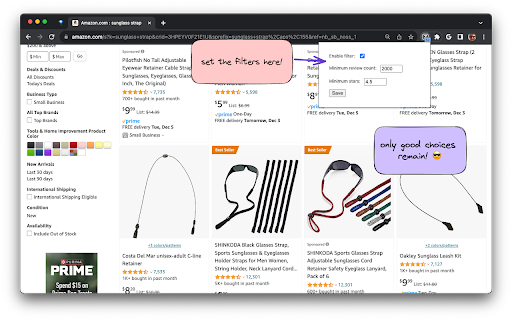


Better purchases in less time! Filter results by minimum number of reviews to quickly find the tried and true products on Amazon. Use this to avoid analysis paralysis when searching for generic items on Amazon. In my personal experience, when there are too many options on an Amazon results page, the most effective way to make a decision is to ignore products with a low number of reviews. It's tedious to use brain power for this. It's also a good way to avoid new items that have fake reviews. This extension automatically filters out products with low number of reviews. You can also add a filter for minimum stars. Hopefully this saves you as much time as it saves me!

Amazon-Sort
Group search results, filter and sort results by price or price per count. This extension groups multiple Amazon page search results, filters and sorts by price or price-per-count. It's compatible with the following Amazon TLD domains: .com, .com.au, .com.be, .com.br, .com.mx, .com.tr, .ae, .at, .ca, .ch, .cn, .co.jp, .co.nz, .co.uk, .co.za, .eg, .es, .fr, .de, .in, .ie, .it, .lu, .nl, .pl, .sa, .sg, .se. If your desired Amazon domain is not working, notify me and I will update app. Key Features: • Automate grouping several pages of results. • Filter out unwanted results against your search words. • Sort by price or price-per-count. • Works seamlessly with all listed 👆 Amazon sites. • Lightweight and user-friendly interface. Why Choose Amazon-Sort? Make informed decisions on the same product at a lower price. Whether you're shopping for household items, tools, or electronics, this tool ensures you get the best value for your money. Disclosure: I built this for my personal use and share it with others. I do not collect, save or monetize your personal data.

Amazon Sort by Review Count & Ratings - Shop Smarter!
Amazon Sort by Review Count & Ratings lets you sort results by review count and rating breakdown to find trusted products faster ⭐ Leave a Review! ------------------------- If you like the extension, leave us a review! (Hopefully 5 star!). If you don't like the extension or it doesn't work, drop us an email and we'll try and resolve the problem! Don't get caught out by the obvious clones of this extension that can't even write their own descriptions! ℹ️ How do you use the extension? ------------------------- 1️⃣ Search for a product on Amazon 2️⃣ Choose a department 3️⃣ Click on "Sort by Reviews" (Or Press Alt + S) 4️⃣ Optionally, filter out products based on minimum quantity of reviews 5️⃣ Enjoy! 🆓 This extension will always be free! If you want to say thanks and buy me a drink 🍻 then feel free to donate! 🙏 🚀 Features ------------------------- ⭐️ An easy to use 1 click solution to be able to sort by review count without needing to select a department! ⭐️ Global compatibility with all known Amazon stores! Be that Amazon.ca, Amazon.com, Amazon.co.uk... etc ⭐ Displays review score and high / low rating percentages on individual product pages ⭐ Shows high and low rating percentages directly in Amazon search results ⭐️ Multi-browser compatibility, works with all Chromium based browsers! ⭐️ Ability to show the user that it is faster to sort by reviews by selecting a department before sorting! ⭐️ Ability to show the user when the search results are already sorted. ⭐️ Easy to use hotkey to view the extensions instructions, simply navigate to Amazon and press ALT + A (A as in Amazon) ⭐️ Easy to use hotkey to sort the product search results, simply navigate to Amazon and press ALT + S (S as in Sort) ⭐️ Easy to use hotkey to access the extensions settings, simply navigate to Amazon and press ALT + C (C as in Configuration) 📝 Changelog ------------------------- ➤ 1.0 - ➤ The ability to sort by review count ➤ 1.1 - ➤ Prevented sorting pages that cannot be sorted to avoid confusion. (An Amazon restriction) - ➤ Added tooltips to help users see why the sort button is disabled - ➤ Added the ability for users to left click the pinned extension to see instructions with screenshots on how to use the extension. - ➤ Added a donation button inside the instructions popup and as a context menu option when right clicking in an Amazon website. ➤ 1.2 - ➤ Prevented already sorted pages from being sorted again to avoid confusion. - ➤ Added tooltips to help users see why the sort button is disabled because the page is already sorted. - ➤ Improved the speed in which the sort functionality becomes available. - ➤ Added the hotkey of Alt + A, so when you are on Amazon you can simply press the hotkey to see the instructions. - ➤ Added the hotkey of Alt + S, so when you are on Amazon you can simply press the hotkey to sort by reviews. ➤ 1.3 - ➤ Updated the name of the extension to "Sort by Reviews for Amazon" for consistency and simplicity. ➤ 1.4 - ➤ Added support for India, Egypt, European Union and Czech Republic - ➤ Improved support for Saudi Arabia & Singapore' alternative domains ➤ 1.5 - ➤ 🔥 Added support for Amazons new results page design/layout (currently only rolled out to Amazon.com) - ➤ 🔥 Added minimum number of reviews slider, to allow you to hide reviews that have only a few 5 star reviews. - ➤ 🔥 Added the overall rating to be visible immediately on the product search results, rather than requiring you to hover over the rating / view the individual products page. - ➤ 🔥 Added the 5 star reviews and 1 star review percentages to be visible immediately on the product search results, rather than requiring you to hover over the rating / view the individual products page. - ➤ Added support for Belgium, Poland & South Africa; If your localisation isn't supported please leave us some feedback and we'll add it! ➤ 1.6 - ➤ 🔥 Added support for Amazons latest results page design/layout. - ➤ 🔥 Added support for displaying the review score as well as high and low review percentages in an individual product page. - ➤ Replaced Amazons unattractive review score average with the one from this extension. (Thanks Amazon for agreeing that this is a great feature. 😉) - ➤ Improved the processing of products to reduce network usage, browser performance impact and overall speed. - ➤ Added temporary review data caching to improve performance and responsiveness. - ➤ Improved the handling of international amazon domains. ➤ 1.7 - ➤ Updated extension name, description, icon and promo title. - ➤ Added support for international delimitation. - ➤ Optimised performance to improve speed of processing review data. - ➤ Improved JavaScript safety to reduce potential issues when Amazon inevitably updates their designs again. ➤ 1.8 - ➤ Fixed the review handling for sponsored products. - ➤ Added an option to "Hide Sponsored" in the search results. - ➤ Updated the style of "Sponsored" badges to make it more obvious to consumers. ➤ 1.9 - ➤ 🔥 Added support for Sorting by Reviews without a Department/Category needing to be selected. - ➤ 🔥 Added gentle background processing to improve performance of sorting. - ➤ Improved mobile / low resolution responsiveness of the UI changes. - ➤ Improved the layout of sponsored review data. - ➤ Improved the retrieval of review data to prevent rare situations were review data is not collected and shown. - ➤ Optimised performance to improve speed of processing review data. ➤ 2.0 - ➤ 🔥 Added a "What's new?" popup on first visit to Amazon to introduce you to the new feature! 📢 - ➤ 🔥 Added the ability to hide toolbar elements (moves them to a discrete hover panel) - ➤ 🔥 Added auto-sorting for when department or category pages - ➤ 🔥 Added auto-sorting for when non-department/category pages with 3 different options: - ➤ ⚙️ Auto-Sort Prompt Mode - Notifies you when sorting is ready via a popup - ➤ ⚙️ Auto-Sort Discreet Mode - Notifies you when sorting is ready via a notification + change to button - ➤ ⚙️ Auto-Sort Instant Mode - Instantly sorts the page when sorting is ready - ➤ Added a full settings panel to the extension popover and via a settings cog. - ➤ Completed a major overhaul to improve performance ➤ 2.1 🆕 - ➤ Adjusted default option values for better support for new users. - ➤ Adjusted delays for better compatibility. - ➤ Improved background processing to use a service worker rate limiter for better compatibility. 🔏 Your privacy ------------------------- We respect our users privacy, this extension does not in any way, shape or forms track, collect, sell or do anything with your personal data, the extension has no connection to any website, service or server. 🔏 Legal ------------------------- "Sort By Reviews for Amazon" is not affiliated, partnered with, endorsed by, or connected to Amazon or its partners in any way, shape, or form. This extension is simply a user made quality of life improvement to help other users find the most reviewed products that they're searching for.

Amazon Shopping Companion & Ad Blocker
Avoid fake reviews, filter sponsored products, check price history, and more! - Enjoy distraction-free shopping by blocking most ads and sponsored items from Amazon search result and product pages - Easily see buying options for any Amazon product - Search product reviews and Q&A sections for red flags - Detect and ignore fake reviews using FakeSpot and ReviewMeta - Check pricing history and get price drop alerts on CamelCamelCamel - Compare with other stores on Google Shopping Amazon Shopping Companion puts all of these shortcuts within one click of any Amazon product page and does not invade your privacy by asking for unnecessary permissions. Note: this is a side project I created to simplify my own shopping and thought it might help others too. I cannot make guarantees but would love to hear from you if you have any questions or feedback.

Sort By Review Count for Amazon
Sort By Review Count for Amazon sorts product search results by most reviewed. Update March 13, 2024: Due to Google Chrome's impending switch from manifest v2 to manifest v3, I had to update the code. Please send me an email at griffithsorganizationllc2023@gmail.com if you are encountering issues with the manifest v3 version. The Google Chrome manifest v3 rollout is staggered so there may be issues that arise during their rollout across browser versions (I don't expect any but its possible). Also, the Firefox and Microsoft Edge versions are now complete and available for download and use with the same account. Edge version is here:https://microsoftedge.microsoft.com/addons/detail/sort-by-review-count-for-/jehnmefoldmahnigfmldbefdggjbpdia Lastly, the Apple ecosystem is distinct unfortunately, so I haven't been able to rollout a version to the same account yet under their TOS (right now you would have to purchase separately). The Apple version (for Mac, iPhone, Safari, etc) is available here: https://apps.apple.com/us/app/sort-review-count-for-amazon/id6445829513 If there are any other browsers that you are unable to get the software on, please contact me and I will try my best to implement it there. ---------------------------------------------------------------------- Sort By Review Count for Amazon allows you to sort product search results by most reviewed. It works best when you are in specific product department. After submitting a search on Amazon, a blue Sort By Review Count button appears in the right hand corner near the sort by drop down menu. Clicking that when in a product department (the column on the left of the search result images) will sort the results by review count. Due to our company’s ongoing costs in development and responding to user requests, our Sort By Review Count app requires a small payment to use upon installation. We prefer doing that rather than collecting and selling your browsing data like other Chrome extensions out there. Payment is provided through a Stripe payment popup, which is an industry standard payment method since Chrome stopping processing payments for all the browser extensions in 2020. Thank you for supporting developers! For those that have already paid, please use the login here option at the popup to enable the app. Once the Sort By Review Count extension is installed, a blue arrow icon will appear in the extensions list. We recommend you pin Sort By Review Count (SBRC) and click it ahead of an Amazon product search, as it is a helpful tool to find trusted and well-reviewed products. A few quick tips for use: (1) Click the blue "Sort By Review Count" button that appears when you enter your search. We recommend you click the icon each time your search results show up to sort. (2) We recommend users consider an adblock during web use. It makes all online web searches less clouded by ads and sponsored results. (3) We recommend clicking a single "Department" (found on the left side column when you are on an Amazon search results page) to get a more accurate sort. For example, if you are searching for blenders, make sure you are in the "Household Blenders" Department. The sort feature adds to the url in your current tab to sort the search results, and Chrome provides a browsing data notice for that (probably because it adds to the url in the current tab you have open) on extension install.
