
cgmdbadjjhheckdicjbihebcmibfpicg
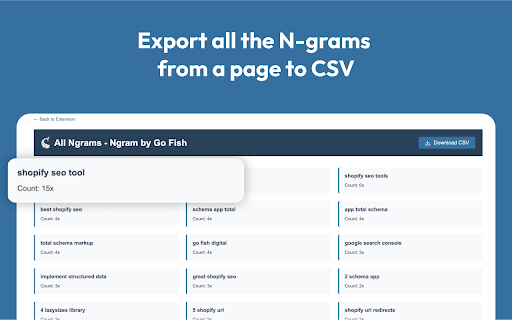

N-gram by Go Fish allows SEOs to see the different N-grams used on any website to help with keyword research. Unlock Deeper SEO Insights with Go Fish’s N-gram Analyzer Extension N-gram by Go Fish is a powerful Chrome extension designed for SEO analysts who want to analyze and optimize on-page content. This tool scans any webpage and identifies common two, three, and four-word Ngrams, highlighting them directly on the page for quick analysis. With version 1.1, you can: • Instantly highlight Ngrams on any webpage (including competitors) • Identify the top 5 most frequently used Ngrams • Generate a detailed report of all Ngrams found • Export results as a CSV for further analysis Built for efficiency, the extension seamlessly integrates into your workflow, helping you uncover content patterns, keyword overuse, and optimization opportunities in seconds. Go Fish Digital is leading ecommerce marketing agency specializing in SEO, PPC, and Social marketing services. This extension leverages Compromise.js and compromise plugin Stat for natural language processing. Compromise.js is an open-source library developed by Spencer Kelly and contributors, licensed under the MIT License. The full license can be viewed at: We acknowledge and comply with the license terms by referencing it here. Boost your SEO content analysis with N-gram by Go Fish: your on-page keyword pattern recognition tool.

Agital - GSC Calculations
Calculates percentage change for clicks, impressions, CTR, and position in GSC. Adds Google Algorithm Updates to Timeline graphs Take control of your organic traffic performance reporting with Agital’s GSC Calculations extension. This Chrome extension calculates and displays percentage changes for clicks, impressions, CTR (Click-Through Rate), and position directly within your Google Search Console dashboard. Now with version 1.6, you can also view percentage changes directly in the tables below the graph. We also included the ability to see when Google rolled out algorithm updates displayed on the GSC graph timeline interface, giving you valuable context for your SEO performance trends. With instant calculations, you get immediate percentage change insights for key metrics, saving valuable time by avoiding manual calculations. The extension integrates seamlessly with Google Search Console, making it effortless to track and analyze your SEO performance. Designed for efficiency and accuracy, the Agital - GSC Calculations extension boosts your productivity by providing precise and reliable calculations, all in one user-friendly interface. Agital, a leading digital marketing agency specializing in SEO, PPC, Social, and performance analytics tools, brings you this innovative solution to simplify and enhance your SEO reporting efforts. v1.3 added support for more international number systems and their usage of spaces, commas, and periods. v1.4 introduces percentage change calculations in tables and an option to view Google algorithm update dates on the graph timeline interface. v1.5 adds latest Google Core Update date. v1.6 adds June 2025 Google Core Update date.

Gandalf
Gandalf is a powerful Chrome extension designed to transform your Google Search Console experience. Gandalf is the ultimate Chrome extension for digital marketers and SEO professionals who want to find the needle in the haystack of their Search Console data. Just as the wizard Gandalf guided the Fellowship through Middle-earth, our extension guides you through the complex landscape of your website's performance in search results. Precise Keyword Categorization: Uncover your most impactful keywords with Gandalf's advanced algorithms. Our extension helps you identify and categorize your top-performing search terms, providing invaluable insights into your site's visibility. Custom Metric Filtering: Dive deep into your data with customizable filters. Sort and analyze your search performance based on crucial metrics such as Impressions, Click-Through Rate (CTR), and Position. This granular control allows you to focus on the metrics that matter most to your SEO strategy. Intuitive Data Visualization: Transform raw data into actionable insights with Gandalf's user-friendly interface. Our extension presents your Search Console data in clear, easy-to-understand visualizations, helping you spot trends and opportunities at a glance. Time-Saving Automation: Let Gandalf do the heavy lifting. Our extension automates the tedious task of data sorting and analysis, freeing up your time to focus on strategy and implementation. Regular Updates: Stay ahead of the curve with frequent updates that ensure Gandalf remains compatible with the latest Search Console features and provides cutting-edge analysis tools. Whether you're a seasoned SEO wizard or just beginning your journey into the realm of search optimization, Gandalf is your trusted companion in navigating the complexities of Search Console data. Don't just guess at your site's performance – let Gandalf illuminate the path to SEO success. Download Gandalf today and discover what's really going on in the depths of your search data!

SiteAnalyzer SEO Tools: Free Meta & SEO Checker
Free browser extension that helps you analyze website content, detect and fix all SEO-errors (links, images, meta, content, etc.). SiteAnalyzer SEO Tools is a free browser extension providing a set of tools for analyzing SEO indicators of web site, technical audit (links, images, meta tags, content, indexing, etc.), URL analysis and correction of SEO optimization errors. SiteAnalyzer SEO Tools is a convenient tool for webmasters and SEO specialists, including many parameters for checking the quality of the site and its pages, configured to identify the most popular SEO errors. The main features of SiteAnalyzer SEO Tools ✓ Determining the total number of site pages in the Google & Yahoo! index ✓ Checking the URL indexing status in Google and Bing ✓ Reveals the contents of Title, Description, H1-H6 tags ✓ Proper check of «Robots.txt» and «Sitemap.xml» presence ✓ Rules accounting for «Robots.txt», meta tag «Robots» and header «X-Robots-Tag» ✓ Canonical URL Checker ✓ Checking for REL «Nofollow», «Sponsored» and «UGC» for links and URLs ✓ Defining internal and external page links ✓ Semantic analysis of page content ✓ Checking pages loading speed ✓ Receiving server response codes (200, 3xx, 4xx, 5xx) ✓ Determining what CMS is used by web site ✓ Checking the registration date and the domain age ✓ Displaying all images of the page and the contents of the ALT tag ✓ Determining the IP address and country of web site ✓ Display Schema, Open Graph and Twitter markup ✓ Determining the presence of links to social networks ✓ Search for subdomains and sites on the same IP ✓ Extracting text Suggestions from Google Images ✓ Show duplicate H1-H6 headers ✓ SSL Certificate Verification ✓ DNS Domain Validation ✓ PageRank Calculation ✓ Sitemap Visualization ✓ Sitemap Clustering ✓ CSR vs SSR Site Rendering Visualization ✓ Schema.org Visualization (visualize JSON-LD schema markup) ✓ Google SERP Analysis (Organic, Advert, Local, Product, Video, Image, News, FAQ, PAA) ✓ TF-IDF Checker for Google SERP ✓ Core Web Vitals ✓ Quick Source Viewer ✓ Integration with Google Search Console ✓ Integration with SimilarWeb ✓ Page SEO Audit by 40 parameters ✓ Export reports to CSV and PNG How can the plugin help SEO specialist? ★ Checking the indexing of pages ★ Analysis of meta tags and page content ★ Search for technical bugs on the site The extension is distributed absolutely free and does not require any registration since it does not collect or send elsewhere your personal data. Updating the version An extension installed via the Chrome Online Store or through Firefox Add-ons are updated independently so no additional actions are required.

GSC Guardian
Stay on top of your website's health. Check for incidents in your Google Search Console data with a simple graph. GSC Guardian 2.10 - Enhanced Google Search Console with Visual Algorithm Tracking 🔒 Security Verified: This extension has been independently reviewed for security to ensure that your data is not being uploaded to any unauthorized third parties: https://manus.im/share/VTfoAgDalRZmVeBU7ePuX2?replay=1 New: Bulk CSV Import - Upload historical annotations and migrate data efficiently ⭐ Trusted by 15,000+ SEO professionals worldwide 🏆 US Search Awards - Best Search Software Finalist ⭐ Please support us with a rating if GSC Guardian helps your workflow! ⭐ SECURITY ENHANCEMENTS • Complete security audit and code review completed • Enhanced security measures with independent verification • Public security transparency implemented for all future releases • Streamlined codebase for improved performance and reliability BULK ANNOTATION IMPORT • Upload CSV files containing hundreds of annotations at once • Preview annotations before importing to ensure accuracy • Download our CSV template to get started immediately • Ideal for migrating historical data or team handovers ENHANCED USER EXPERIENCE • Status messages now auto-hide for a cleaner interface • Annotations are filtered by Search Console property • New "Show All Resources" option for multi-property views • Improved visual hierarchy with dashed annotation lines JULY 2025 STABILITY UPDATE • Fixed compatibility issues with recent Google Search Console changes • Resolved date range switching bugs • Improved annotation property association ALGORITHM UPDATE VISUALIZATION See Google's algorithm updates as visual overlays on your traffic graphs. Instantly understand if traffic changes correlate with known updates. COMPREHENSIVE ANNOTATION SYSTEM • Add context to traffic changes with timestamped notes • Import/export annotations for team collaboration • Search and filter annotations by date or keyword • Maintain historical records of site changes and optimizations DARK MODE Reduce eye strain during extended analysis sessions with a carefully designed dark theme. MULTI-LANGUAGE SUPPORT Available in 9 languages: English, Spanish, Dutch, French, Portuguese, German, Italian, Japanese, and Russian. DATA PORTABILITY Export all annotations and incidents to CSV or Google Sheets for reporting, backup, or migration purposes. FOR SEO & MARMETING AGENCIES • Track client site changes across multiple properties • Document optimization efforts with timestamped annotations • Export visual reports showing algorithm impacts • Onboard new team members with historical context via CSV import FOR IN-HOUSE SEO & MARKETING TEAMS • Correlate development releases with traffic changes • Maintain audit trails of SEO implementations • Share insights across departments with exportable data • Track seasonal patterns with historical annotations FOR WEBSITE OWNERS • Understand traffic fluctuations in context • Document when content was published or updated • Track marketing campaign launches against organic performance • Build institutional knowledge about site performance FOR SEO CONSULTANTS • Quickly assess algorithm impact during site audits • Import client annotations for comprehensive analysis • Generate visual reports for client presentations • Maintain detailed records across multiple client projects 1. Install the extension from Chrome Web Store 5. Use import/export features for bulk operations IMPROVE ANALYSIS • See patterns between updates and performance • Maintain comprehensive historical context • Make data-driven decisions with complete information PROFESSIONAL REPORTING • Export annotated data for client presentations • Create visual timelines of SEO efforts • Document ROI of optimization work • API integrations with project management tools • Automated annotation rules • Multi-account management dashboard • Advanced filtering and analytics • Actively maintained with regular updates • Responsive support team • Your data remains within Google's ecosystem • No external servers or data collection • Independent security verification with public audit available • Open to feature requests from the community Install GSC Guardian to add powerful visualization and annotation capabilities to Google Search Console. Questions or feedback? We're here to help make your SEO workflow more efficient.
