
cgjcmonifjkgeepfjfbbhegbohehpfdp

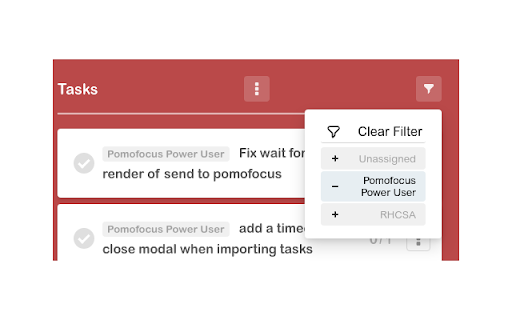
Extra features for pomofocus.io If you're enough of a pomofocus.io power user to use the premium pomofocus offering, this extension may help your workflow. These simple features can go a long way to make any large projects you work on more digestible. As of v1.1.0, the extension was revived to work again while both sites were lightly redesigned. Pomofocus filtering works again, which was the main part of the project for me. Todoist imports will be back in the next version!

Pomodoro
The Pomodoro Technique - Focus. Relax. Improve. Achieve. Pomodoro Technique is a time management method by Francesco Cirillo in the 1980s *****There are six steps in the original technique***** 1. Decide on the task to be done. 2. Set the Pomodoro timer (traditionally to 25 minutes). 3. Work on the task. 4. End work when the timer rings and put a checkmark on a piece of paper. 5. If you have fewer than four checkmarks, take a short break (3–5 minutes) and then return to step 2; otherwise continue to step 6. 6. After four Pomodoros, take a longer break (15–30 minutes), reset your checkmark count to zero, then go to step 1. Application developed by Linh Okita and Nyan.

Pomo
A pomodoro study timer that is simple and easy to access. Pomo has a 25 minute study timer, 5 minute break timer, and 15 minute break timer. The Pomo icon in the top right corner will appear white when not in use (or paused), red when the timer is active, and change to green when the timer has ended. Additionally, if chrome notifications are enabled a notification banner or alert will appear notifying you that your timer has ended.

Pomodoro Timer for Google Chrome™
A simple extension Pomodoro timer with to-do lists, focusing on work. Begin using the pomodoro technique to increase your productivity at work/when you are studying. Here is how this extension works. You have a large project/task to work on. Once you have installed our software extension, start writing and break down the large project into small individual tasks. Here is an example of how you could use this extension. - Studying for History Exam - - Study the Civil War - Study factors which led to civil war etc. Once you have broken down the project into mini tasks, begin studying by pressing the "play" button. The timer will start and you have 20 minutes to work on this task. Our software will notify you once the 20 minutes are up and you can set a 5/10 minute break for yourself. Begin on the next task once the break is over. This study/work technique is very efficient as it allows your brain to take a short break every 20-25 minutes and you are fully focused during the 20 minutes you are working/studying. Our extension also has a cool history feature - you are able to see how many pomodoro's you accomplished for the day and its a great way to keep track of progress of your work/studying. Begin using this Pomodoro Timer today and become more productive at work/at schoool.

Pomodoro Focus - Task Management
Maximize productivity with an ever-visible foreground timer plus personalized task management on every tab. 🔓 Unlock unparalleled productivity with Pomodoro Focus - Task Manager: Your go-to companion for mastering the Pomodoro Technique, time management, focus, and efficient task tracking thanks to the Chrome Side Panel integration. A Seamless Pomodoro Timer: Constantly visible on every page and tab, this foreground timer lets you embrace the Pomodoro Technique without switching or disrupting your flow. Advanced Task Management: Whether doing work, study, or personal development, you can easily add, view, and manage tasks. See your completed to-do list items and what's next at a glance. 1) Persistent Visibility: No more tab-switching! The Pomodoro timer stays visible across all your browsing, boosting your focus and productivity. 2) Universal Integration: Work, study, or research across multiple tabs - the timer keeps your concentration intact. 3) Efficient Task Management: Manage your to-do lists easily. Track your progress and view completed items swiftly. 4) Personalized Time Management: Customize your focus intervals and break times to suit your unique work rhythm, fully adapting the timer to your needs.
