
cgcpmpfdoddapgeodhoaebggcpaijdmd
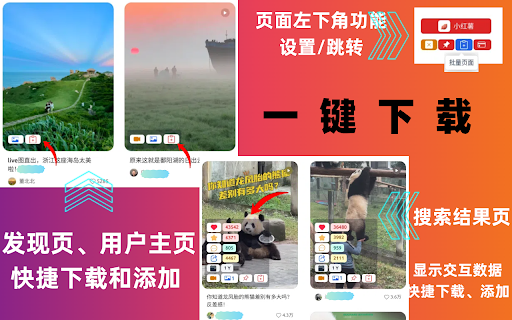


小红书笔记无水印高清视频/图片/live下载导出、商品详情图/描述图/视频下载、搜索列表交互数据排序及笔记评论导出 一键下载小红书网页版笔记里的无水印高清视频/图片 🚀 使用 1️⃣ 单个笔记视频/图片下载:在笔记详情页\列表展示页面,点击「视频」「图片」下载图标即可下载 2️⃣ 批量下载:在笔记详情页\列表展示页面,点击「添加」图标,添加笔记,在页面左下角 点击功能操作区可以进入批量操作页面 3️⃣ 评论导出:在笔记详情页,点击「评论」图标,即可打开笔记评论窗口,根据需要获取评论,然后可以搜索/导出评论或者下载评论图片 4 商品图片/视频下载:在商品详情页,点击「获取商品图片/视频」按钮,即可获取数据,然后可以下载 详情图/描述图/视频 🎨 特点 ✓ 快速下载:帮助您快速下载小红书视频图片,让您更好地享受视频图文笔记内容。 ✓ 简单易用:界面简单易用,让您轻松掌握使用方法。 ✓ 根据不同条件对搜索结果页进行排序(点赞、收藏、评论、分享、时间) ✓ 批量下载多个笔记 ✓ 下载商品图片/视频 ✅ 高清无水印 ✅ 一键下载主图/评论图/视频封面/实况Live ✅ 无需登录 ✅ 批量下载小红书无水印图片/无水印视频/实况Live ✅ 搜索结果列表页展示交互数据(点赞、评论、收藏、分享),可以一键导出搜索结果 🆕 新更新 -1.1.4 修复下载原始高清视频问题 -1.1.0-1.1.3 修复视频下载带水印问题 -1.0.9 ✓ 新增:商品图片/视频下载 ✓ 优化:批量下载实况图live bug -1.0.8 ✓ 新增:文件名设置、收藏、点赞下载 -1.0.5-1.0.7 ✓ 优化:获取信息bug -1.0.4 ✓ 优化:下载流程 -1.0.1-1.0.3 ✓ 新增:实况图Live下载 ✓ 新增:评论图片下载 - 1.0.0 ✓ 初始发布,全功能发布 ✓ PRO版本购买 💴 Pro订阅版本: - 基础版本:支持单个笔记视频/图片下载/有数量限制的批处理 - Pro版本:无限制全功能 🚀 重要声明: 媒体资源供个人离线使用,如果想在社区中分享它们或用于商业用途,则需要征得作者的同意。 🔒 数据隐私 用户行为数据都在您的本地计算机中处理,它永远不会经过我们的网络服务器,服务端请求仅仅判断用户是否购买Pro套餐。 👋 联系方式 如果您有任何问题,请随时联系 geckoinfocloud@163.com

小红书笔记下载工具
小红书笔记下载工具,让小红书运营更简单。 主要功能: 1.采集小红书搜索页笔记数据 2.采集小红书搜索页用户数据 3.采集小红书博主页笔记数据 4.同步到飞书多维表格

RedNote Downloader
Download avatars, images, live photos and videos from RedNote (Xiaohongshu) with ease. 🧑💻 This extension is in beta version, feel free to suggest features to support@codeconuts.net. We will reply as soon as possible~ ✨ With just a few clicks, you can 1. Download user avatars (jpg), note images (jpg), live photos, and videos 2. Download note text (markdown) and note media and view the note conveniently on your PC 3. Download all notes on a user profile with just 2 clicks 1. View download progress: Visit the webpage of the downloading note, and open the popup to view progress. 2. Download files in background: You can switch to another tab / visit another webpage / close the tab without interrupting the download. 3. Remember what you downloaded: Suppose you downloaded all notes of a user. If the user posts new notes, only new ones will be downloaded. 4. Categorize the downloaded notes into one folder per user: to keep your download directory tidy and clean. 5. Restore the date of photo taken/note posted: In the file explorer, you can sort the images of a user by the date taken/posted. 6. Remove watermarks automatically: Currently supports images and videos (but not live photos). ⚠️ Disclaimer: This tool is provided for educational and personal use only. The developers are not liable for any damages or consequences resulting from your use of this tool.

Zhi Xiaohong - Xiaohongshu AI All-in-One Assistant
Xiaohongshu material watermark removal download (supporting batch note download) and many other practical features. ✨ **What is SmartRed?** SmartRed is a powerful operational tool designed specifically for users of the Xiaohongshu (Little Red Book, XHS) platform, perfect for bloggers, market researchers, product designers, and operational professionals. It provides in-depth competitive analysis to boost viral content creation, marketing strategy development, and competitor insights, significantly enhancing operational efficiency! 🔥🔥🔥 **Limited-Time Offer** Register and invite new users to receive an additional **3 days of Professional Membership** for free! Start your data-driven journey now! **New Feature Launch!** 1️⃣ **AI Title Generator** powered by deep learning from Xiaohongshu’s viral notes. It intelligently matches trending keywords, pain points, and emotional formulas to generate high-click-through-rate titles in real-time, along with optimization suggestions to skyrocket your note’s traffic! **Core Features of SmartRed** 🌟 **1. High-Definition Material Download** Download images and videos from Xiaohongshu notes individually or in bulk, with automatic watermark removal to enrich your creative material library! 📸 🌟 **2. Note Data Download** Batch download note content with a single click, including titles, authors, engagement metrics, and more, empowering you to create viral content! 📝 🌟 **3. Xiaohongshu Note Analysis** Visualize note data through intuitive charts to quickly understand commercial value, optimize content strategies, and boost operational results! 📊 🌟 **4. Blogger Data Analysis & Download** Dive deep into bloggers’ content characteristics and market influence to make data-driven collaboration decisions and find the perfect blogger for you! 👩🎤 🌟 **5. Keyword Search** Analyze notes and blogger data by keywords with ease, and save them to the cloud for convenient, anytime access! 🔑 🌟 **6. Restricted Word Check** Check for restricted words before publishing to ensure compliance, safeguarding your content creation! 🚫 🌟 **7. AI-Powered Viral Title Creation** The AI Title Generator, trained on Xiaohongshu’s viral notes, matches trending keywords, pain points, and emotional formulas to create high-click-through titles and provide optimization suggestions for explosive traffic growth! 🌟 **9. Bulk Blogger Data Download** Analyze and collect data from multiple bloggers with one click, organizing it into tables for doubled efficiency! 🌟 **10. One-Click Note/Blogger Collection** Save notes and bloggers to the cloud with one click, creating personal collections for easy tagging and future reference. 🌟 **11. Pygmalion Blogger Collection & Comparison** Batch collection, comprehensive comparison, and export of collection/comparison results for more efficient collaboration choices. 🌟 **12. Pygmalion Blogger Details Export** Export exactly what you see—what you see is what you get! 🎉 **Why Choose SmartRed?** SmartRed is a robust Xiaohongshu operational tool, offering high-definition material downloads, data analysis, bulk downloads, and more. It empowers you to enhance content creation and data analysis capabilities, making operations more efficient! 💪 **Disclaimer** SmartRed is not an official Xiaohongshu plugin. Xiaohongshu™ is a trademark of Xiaohongshu Inc., and SmartRed is not affiliated with Xiaohongshu™ or Xiaohongshu Inc. Try SmartRed now and unlock your new operational skills! 🎉

小红薯--小红书图片视频下载/图片文本识别
小红书网页版,一键下载帖子里的所有图片(主图片/视频封面图及评论区图片),也可分别下载主图、视频封面、评论区图片、视频;小红书图片文本识别;小红书无水印图片下载插件 小红书网页版一键下载帖子里的图片视频 打开小红书帖子页面:/explore/... 🎨 特点 ✓ 快速下载:帮助您快速下载小红书视频图片,让您更好地享受视频图文笔记内容。 ✓ 简单易用:界面简单易用,让您轻松掌握使用方法。 ✓ 批量下载多个笔记 ✅ 高清无水印(PNG) ✅ 一键下载主图/评论图/视频封面/实况Live(zip) ✅ 分区下载主图/评论图/视频封面/实况Live(zip) ✅ 无页面侵入,可以预览主图/评论图/视频/实况Live ✅ 无需登录 ✅ 批量下载小红书无水印图片/无水印视频/实况Live ✅ 提取图片的文本 🆕 新更新 -1.3.8-1.3.9 添加下载文件名的设置 -1.3.7 修复下载原始高清视频问题 -1.3.5-1.3.6 修复视频下载带水印问题 -1.3.4 修复获取评论区图片问题 -1.3.2-1.3.3 修复:修改页面获取图片视频问题 -1.3.0-1.3.1 新增:支持实况Live 下载成MP4视频 -1.2.8-1.2.9 新增:支持批量下载小红书短链接 -1.2.7 新增:设置批量下载文件路径 -1.2.6 修复:苹果系统heic格式下载异常 -1.2.5 新增:图片文本提取 - 1.2.3-1.2.4 修改视频获取异常问题 - 1.2.1 优化批量下载下载包过大导致浏览器异常问题 - 1.2.0 适配小红书笔记页面图片地址新规则 - 1.1.9 适配小红书视频地址新规则 - 1.1.8 ✓ 优化视频下载功能 - 1.1.7 ✓ 优化批量下载页面加载速度 - 1.1.6 ✓ 优化批量下载卡着不动问题 - 1.1.4 ✓ 批量下载bug修改 ✓ 添加一键添加多条数据功能 - 1.1.3 ✓ 添加评论自动定位功能 ✓ 添加批量下载功能 - 1.0.2 ✓ 修复部分笔记的图片路径重复及路径异常问题 - 1.0.1 ✓ 修复配置信息问题
