
cfmccoefeojndmkdmbkgalghikfafdod
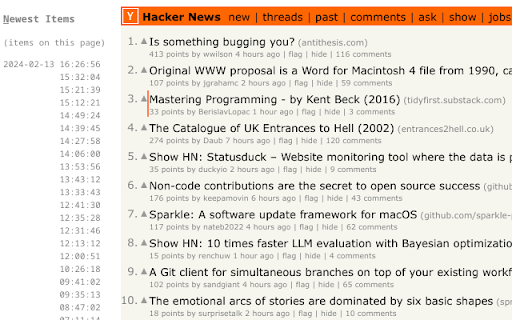
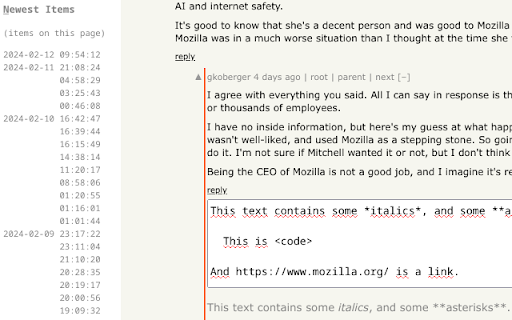
Vi-style key bindings for browsing Hacker News Vi-style key bindings for browsing Hacker News. It's fast. If you have to wait a perceptible amount of time, that's a bug. Use the key bindings similar to Vi to navigate Hacker News stories and comments. It should work on story listings (front page, /new, /newest, /best, user submissions, etc.), comment threads, and comment listings (user comments, etc.). Also, you can quickly find new comments by hitting “n” to browse comments in inverse chronological order. In addition, the quick-reply and quick-edit forms let you see a preview of the comment you are writing. Finally, the original poster (OP) is highlighted in comments. Note: Like in Vim mapping, case is important. So j means hitting the j key with Caps Lock disabled, and without holding Shift. But J means hitting j key with either Caps Lock enabled, or while holding Shift. - j: Next comment/story - k: Previous comment/story - J: Next sibling comment - K: Previous sibling comment - g: Go to first story/comment - G: Go to last story, last root comment or “More” link - H: Focus on story/comment at the top of the screen (high) - M: Focus on story/comment in the middle of the screen - L: Focus on story/comment at the bottom of the screen (low) - n: Switch to Newest Items - h: Parent comment/story (see Follow Links) - p: Parent comment/story (see Follow Links) Note: You can also select an item by clicking in its bounding box. - o: Open story link/comment - O: Open story link/comment in background - c: Open comment thread - C: Open comment thread in background - b: Open both story link and comment thread - B: Open both story link and comment thread in background - h: Follow “context” link (go to comment thread, but focus on current comment) - p: Follow “parent” link (go to parent's page, and focus on parent comment/story) - 1: Open 1st link in comment (maintain shift to open in background) - …: … - 9: Open 9th link in comment (maintain shift to open in background) - 0: Open 10th link in comment (maintain shift to open in background) Note: When on the “XXX more comments” link, you can hit either of `[lLcC]` to go to the next page of comments. Note: The digits of the numeric keypad work as well to open links in comments. However, this can only open links in foreground. Note: When using AZERTY, the key bindings to open links inside comments still work like in QWERTY. Hit the 1 key without shift (like typing `&`) to open the 1st link in foreground. Hit the 1 key with shift (like typing `1`) to open the 1st link in background. Same for the other link numbers. - m: Collapse/uncollapse comment tree - u: Upvote story/comment, or cancel vote - d: Downvote story/comment, or cancel vote - f: Favorite/un-favorite story/comment of the current page - F: Flag/unflag story/comment of the current page - r: Comment on story, or reply to comment (with preview) - e: Edit comment (with preview) - D: Delete comment - Ctrl+Return: Submit current form In the Newest Items list, the following key bindings are available:

Workiro
Integrate any website with Workiro to create tasks and manage your work. Do more in Google Chrome with the Workiro connector. Integrate Workiro with any number of web applications, so that you can quickly jump from a record in another system to the corresponding record in Workiro. Highly configurable. You can also perform quick Workiro actions related to the current record, such as create a new task for the client record you’re working on. * Documents: Capture, organize, manage and store work easily. * Communication: Communicate with anyone quickly and securely. * Shared tasks: Get work with anyone, in a structured, clear way. * Signatures: Unlimited E-Signatures with a simple client experience. * Custom branding: Represent your brand with every interaction. * Alerts, reminders & more: Smart nudging and notifications. Join 65,000+ GetBusy UK Ltd software users from small to enterprise businesses around the world. Help us build the product you need. We love your feedback, either in the app, or email help@workiro.com

Congree Web Interface
Write according to your company's Style Guide This extension helps you to integrate your company's Congree Authoring Server into specific websites. Research Meets Practice Content optimization solutions based on scientific insight and long-standing industry experience Higher text quality with less effort Apart from the reuse of sentences and consistent use of terminology, Congree offers a comprehensive Language Check that covers 98 percent of the English and German languages. The Congree Authoring Server is scalable and thus supports the editorial work in small, medium-sized, and large enterprises. Rule-Based Language Check Apart from the spelling, grammar, and terminology, the rule-based Language Check also checks the style. Predefined rule sets cover most application cases; additional company-specific rules can be added as needed. Authoring Memory The Authoring Memory serves as a sentence repository, which shows all text segments that are similar to your text and that were written and approved in the past. You can apply these text segments with a click. New sentences are included in the Authoring Memory after they are checked and approved. Congree Data Grooming can help to maintain and improve the quality of your Authoring Memory. Terminology Component The connection of third-party terminology software enables access to a wide range of information on terminology hits. The terminology component in Congree delivers definitions and usage information on specialized terms – including preferred terms, admitted terms, and deprecated terms.

Boss Hub | Card
Boss Hub Card | Your Business Card Generator Boss Hub | Card is a multi-user digital business card generator system that allows many users to create business cards containing a large amount of information that can be shared with clients. Create your business digital card with lots of information. Make Your Own Smart business Card with us and grow your business easily.

FLOZABLE Tab Monitor
Boost focus with timers, block distractions, get study tips, and stay updated with group alerts using FLOZABLE. Supercharge your focus and productivity with the FLOZABLE Study Focus Chrome Extension. Seamlessly integrated with your browser, this extension is your go-to tool for cultivating efficient study habits and making the most out of your online learning experience. Time Management Mastery: Effortlessly track your study time with our intuitive timer. Set focused intervals, challenge yourself, and stay on top of your study goals. Distraction-Free Browsing: Activate the distraction-free mode to limit access to non-educational websites during your study sessions. Say goodbye to procrastination and hello to enhanced concentration. Personalized Study Plans: Receive AI-generated study suggestions based on your learning habits and preferences. Tailored recommendations to keep your study sessions engaging and effective. Group Study Alerts: Stay connected with study groups seamlessly. Receive instant notifications for group study invitations, challenges, and achievements directly through the Chrome Extension. Progress at a Glance: Get a quick overview of your study progress with a personalized dashboard. See your daily, weekly, and monthly study trends, empowering you to stay motivated and accountable.
