
cflakfhockilljdbofnanaijpmpmfcol
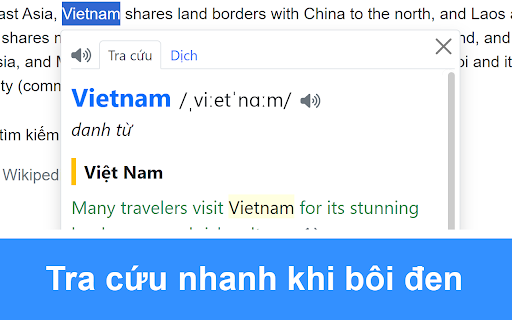


Tra từ điển Anh Việt, dịch mọi ngôn ngữ ngay trên trang web với Từ điển ENVI Click vào icon của tiện ích để bật/tắt chức năng và xem hướng dẫn. 1) Tra cứu khi bôi đen Bôi đen tiếng Anh để tra cứu nhanh. - Tra từ vựng với ví dụ và giải thích. - Dịch đoạn văn. - Tra động từ/tính từ bất quy tắc - Phát âm từ vựng và ví dụ. - Click vào từ vựng trên Popup để tra nhanh. 2) Dịch nhanh khi di chuột Di chuột đến văn bản để dịch. 3) Tra cứu bằng chuột phải Bôi đen văn bản → Nhấn chuột phải → Nhấn "Tìm kiếm trên Từ điển ENVI" để tra từ và dịch đoạn văn. 4) Tra cứu trên thanh tìm kiếm Trên thanh tìm kiếm của trình duyệt, gõ "envi" + dấu cách → nhập từ hoặc nội dung cần tra. Mẹo sử dụng hiệu quả: - Nhấn vào từ vựng, Xem bình luận trên Popup để xem chi tiết từ vựng và bình luận. - Double click để bôi đen từ, triple click để bôi đen câu. - Nhấn giữ Alt để bôi đen link. - Nếu bạn dùng Edge, có thể dùng phím tắt Ctrl Shift + X để copy button hay những phần chặn copy, sau đó tra cứu trên thanh tìm kiếm (gõ "envi" + dấu cách → paste nội dung đã copy) để tra nhanh. - Từ điển ENVI có thể nhận dạng chữ viết tay, nhận dạng hình ảnh. Hãy truy cập envi.jpdictionary.com để sử dụng tính năng. Chúc bạn học tốt với tiện ích tra nhanh của Từ điển Anh Việt, từ điển tiếng Anh ENVI 📕😊 Website: https://envi.jpdictionary.com

FPT GPA
An extension for FPT University by RubyBar Date: 27/12/2022 ---------------------------------------------------------------------- This software supports students to calculate the average score of each student's semester. Additionally, it can calculate the average GPA for students to know the type of diploma that owns the present. ----------------------------------------------------------------------- Version history: v1.1.2: Add list undefect v1.1.3: Update new format FAP v1.1.4: Update new format FAP v1.1.5: Update new format FAP

Coursera Auto Grade
Review your peers on coursera with ease This extension automates the peer review process on Coursera. With only the click of a button, it will automatically selects all the radio button options with highest grade, fill in text boxes and submit the review User can also freely customize the content to put into text fields

Auto EduNext
Step 1: Install extension to your device Step 2: Click reload page to use, Step 3: Click on the "Grade on groupmates" button and then automatically rate 5 stars (member rating) Or click on the "Grade" button and then automatically rate the presentation 5 stars (score the presentation). Step 4: Click the "Grade" button to record the score - If you are not satisfied with the 5-star score, please turn off the extension, then reload the page and rate it as you like. - Allow CTRL + C and CTRL + V

JP English Dictionary: English to 200 Languages
Free English dictionary with simple, clear explanations; translates English into 200 languages. Click on the extension icon to toggle the functions on or off. 1) Look up when highlighting Highlight English text for quick lookup: - Look up vocabulary with examples and explanations. - Translate passages. - Look up irregular verbs/adjectives. - Listen to the pronunciation of vocabulary and examples. - Click on vocabulary in the popup for quick lookup. 2) Quick translation by hovering Hover over the text to translate. 3) Look up with right-click Select text → Right-click → Click "Search on JP English Dictionary" to lookup, analyze and translate the text. 4) Look up on search bar On the browser's search bar, type "jp" + space → Enter the word or sentence you want to lookup. Tips - Turn off the checkbox when not in use. - Double-click to highlight a word, triple-click to highlight a sentence. - Hold down Alt to highlight links. - If you use Edge, you can use the shortcut Ctrl Shift + X to copy buttons or blocking parts, then lookup on the search bar (type "jp" + space → paste the copied content) for quick lookup. - JP English Dictionary can recognize handwritten characters, image recognition. Visit english.jpdictionary.com to use this feature.
