
cfgkjnjmlckppgajnicogfdnhhndpikk

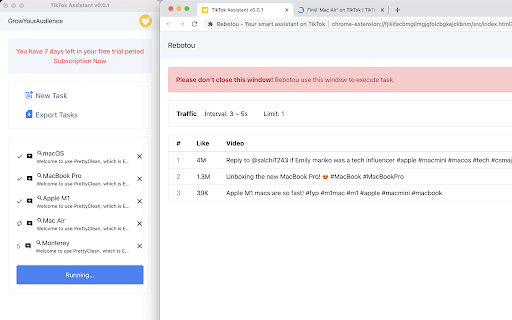
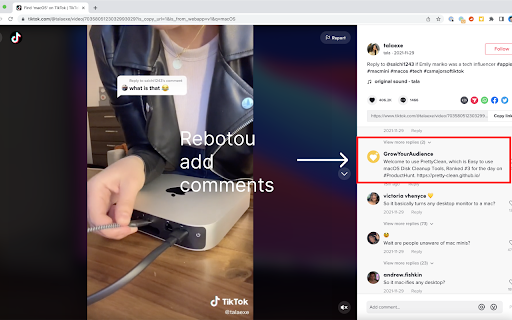
Get more user engagement on TikTok by auto like & comment, allowing for fast user growth and income with minimal time investment. Rebotou is an automated intelligent assistant that provides automated add comment functionality that you can use to get more interaction with users on TikTok with minimal time. With hundreds of millions of active users per month on TikTok, using Rebotou helps you automate the task of interacting with a huge number of users so that you Get more business conversions and save your time. 1. Automated comments 2. Support comment on personalization 3. Intelligent workflow scheduling 4. Work the same way as humans to avoid platform bans 5. Visualization execution 6. Good team collaboration ability, easy for you to use at scale. 7. TikTok video analysis. 8. Support address bar shortcut keys "rb + Tab + Enter" 9. Default comments

ChatGPT Automation - Auto ChatGPT on chatgpt.com
Auto ChatGPT for your prompts at scale. Batch generate and auto-download responses and images on ChatGPT.com. ChatGPT Automation is an Auto ChatGPT tool built to fully automate your workflow on OpenAI's chatgpt.com. No more manually typing prompts one by one — let ChatGPT run automatically. This extension turns ChatGPT into a batch-processing engine, allowing you to auto-submit prompts, auto-generate content, and auto-download results at scale. 🔥 What ChatGPT Automation does Auto ChatGPT prompts continuously without manual interaction Batch generate AI text, images, and visual content Automatically download results with smart file naming Handle long prompt queues safely with smart random delays 🤖 Auto ChatGPT Batch Processing Queue dozens or hundreds of prompts and let ChatGPT Automation automatically: - Submit prompts to ChatGPT - Wait for generation to complete - Move to the next prompt No clicks. No babysitting. 🎨 Image to Image Transformation Batch transform and enhance images using AI with text prompts Chain mode: automatically use the previous generated image as input for the next prompt 🧩 Ingredients to Text Mode Upload reference images and batch-process them with prompts Auto-add character images based on filename matching ⚙️ Professional Automation Controls - Smart Random Delay System to avoid rate limits - Configurable min/max delay between prompts - Auto Download once generation completes with custom folder organization - Auto-rename files based on prompt content - Max Retries on failure — automatically retry failed prompts - Multiple outputs per prompt (1–4) 📊 Real-time Queue Monitoring - Live prompt queue with per-prompt status (Queued → Running → Completed) - Visual progress tracking inside the Side Panel - Retry counter per prompt ✅ Perfect for - Content creators and copywriters - AI image and visual producers - Automation & productivity users - Anyone who wants to Auto ChatGPT at scale

Auto Scroller for Reels, Shorts & TikTok
Auto scroll through Instagram Reels, YouTube Shorts, TikTok & Facebook. Hands-free scrolling for a seamless video experience. Auto Scroller for Reels, Shorts, & TikTok Auto Scroller provides hands-free scrolling for short-form video platforms with a clean, customizable experience. Key Features: - Keyboard Shortcuts - Custom shortcuts for toggle, pause/resume, speed up/down, and reset speed. - On-Page Status Indicator - Real-time status, playback speed, optional timestamp, and seekable progress bar. - Per-site position presets and drag-to-place custom positioning. - Opacity and accent color customization. - Smart Behavior - Optional auto-enable on supported pages. - Optional pause when comments are open. - Light, dark, and system theme options. - Data Management - Export/import settings. - Usage statistics with reset support. What's New in Version 2.0.4: - Performance optimization for long scrolling sessions. What's New in Version 2.0.2: - Improved reliability of auto-enable on supported pages. - Improved video targeting and stale-state recovery for SPA route changes. - Performance and stability updates. - Enhanced Light Theme for improved visual clarity. - Extended platform support to include Firefox. Install Auto Scroller for a more consistent and convenient viewing experience.

TTGET - TikTok Comment Exporter
Export TikTok comments to CSV/Excel. Bulk download comments with replies, likes & user data. Fast & powerful video analyzer. TikTok Comment Exporter - Download TikTok comments to Excel, CSV, JSON. Export TikTok video comments with replies for free. TikTok Comment Exporter – The #1 Chrome extension to export and download TikTok comments. Save TikTok video comments to Excel (XLSX), CSV, or JSON format with just one click. Looking for a way to download TikTok comments? Need to export TikTok video data for analysis? TikTok Comment Exporter is the perfect tool for marketers, researchers, social media managers, and content creators. ⭐ Why Choose TikTok Comment Exporter? ━━━━━━━━━━━━━━━━━━━━━━ ✅ Export TikTok Comments Instantly – One-click download from any TikTok video ✅ Download TikTok Comments to Excel – Export to XLSX, CSV, or JSON format ✅ Save TikTok Replies – Export comment replies for complete thread data ✅ Bulk TikTok Comment Download – Export hundreds of comments at once ✅ TikTok Data Export Tool – Perfect for TikTok analytics and research ▸ Complete TikTok Comment Data • TikTok username and profile URL • Comment text and content • TikTok comment likes count • Comment post date and time • Reply count per comment • Parent comment reference for replies ▸ Advanced TikTok Export Options • Include or exclude TikTok replies • Real-time export progress tracking • Pause and resume TikTok comment export • Works on all TikTok video pages 🎯 Who Uses TikTok Comment Exporter? ━━━━━━━━━━━━━━━━━━━━━━ → Social Media Marketers – Analyze TikTok engagement and audience sentiment → Market Researchers – Study TikTok trends and consumer opinions → Content Creators – Get insights from TikTok audience feedback → Brand Managers – Monitor TikTok comments about your brand → Data Analysts – Export TikTok data for visualization and reporting → Academic Researchers – Collect TikTok data for social media studies 🚀 How to Export TikTok Comments ━━━━━━━━━━━━━━━━━━━━━━ ① Install TikTok Comment Exporter extension ② Open any TikTok video page ③ Click the extension icon ④ Select export format (Excel, CSV, or JSON) ⑤ Click "Start Export" to download TikTok comments 🔒 Safe & Private TikTok Data Export ━━━━━━━━━━━━━━━━━━━━━━ • No TikTok data stored on external servers • All TikTok exports processed locally in your browser • We never access your TikTok login credentials • 100% safe TikTok comment download

ChatGPT AI for TikTok video comments and messages by MailMagic
Generate engagements 10 times faster for your TikTok video posts with personalized AI comments responses Reply to TikTok comments using ChatGPT like AI FREE to use forever and No Ads. 🆓 ✔️ AI can reply to comments on your videos. ✔️ AI can reply to comments on other creators' videos. ✔️ AI can reply to a video post's description. ✔️ AI can reply to your direct messages (DMs). ✔️ Train your AI with your FAQ. ✔️ Answer to support questions 10 times faster. ✔️ Use AI to match questions to a specific answers. ✔️ All languages are supported. It is important to answer comments on TikTok because it will generate extra engagements for your posts. However, it is hard to answer 1000 comments on a viral video. The Mail Magic TikTok AI will help you answering your comments 10 times faster. This uses similar AI technology as the Mail Magic email writer. You can find our AI email writer on mailmagic.ai
