
cfegchignldpfnjpodhcklmgleaoanhi

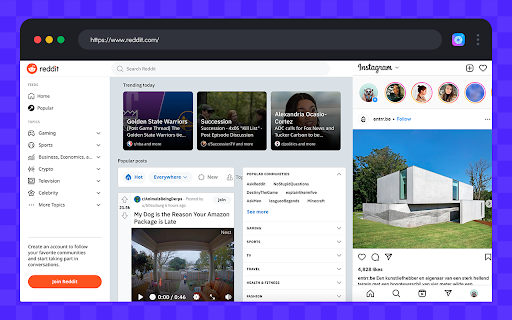

Run web client for Instagram™ just like your favorite mobile app. Download videos and images, upload your own content, and send DM. Sidegram is a useful Chrome extension that allows users to experience the popular social media platform. This is a simple and powerful tool with many features to make your social user experience even better. With one click in your browser, you will be taken to the popular social network, where you can share photos and videos, view the news feed and chat with friends. There are several reasons why you might want to use this web client: 1. Downloading videos and images: The extension allows you to download videos and images directly to your computer. This can be helpful if you need to save content for later or share it on other social media platforms. 2. Uploading content: If you create content, the extension allows you to upload posts directly from your desktop. This can be more convenient than transferring files from your phone to your computer. 3. Sending DMs: With the extension, you can send direct messages to your followers and friends. 4. Convenient browsing: By using the Sidegram extension, you can browse Instagram on your desktop just like you would on your mobile device. This can be helpful if you prefer to use a larger screen, or if you're working on something that requires you to switch between multiple tabs. All of these features make Sidegram a must-have tool for anyone who loves Instagram and wants to make the most of it. Not only is it flexible and straightforward to use, but it also works like a mobile app. So, whether you're an influencer, a marketer, or just someone who enjoys browsing Instagram, Sidegram allows you to do more while on a desktop computer.

Instagram Downloader - Download Video, Story, Reels & Photo
Download Instagram Reels, Video, Story & Photo in one click. Bulk download all posts with no watermark. Fast, high quality & free. Download Instagram Story, Photo, Video & Reels in One Click! The ultimate free Instagram downloader for Chrome – capture high-quality videos, photos, Stories, and Reels without any hassle. Enjoy secure, private downloads with no login, no watermarks, and zero ads for a seamless experience. Save Instagram Story before they disappear forever! 📌 Key Features & Benefits: • 📷 Download Instagram Video & Photo – Grab content straight to your device in crisp HD & 4K quality, keeping every detail intact. Perfect for Instagram photo download and Instagram image download needs. • 🎥 One-Click Instagram Reels Downloader – Quickly download Reels from any feed or profile, preserving your favorite clips in original quality. • 📌 Instagram Story Download – Save Instagram Stories and highlights with just one tap – never lose important moments again! Supports bulk Instagram story download. • 📂 Bulk Download Power – Download an entire profile's posts, Stories, or Reels in one go, with built-in progress tracking and smart folder organization by author, date, or type. • 🚀 Fast & Secure Downloader – No login required, completely private and ad-free. No tracking, no hidden fees – just high quality Instagram video download and saver tools! • 🌐 AI-Powered Image Translator – [NEW] Instantly translate Instagram images with one click! Our built-in AI Image Translator detects text in photos (OCR) and translates it to your preferred language. Easily switch between original and translated views and download the translated image directly to your device. The best tool to download translated Instagram photos and break language barriers. 🎯 Why You Need This Instagram Downloader? Instagram's built-in tools don't support direct downloads for Stories, Reels, or videos, leaving your cherished moments at risk of vanishing. This extension bridges that gap, letting you archive content from feeds, profiles, or Explore pages in seconds. Ideal for creators, fans, or anyone building a personal collection of Instagram highlights – from quick Instagram reels download to full profile backups. 🖱️ How to Use? • Browse Instagram as usual – head to any feed, profile, post, Story, or Reels section. • Hover over posts to reveal the auto-appearing download button. • Tap the icon for single downloads of photos, videos, or Stories in original quality. • On profiles, hit "Download All" to batch-process full galleries, Stories, or Reels, with real-time progress and smart folder setup. 💡 Why Choose This Instagram Downloader Over Others? • 🔥 Lightning-Fast Performance – Downloads complete in moments, faster than most alternatives for Instagram video download. • 🔒 Login-Free Operation – Runs entirely in-browser, safeguarding your account privacy with no data collection. • 📷 Original Quality Preserved – HD & 4K support without compression, watermarks, or ads. • 📂 Bulk & Batch Downloads – Save entire Story series, multiple posts, or Reels with one click – unique export for mass Instagram downloader needs. • 💯 100% Free & Safe – Completely ad-free and local storage only, ensuring total peace of mind. • 🗂️ Advanced Organization – Auto-sort by date, creator, or type to keep your library clutter-free. 🚀 Start Downloading Now! Don't miss out on your top Instagram moments – install this downloader today and turn browsing into effortless archiving. Compatible with public profiles and followed accounts for personal use only. Instagram downloader made simple! ⚠️ Disclaimer This extension is an independent tool and is not affiliated with, authorized by, endorsed by, or in any way officially connected with Instagram, Meta Platforms, Inc., or any of its subsidiaries or affiliates. All content downloaded through this extension is the sole responsibility of the user. This tool only works with publicly available content or content from accounts you follow, in accordance with Instagram's Terms of Use. Please respect copyright and privacy laws in your country. The developer is not responsible for any misuse of this extension.

Downloader for Instagram - Promaster
Download Instagram photos, videos, Reels, and Stories in one click. Fast Chrome tool with single and bulk download options Downloader for Instagram – Promaster is a powerful Chrome tool that lets you save Instagram content directly to your device. Whether you're a content creator, social media manager, or just want to archive your favorite posts, this tool makes downloading Instagram photos, videos, Stories, and Reels fast and effortless. • Download Photos and Videos – Save any Instagram post with a single click. • Reels Downloader – Capture Reels from public profiles without quality loss. • Stories Downloader – Save Stories manually or in bulk, including video clips and images. • Bulk Download Mode – Select multiple items from a profile and download them all at once. • Smart Chrome Integration – Access download buttons directly inside the Instagram interface. This tool is designed to be simple, effective, and reliable. Whether you're downloading one image or an entire feed, Promaster keeps the process quick and intuitive. With full support for multiple media formats, it fits seamlessly into your Chrome browser workflow. - Content Creators – Quickly archive or repurpose your own content. - SMM Professionals – Collect user-generated content or client materials. - Everyday Users – Save favorite posts, inspirational Reels, or time-limited Stories. This Chrome tool is an independent extension and is not affiliated with Instagram or Meta Inc. It is intended for personal use only. Please respect copyright laws and do not download content without permission from the original creator. Get Promaster – the all-in-one Instagram download tool built for speed, flexibility, and simplicity.

Instagram Chat Backup - Export DMs in HTML with Media
Backup & export Instagram DMs as HTML files with photos, videos & media. Download your full chat history in one click. Instagram Chat Backup lets you export your Instagram DMs as clean, beautifully formatted HTML files — with all photos, videos, and shared media fully preserved. It's the easiest way to backup, download, and archive your Instagram chat history directly from Chrome. Unlike plain text exports, this extension saves your conversations as HTML files that look just like your actual Instagram inbox. Shared images, videos, voice messages, and other media are included — so you get a true, complete backup of every conversation. - Export Instagram DMs as rich HTML files with full formatting - All media preserved — photos, videos, reels, voice messages, and shared posts - Supports individual and group conversations - One-click backup — no technical knowledge required - Works directly within Instagram's web interface - Privacy-first: everything stays on your device, nothing uploaded to external servers - Lightweight — installs in seconds with zero performance impact 1. Install the extension from the Chrome Web Store 2. Open Instagram in Chrome and go to your DMs 3. Select any conversation you want to save 4. Click "Backup" — your chat is exported as an HTML file with all media 5. Open the file in any browser to view your conversation exactly as it appeared Perfect For: - Saving important business or client conversations - Archiving sentimental messages and shared memories - Keeping records before deleting or deactivating your account - Backing up group chat history with all shared media intact - Legal or compliance documentation How to backup Instagram chat? -> Simply install the extension, open any DM conversation, and click backup. Your messages and media are saved instantly as an HTML file. How to export Instagram chat with media? -> This extension exports your full conversation — text, images, videos, and attachments — into a single HTML file you can open in any browser. How to download Instagram chat? -> One click downloads your entire conversation history to your device. No third-party apps, no data leaving your computer. Stop risking the loss of important conversations. Download Instagram Chat Backup today and keep your DMs safe — with every photo, video, and message preserved exactly as you remember them.

Instagram Video Photo Download - IG Downloader
Instagram Downloader for Instagram Video Download and Instagram Photo Download in HD. Fast Instagram Video & Photo Download tool. This Instagram downloader helps you complete Instagram video and photo download quickly and easily. With a clean interface and simple controls, you can save media directly while browsing. The extension works as a lightweight IG downloader that lets you download videos, photos, reels, stories, and carousel posts in just a few clicks. Whether you want to keep memorable posts or collect inspiration, this Instagram downloader makes the process smooth and efficient. If you need a reliable IG downloader for daily use, this tool provides a fast way to perform Instagram video and photo download while keeping the original quality. Instagram Video and Photo Downloader – Fast & Easy Media Save The extension adds a quick button for Instagram video and photo download directly on supported posts. With this Instagram downloader, you can: Download videos from posts and reels Download carousel images and videos Perform fast Instagram video and photo download with one click This IG downloader works directly in your browser and does not require complicated steps. When you perform Instagram video and photo download, the extension keeps the original resolution whenever possible. Smooth experience using the Instagram downloader The IG downloader ensures your downloaded media keeps its clarity and quality. This Instagram downloader supports several types of Instagram video and photo download, including: Post videos and photos With this IG downloader, you can easily manage Instagram video and photo download for different types of content without switching tools. Using the extension is simple: Install the extension in your browser Open Instagram and browse normally Click the button to start Instagram video and photo download This Instagram downloader works automatically after installation, so you can complete Instagram video and photo download without extra configuration. Q: Do I need to log in to use the extension? No. The IG downloader works directly on public content and most Instagram video and photo download actions do not require login. Q: Will downloaded files lose quality? No. The Instagram downloader attempts to keep the original quality whenever possible. Q: What types of content can be downloaded? Videos, photos, reels, stories, and carousel posts can be saved using Instagram video and photo download. The extension provides a free version with core Instagram video and photo download features. You can continue using the free Instagram downloader, or upgrade if you need advanced capabilities.
