
cfdpeaefecdlkdlgdpjjllmhlnckcodp
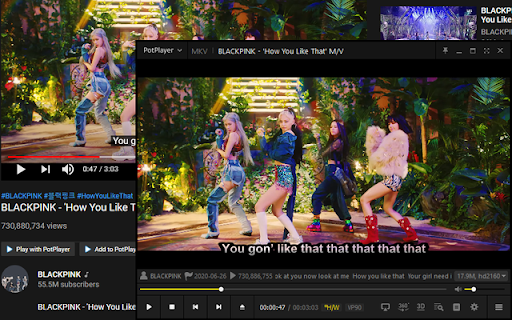


Quickly play or add a YouTube video (playlist), Twitch to PotPlayer using buttons on a page, also via context menu and middle-click > HOW TO USE IT: You need to install the latest version of PotPlayer to get it working - https://potplayer.daum.net

Picture in Picture | PiP | Floating Player for Youtube
Watch video in a floating PiP window. Picture in Picture for YouTube, Netflix & all sites. Always on top. Watch any video in a floating video player — always on top, always visible. Picture in Picture (PiP) pops out video from any website into a resizable floating window that stays above all tabs and apps while you browse, work, or multitask. How it works Click the extension icon while a video is playing. The video pops out into a floating PiP window. Move it anywhere, resize it, and keep watching while you switch tabs or work in other apps. Features ✅ Floating video window — always on top of other windows ✅ Works on every website with an HTML5 video player ✅ One-click activation from the Chrome toolbar ✅ Reposition and resize the floating player freely ✅ PiP mode stays active across all tabs ✅ Keyboard shortcut: Alt+P (⌥+P on Mac) Does Picture in Picture work on YouTube? Yes. Click the icon on any YouTube video to open it in a floating PiP window instantly. Does PiP work on Netflix? Yes. Works on Netflix, Disney+, Prime Video, and all major streaming platforms. How do I enable Picture in Picture mode? Install the extension, go to any page with a video, click the PiP icon in your Chrome toolbar. Done. Can I resize and move the floating window? Yes. Drag to reposition, pull edges to resize. Does the floating player stay visible when I switch tabs? Yes. The PiP window stays on top of all other windows across every tab and app. What is the keyboard shortcut for Picture in Picture? Alt+P on Windows/Linux, ⌥+P on macOS.

HD, Replay, Popout for YouTube™
Make YouTube videos automatically play in HD, Repeat YouTube videos automatically, and Open any YouTube video in a popout window. Make YouTube videos automatically play in HD. and Repeat YouTube videos automatically. *Auto HD feature Forces YouTube to play HD quality all the time. Never see a bad low quality movie anymore. Automatically loads HD version of YouTube videos. *Auto Replay feature Repeat YouTube videos automatically. Intuitive and easy to use. Published the extension since 2014 Updated to the manifest v3 in December 2023

HoverTranslate - YouTube Subtitle Translator
Build vocabulary while watching YouTube! Instantly translate words in subtitles by hovering. Perfect for language learners. HoverTranslate – Build Vocabulary with YouTube Subtitle Translation! Master any language while watching YouTube videos! HoverTranslate is the ultimate vocabulary builder and subtitle translator for language learners. Watch native content with original subtitles and instantly understand every word without interrupting your viewing experience. Why Language Learners Choose HoverTranslate: No more pausing videos or switching to dictionaries! Simply hover over any word in YouTube subtitles to see instant translations. Perfect for building vocabulary naturally while enjoying your favorite content. Key Features for Effective Language Learning: • Instant Hover Translation: Build vocabulary effortlessly - just hover your mouse over any subtitle word to see its translation immediately. • Smart Phrase Translation: Learn idioms and expressions! Hold Shift to select and translate entire phrases, or enable "Always enable multiple selection" for easier phrase selection. • 190+ Language Support: Learn Spanish, French, Japanese, Korean, German, or any language! Translate YouTube subtitles from any language to your native one. • Auto Language Detection: The extension automatically detects the subtitle language - start learning immediately! • Multiple Translators: Choose between Google Translate and Bing Translator for the most accurate vocabulary translations. • Smart Auto-Pause: Videos automatically pause when you hover over subtitles, giving you time to learn new vocabulary without missing content. • Universal Subtitle Support: Works perfectly with both manual and auto-generated YouTube subtitles. • Personal Vocabulary Builder: Save new words and phrases to your dictionary with one click! Build your personal vocabulary list while watching. Export your dictionary as JSON or CSV. • Customizable Interface: Translation tooltips match your YouTube theme or customize to your preference for comfortable learning. Perfect for: - Language students expanding vocabulary through YouTube - Professionals improving business language skills - Anime fans learning Japanese naturally - K-drama enthusiasts studying Korean - Anyone learning languages through immersive content Open Source & Community Driven: HoverTranslate believes in transparency and continuous improvement: - GitHub: https://github.com/kozii-d/hover-translate - Email: hovertranslate@gmail.com - Changelog: https://github.com/kozii-d/hover-translate/blob/master/CHANGELOG.md Start Building Your Vocabulary Today! Start your language learning journey today! HoverTranslate transforms YouTube into a powerful vocabulary-building tool, helping you progress from basic words to complex expressions naturally. Install now and transform every YouTube video into a vocabulary-building opportunity!

YouTube Subtitle Downloader
Youtube Subtitle Downloader: download subtitles from YouTube easily. Extract, copy or download with the youtube subtitle downloader YouTube Subtitle Downloader makes it easy to download subtitles from YouTube. Before downloading or copying, the extension lets you customize how subs look: show timestamps, set line length, and choose between TXT, SRT, or VTT formats. 🚀 Quick Start Tips 1. Install extension by button “Add to Chrome” 2. Open any youtube video 3. Click button on panel of Video (green button) 4. Download youtube subtitles Features 📁 Formats: SRT, VTT, TXT. Download subs as SRT, VTT, TXT file. 📥 Download YouTube subtitles 📋 Copy YouTube caption to clipboard 🔠 Dual subtitles support 🌍 Translating into 150+ languages 📏 Adjust caption line length ⏱️ Toggle timestamps. Show or hide timecodes. 🔃 Auto-scroll with playback: Subtitles follow the video and highlight line. 🖱️ Click to jump: Click any subtitle block to skip to that moment in the video. 🌓 Light and dark theme Who Is It For? 🎥 Creators. Download subtitles from youtube, translate them, and re-upload to your own videos for global reach. 🌐 Translators. Use dual-subtitle mode and translation to work faster with accurate source context. 🧠 Language Learners. Compare original and translated subtitles in real time while watching. 🎓 Students & Educators. Extract transcripts for lectures, educational videos, and study materials — perfect for test prep, note-taking, and research. Formats for downloading YouTube subs: ▪️ SRT — Subtitle file with timestamps ▪️ TXT — Flexible plain text format ▪️ VTT — WebVTT format for online video players 📌 How to get a transcript of a YouTube video? 💡 With Youtube Subtitle Downloader, you can easily generate a full YouTube video transcript in just one click. Open any video, activate the extension, and export the transcript as a TXT or SRT file. Perfect for studying, quoting, or saving key insights. 📌 How to download subtitles from YouTube? 💡 Simply install the extension, open a video, and click the “Subs” button. You’ll be able to download subtitles from YouTube in either SRT or plain text format. Great for anyone looking for a fast, easy YouTube subtitles download tool. 📌 How to get YouTube video script? 💡 This extension acts as a powerful video script extractor. It converts subs into clean text that can be copied, edited, or reused as a full script for content creation, translation, or study. 📌 How to download transcript from YouTube? 💡 Use the extension to download transcript files with or without timestamps. It's a fast and accurate transcript downloader that works directly on the video page. 📌 How to download captions from YouTube? 💡 With this tool, you can download captions — whether they're auto-generated or manually added — and save them in the format you prefer. It also works as a YouTube caption downloader for multilingual transcripts and translations. 📌 Is the extension free to use? 💡 Yes, extension is available as a free Chrome extension. 📌 Is my privacy secure with this extension? 💡 The extension collects only a generated identifier using the FingerprintJS library and your email. This data is not shared with anyone and is only stored on the server for identification. Technical Details: 🆙 Use Chrome version 70 or higher to ensure the extension plays clips without any issues. 🔒 Youtube Subtitle Downloader is built on Manifest V3, providing maximum security, privacy, and performance for you. 🏆 It follows all Chrome Web Store guidelines to be high-quality, trustworthy, and safe. The Feature badge from Google confirms this. 👨💻 The extension is developed and maintained by professional developer Anton Khoteev with over 10 years of experience in web development. We follow three key principles: be safe, be honest, and be useful. You can contact developer via: - email aahoteev@gmail.com - Telegram @antonkhoteev
