
cfdhaglgnhlacodkjjmlbcglgecnelnj

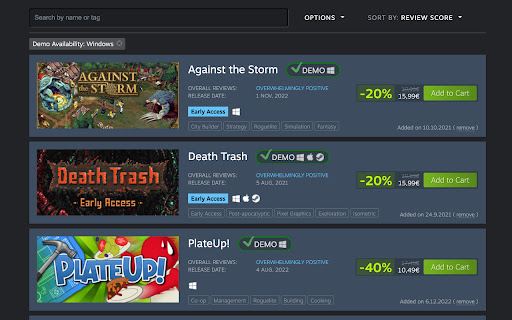
Check which games in your Steam wishlist have a demo. STEAM'S API HAS CHANGED AND THE EXTENSION NO LONGER WORKS. I'll attempt to fix it as soon as I have some free time. 'demos in my Steam wishlist' is activated every time you access a wishlist page at https://store.steampowered.com. 'demos in my Steam wishlist' is the only extension to: - Add a filter option to only display games with demos. - Add a tag next to each item that has a demo available. Both the filter and the tagging systems distinguish demos by platform (i.e. Windows, Mac, or Linux/Steam Deck), which not always are the same platforms supported by the full game. No login required. We don't access your personal data. We only use publicly available data provided by Steam itself. 1.0.4. - Fixed bugs - Added a link to the wishlist page in the extension's popup tab If the filter misbehaves in any way, open your wishlist in a new tab (instead of simply refreshing the page), and everything should be fine again.

Steam Store Tooltip
Show Steam games information when hovering the store links. ⚡️ Quickly see all the relevant game's info in a tooltip: ▫️ price and discount ▫️ screenshots ▫️ categories ▫️ reviews positive rating ▫️ wishlisted or owned game (available if you're logged in on the browser) ▫️ description ▫️ release date ▫️ platforms ▫️ user tags ▫️ Metacritic score ⚡️ Choose the store language ⚡️ Choose the store currency (available if you're not logged in on the browser) ⚡️ Activate the tooltip with a chosen key ⭐️ Free and open source

alike03's Subscription Info on Steam
See on Steam if the game is currently available on any Subscription package like Xbox Game Pass PC & Console, Ubisoft+ or EA Play Have you ever bought a game only to discover later that it was already included in a subscription service you're subscribed to? You're not alone; I've experienced that frustration too. So, I thought, "What if I could see this information directly on Steam?" This addon checks your game selections against a database, displaying current availability on Xbox Game Pass for PC and Console, Ubisoft+, EA Play, and EA Play Pro. Enjoy an ad-free experience with alike03's Subscription Info. You can support me by purchasing games through my affiliate link on the Contributors Page—it provides a small contribution to me at no extra cost to you. If you're feeling generous, you can also support me directly via PayPal or Ko-fi. Your support is greatly appreciated!

Augmented Steam
Augments your Steam Experience Augmented Steam is a browser extension by IsThereAnyDeal that improves your experience on the Steam platform by providing helpful information and tons of customization options. - Price details (current best, historical low) for any game or DLC sourced from many authorized stores - More visible highlighting of games you own or have wishlisted or ignored (also works with your IsThereAnyDeal Waitlist and Collection!) - Fine-tuned product search with search filters such as review count / score and Early Access - Sort and filter options for the market, games, friends, groups, achievements, badges and reviews - Links to popular websites with additional related information, plus the ability to add your own custom links - Quick / Instant Sell items in your inventory - Custom profile backgrounds and styles, visible to all users of Augmented Steam - Take and store notes about any game - Maximize information relevance by hiding unwanted content blocks from app pages or the homepage - Automatically skip age gates for NSFW content - Batch actions for various scenarios, e.g. registering multiple product keys or adding multiple DLCs to your cart at once - And many more! Augmented Steam is a fork and spiritual successor of Enhanced Steam, which has come to its end of life in February 2019. A note about affiliate links: One of the features of Augmented Steam is showing you the best price out of the selection of stores, as well as the best historical price. We have affiliate relationship with some of these stores, and the extra links that are added may be affiliate links. You can turn this feature completely off, or filter which stores you want to be included. We will never modify the existing links, or links from other extension, with our own affiliate links.

Steam Web Integration
Integrate your personal Steam information on the web, at your convenience!. Features - Checks web pages for links or images of steam games or DLC - Displays informative icons next to the link or image - Shows tooltips with additional information (on icon hover) - Information includes: - Type (game, DLC or package) - Ownership on Steam - Wishlisted on Steam - Followed on Steam - Ignored on Steam - Delisted/removed from Steam - Limited on Steam (low confidence metric) - Steam Trading Cards - Game bundle history - Caching of data - Support for dynamically changing web content - Context menu options - Highly configurable - Toolbar with filters and other options FAQ Why does it not work? Make sure you are logged in to steam with your account in your web browser. If that does not work, try factory reset. Why does it still not work? Try factory reset. Otherwise, be sure to contact me and provide me the log/error from the extension, if there is any. Can I suggest a feature, or ask a question? Yes, absolutely! Post it on the GitHub page: https://github.com/Revadike/SteamWebIntegration/
