
cfahdpkjihoomfomffdbmamapgdpohoe
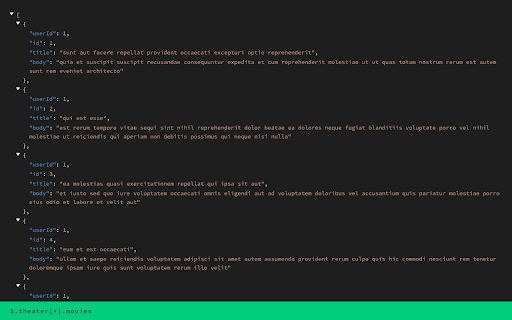
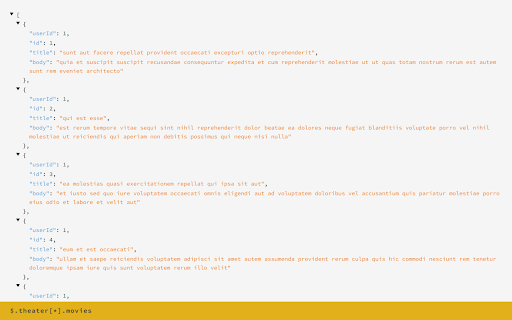

Minimal JSON Viewer with JSON Path Minimal JSON Viewer with JSON Path Support. Features -------------- 1. Syntax Highlighting 2. Collapsible tree for improved readability 3. Dark themed 4. Realtime JSON Path support 5. Multiple Themes Note: This extension might have conflict with other JSON highlighters/beautifiers, like 'JSON Formatter', 'JSONView', 'Pretty JSON' and so on – Please, disable those before trying this for better experience.

JSON Viewer Plus - 20+ Themes & Auto Formatter
Fast JSON viewer & formatter with paste tool, 20+ themes. Auto-format URLs or paste JSON directly. Modern UI. Works offline, free 🚀 THE MOST BEAUTIFUL & VERSATILE JSON VIEWER FOR CHROME JSON Viewer Plus is a powerful JSON formatter, beautifier, and parser designed for developers, API testers, and data analysts. Transform messy JSON into beautiful, readable code with 20+ premium themes. Now with a standalone paste tool - format JSON without opening URLs! ✨ Standalone JSON Viewer - Paste & format JSON directly in the extension popup without needing a URL 🎨 Redesigned Modern Interface - Sleek, intuitive UI for better user experience ⚡ Improved Performance - Faster rendering and smoother interactions 🎨 20+ Premium Themes - Light and dark mode support - Monokai, Dracula, Solarized, Nord, and 17+ more - One Dark, GitHub, VS Code, Material themes - System theme auto-detection - Customizable color schemes 📋 Dual Mode Operation - Auto-detect & format JSON in browser tabs (classic mode) - Paste JSON directly in popup - no URL needed (NEW!) - Perfect for quick formatting, API responses, log snippets - Copy formatted or minified output instantly - Share formatted JSON with colleagues ⚡ Smart Auto-Formatting - Auto-detects JSON in any browser tab - Instant pretty print and beautification - Syntax highlighting for easy reading - Configurable indentation (2/4 spaces or tabs) - Automatic line numbers - Fast rendering even for large JSON files - Lightning-fast performance improvements in v1.2 🛠️ Developer Power Tools - JSONPath display on hover - see exact data location - HTTP headers viewer for API debugging - Timestamp addition for accurate tracking - Clickable URLs (automatically detected and linkified) - Fold/unfold JSON objects & arrays with one click - Array size display for quick insights - Copy formatted or minified JSON - Modern, redesigned interface for better workflow 🔍 NAVIGATION & SEARCH - Collapsible tree structure for complex JSON - Navigate nested objects effortlessly - Indent guides for better readability - Quick expand/collapse all sections - Easy-to-scan structure 📊 PERFECT FOR - Quick JSON formatting - just paste and go! - REST API testing and debugging - JSON file analysis and validation - Web development and data parsing - Log file inspection - API response verification - JSON schema validation - Database query results - Configuration file editing - Sharing formatted JSON with team members - Validating JSON snippets from documentation ✅ Paste Tool - Format JSON without opening URLs (NEW in v1.2!) ✅ Modern UI - Beautiful redesigned interface (NEW in v1.2!) ✅ Faster - Improved performance (NEW in v1.2!) ✅ Works Offline - No internet connection required ✅ Privacy First - No tracking, no analytics, zero data collection ✅ Lightweight - Negligible performance impact on non-JSON pages ✅ Universal - Works on any valid JSON page, URL doesn't matter ✅ 100% Free - No ads, no premium upsells, completely free forever Standalone Paste Tool (NEW!) Open the extension popup, paste any JSON, and instantly format it. No need to open URLs or create test files. Perfect for: - Formatting API responses from Postman/Insomnia - Validating JSON snippets from documentation - Cleaning up messy log data - Sharing formatted JSON with colleagues - Quick JSON validation during development Automatic Content Detection Instantly recognizes JSON content in browser tabs and formats it automatically. No manual action needed. Clickable Links All URLs in your JSON are automatically converted to clickable links, streamlining your workflow. Professional Formatting Choose your preferred code style with customizable indentation levels. Perfect for teams with coding standards. HTTP Headers Display View HTTP headers directly alongside your JSON data, providing essential context for API debugging and troubleshooting. **Method 1: Paste & Format (NEW!)** 1. Click the JSON Viewer Plus icon in your toolbar 2. Paste your JSON in the popup 3. Instantly see formatted, highlighted output 4. Copy, download, or customize theme **Method 2: Auto-Format URLs** 1. Open any JSON URL in Chrome 2. Watch it automatically format and beautify 3. Customize your theme from 20+ options 4. Hover over any element to see its JSONPath Or simply paste this JSON in the popup: {"name":"Test","version":"1.2","features":["paste","format","beautify"]} - Lightning-fast parsing and rendering (NEW v1.2 optimizations!) - Handles large JSON files - Less than 1 millisecond impact on non-JSON pages - Efficient memory usage - No background processes - Smoother interactions and faster UI response We take your privacy seriously: - Zero data collection or tracking - No analytics or telemetry - No external server communication - All processing happens locally in your browser - Your pasted JSON never leaves your machine - No permissions abuse Standalone JSON Editor The new paste tool isn't just for viewing - edit JSON directly in the popup, validate structure, and copy clean output. JSONPath Reference Hover over any JSON element to see its exact JSONPath location. Perfect for documentation and API integration. Fold/Unfold Control Click any object or array to fold/unfold it. Focus on the data you need while keeping large JSON files manageable. Timestamp Tracking Add timestamps to your JSON data for debugging time-sensitive issues and tracking data changes. Raw & Formatted Views Toggle between beautifully formatted JSON and raw source. Perfect for copying data or debugging parser issues. - Use the paste tool for quick JSON formatting - no URLs needed! - Use Ctrl/Cmd + Click to collapse all sibling elements - Switch themes to match your IDE or workflow - Enable line numbers for easy reference in documentation - Use JSONPath for precise API endpoint documentation - Fold large arrays to focus on structure first - Copy formatted JSON from paste tool directly to your code Unlike basic JSON formatters, JSON Viewer Plus offers: ✓ Standalone paste tool - format without URLs (UNIQUE!) ✓ Modern redesigned interface (NEW v1.2!) ✓ Improved performance (NEW v1.2!) ✓ 20+ themes vs 1-2 themes in other extensions ✓ JSONPath display on hover ✓ HTTP headers viewer ✓ Timestamp addition ✓ Professional-grade syntax highlighting ✓ Automatic link detection and clickable URLs ✓ Array size indicators ✓ Configurable indentation styles To enable JSON Viewer Plus on local files: 1. Right-click the extension icon 2. Select "Manage Extension" 3. Enable "Allow access to file URLs" For Incognito Mode: 1. Go to chrome://extensions 2. Find JSON Viewer Plus 3. Enable "Allow in Incognito" We actively maintain and improve JSON Viewer Plus based on user feedback. Your suggestions help make it better for everyone! - Supports large files - UTF-8 encoding support - Cross-origin request compatible - Content Security Policy compliant - Standalone paste tool with instant validation

Virtual Json Viewer
JSON browser extension with virtual DOM, search and JQ filtering Features - **Extremely fast** JSON rendering using virtual DOM - Full text search - JQ filtering - JSON Lines support - Shareable URLs - Customisable theme and settings - Prettify/minify - Raw JSON viewer - Download JSON Bugs and suggestions https://github.com/paolosimone/virtual-json-viewer/issues Note: JQ filtering availability relies on WebAssembly and is subject to website Content Security Policy

Functional JSON viewer
Modern JSON formatter and explorer.

JSONView
View JSON documents in the browser. Normally when encountering a JSON document (content type "application/json"), the browser simply shows plain text. With the JSONView extension, JSON documents are formatted, highlighted, and arrays and objects can be collapsed. Even if the JSON document contains errors, JSONView will still show the raw text. Once you've got JSONView installed, check out http://jsonview.com/example.json to see the extension in action!
