
cepkinnfkjeohkfopgdbpijlpmpepmfh
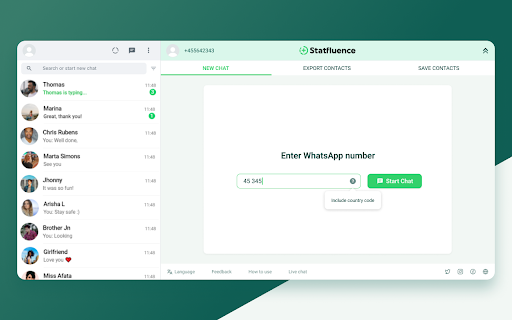

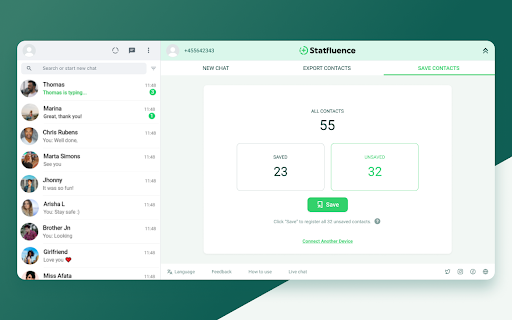

Instantly export and save contacts, unknown numbers, and other data from WhatsApp chats and groups Contact Saver for WhatsApp Statfluence set out to resolve recurring issues faced by WhatsApp users, “How to export and save WhatsApp contacts easily?” With Statfluence’s Chrome extension, individuals have a solution. Instantly export and save contacts, and unknown numbers, from WhatsApp chats and groups. Saving WhatsApp contacts got simpler! Pair Contact Saver with the Statfluence mobile app to sync and save contacts — no exporting required. EXTENSION FEATURES Contact Saver enables you to save all previously unsaved contacts in one click, saving you hours of manual work and enabling previously unsaved contacts to view your status. Contact Saver quickly exports (even unsaved!) numbers to a spreadsheet, so you can see and analyze all your contacts in one place. It’ll also match names to phone numbers if individuals have included it in their profiles. 📲Numerous options for bulk exporting of WhatsApp contacts: - Export contacts from all WhatsApp chats and groups - Export saved WhatsApp contacts only - Export unsaved WhatsApp contacts only - Export contacts from a specific WhatsApp group 🗨 Chat with any WhatsApp registered number Statfluence allows you to immediately chat with someone without having to add their number to your contacts. 📞 Get 24/7 customer support whenever you need it Our team is available 24/7 by WhatsApp to answer any questions you have or troubleshoot any issues. Our average response time is less than 3 minutes. PRIVACY NOTICE We never track, store, or sell your personal data. Disclaimer WhatsApp is a trademark of WhatsApp Inc. This Chrome Extension is an independent product developed by Statfluence LLC and has no relationship to WhatsApp Inc.

WhatsApp Contact Saver
Stop losing contacts or manually copying numbers one by one. With WhatsApp Contact Saver, a single click extracts all your WhatsApp contacts and saves them directly to your phone's address book in seconds, using the name each person set on their own WhatsApp profile. Here's how it works: 1. Open WhatsApp Web in Chrome 2. Click the extension button 3. Wait a few seconds 4. Done! Your contacts are saved Manage your subscription: https://billing.stripe.com/p/login/00g3cqcAT2V2cTu9AA

WA Master: Unsave Contact Exporter For WhatsApp Chats & Groups
WA Master: Unsave Contact Exporter For WhatsApp Chats & Groups - Download All Unsave Contacts in Just 2 Minutes Welcome to WA Master, the ultimate WhatsApp contact exporter designed to optimize your WhatsApp contact management experience. Our Chrome extension, WA Master: Unsave Contact Exporter For WhatsApp Chats & Groups, provides you with seamless control over your contacts list, ensuring an organized and clutter-free experience. Are you tired of the clutter in your WhatsApp contacts, filled with unsaved numbers and duplicate entries? Say goodbye to the frustration of manual organization. WA Master simplifies the process by allowing you to effortlessly export and manage your unsaved contacts in bulk, both from individual chats and WhatsApp groups. Key Features: Automatic Export of Unsaved Contacts: WA Master can automatically detect and export unknown numbers that are not saved in your contacts. This feature ensures that you never miss out on important contacts that haven't been manually saved, streamlining your communication process. Export Numbers from WhatsApp Groups: WA Master allows you to export contacts from WhatsApp groups. Whether you are part of a business group or a social circle, easily extract all the unsaved numbers from group chats, ensuring you have all the necessary contacts in one place. Export Numbers from WhatsApp Groups: WA Master allows you to export contacts from WhatsApp groups. Whether you are part of a business group or a social circle, easily extract all the unsaved numbers from group chats, ensuring you have all the necessary contacts in one place. Free to Use: Experience all the powerful features of WA Master without any cost. Our extension is completely free to use, providing you with top-notch contact management capabilities without any financial burden. User-Friendly Interface: Our intuitive and user-friendly interface makes it easy for you to manage and export contacts. With just a few clicks, select and export multiple unsaved contacts, eliminating the need for tedious manual entries. Time-Saving Efficiency: Whether you're managing personal or business contacts, WA Master streamlines the process, saving you valuable time and effort. No more manual data entry – WA Master does the heavy lifting for you. Enhanced Contact Management: WA Master serves as your reliable WhatsApp unsave contact exporter, ensuring you have full control over your contacts list. Experience the convenience of efficient contact management, all within your Chrome browser. Why Choose WA Master? Simplified Contact Exporting: WA Master makes it incredibly simple to export unsaved contacts, whether they're from individual chats or groups. This means less hassle and more organization. Clutter-Free Contacts List: Say goodbye to a cluttered contacts list. With WA Master, keep your contacts list clean and organized, improving your overall WhatsApp experience. Effortless Management: Manage your contacts with ease. WA Master’s automation and bulk export features remove the need for manual data entry, making contact management effortless. Boost Your Productivity: Save time and boost your productivity by letting WA Master handle your unsaved contacts. Spend less time organizing and more time communicating. Take Charge of Your WhatsApp Contacts Today Don't let unsaved numbers clutter your WhatsApp contacts list. Take charge with WA Master: Unsave Contact Exporter For WhatsApp Chats & Groups. Enjoy a clutter-free contacts list and say goodbye to manual data entry. Try WA Master now and simplify your WhatsApp contact management journey. Download WA Master today, the leading WhatsApp extension, and revolutionize the way you manage your WhatsApp contacts!

WA Contacts Extractor
Extract and export all WhatsApp contacts from groups, chats and labels. Choose from CSV, Excel, JSON, or VCard formats. WhatsApp Contacts Extractor is a simple and powerful tool that allows you to extract and export all your WhatsApp contacts, including unknown phone numbers, in just a few clicks. With this extension, you can keep your data secure and choose from CSV, Excel, JSON, or VCard formats to export your contacts. 🔹 Save time and effort: Extract and export your WhatsApp contacts quickly and easily. Keep your data secure: Choose from multiple export formats to keep your data safe. 🔹 Get organized: Export all your WhatsApp contacts, including unknown phone numbers, in just a few clicks. 🔹 Never lose your contacts again: Backup and export your WhatsApp contacts with a click of a button. 🔹 Export WhatsApp contacts to use in other applications. 🔹 Backup WhatsApp contacts in case of data loss or device transfer. 🔹 Organize and manage your WhatsApp contacts more efficiently. Note: WhatsApp Contacts Extractor does not collect any personal data or violate any terms of service. It only extracts and exports WhatsApp contacts that are already stored on your device. # Feature ✅ Export & save contacts ✅ Extract contacts from WhatsApp groups and chats ✅ Filter contacts by country ✅ Save contacts from labeled chats ✅ Export data to XLS/CSV/JSON/VCard ✅ Continued free updates with premium support # Home Page https://wa-contacts-extractor.watool.online We hope you enjoy using WhatsApp Contacts Extractor! If you have any questions or feedback, please don't hesitate to contact us. (Email: hello@watool.online) #Legal WhatsApp is a trademark of WhatsApp LLC. This extension is an unofficial enhacement for WhatsApp™ Web and is not related in any way to WhatsApp LLC.

WAContactSaver
Extract & Export WhatsApp group members, unknown phone numbers and unsaved contacts to Excel/CSV/JSON/VCard. Extract & Download all phone numbers from your WhatsApp groups and chats. Extract contacts' phone numbers and download them to Excel. The best extension for marketing and sales companies, easy to save phone numbers from a WA group to an Excel file, CSV, JSON or even VCard file. Very useful for prospective leads or contacts. # HOW TO GET STARTED? Open web.whatsapp.com, and scan to log in; select the group to which you want to export contacts' phone numbers, and Click the Export button. ✓ Export contacts from all WhatsApp groups ✓ Extract contacts from a specific WhatsApp group ✓ Download contacts from all chats ✓ Save contacts from a labels ✓ Save contacts from a specific country ✓ Includes the users country information ✓ Export data to XLSX(Excel)/CSV/JSON/VCard # SUPPORTED FORMATS Export contacts from WhatsApp into Excel, CSV, JSON and VCard formats WA TOOL FAMILY You can explore our additional WhatsApp tools by selecting the tools menu - WA Sender - Send messages to multiple recipients - WA Group Scraper - Scrape group link from any website and join them, extract members # DATA PRIVACY No Email address is needed to log in. No data is shared with third parties. All data is processed in your local computer, never passing through our web server, and no one knows what you exported. # STATEMENT WhatsApp™ is a WhatsApp Inc. trademark registered in the U.S. and other countries. This is an independent project not related to WhatsApp™ Inc. # FAQ If you have any questions, don't hesitate to contact us at help@whatsabot.com.
