
cenebmbnfldkhfnhfgjamahgfoclcoie
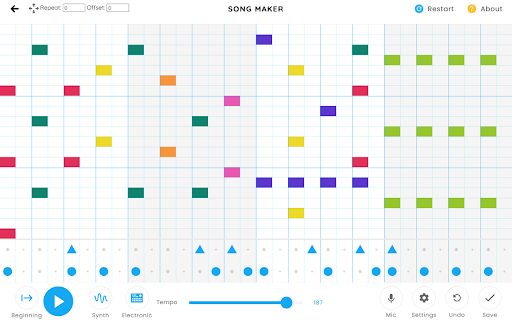
Quality of life features for Chrome Music Lab: Song Maker

Udio AI Music Generator
Udio AI Music Generator by UdioAI: Instantly create and download unique MP3 songs Sure, here is a more modified version with different symbols and additional changes: 🎶 UdioAI: Instantly Generate and Download Unique MP3 Songs 🔸 What is UdioAI? UdioAI is an innovative generative AI model that creates music based on user inputs. The beta version was released to the public on April 10, 2024. Creating Music with UdioAI UdioAI allows users to describe the type of music they want, and the AI generates unique, high-quality tracks based on these prompts. It is often hailed as the "ChatGPT of music generation." Impact and Features of UdioAI While UdioAI's music may not replace human creativity, it serves as a powerful tool for musicians and music lovers. It is considered a game-changer in the AI music industry, alongside tools like Suno, Google MusicFX, and CassetteAI. 🔸 Crafting Your Prompt Think about the feel, theme, or genre you want for your song. Provide a detailed description in the prompt box, such as “a chillwave track that captures the serenity of a beach sunset,” to guide the AI music generator effectively. 🔸 Generate and Review Click the generate button. Listen to the generated track and refine your prompt as needed to achieve the desired result. 🔸 The Importance of Details Specificity helps the AI music generator better capture your vision. Mentioning genres, moods, or specific instruments will guide the AI more accurately. ➢ Automatic Music Creation The AI audio generator can automatically create unique, royalty-free music across a wide range of styles and genres. Using advanced machine learning algorithms, it generates new compositions based on text prompts, lyrical ideas, or other musical characteristics. ➢ Comprehensive Metadata Some AI audio tools can generate detailed metadata for entire music catalogs, including genre, mood, instruments, and more. This feature can save significant time and effort for music creators and publishers. ➢ Variety of Music Styles The AI audio generator can produce a vast array of musical styles, from classical to electronic, pop to ambient. Users can typically customize the generated music to suit their specific needs and preferences. By design, your data remains secure within your Google account and is not stored on our servers. Your data is never shared with anyone, including the add-on owner. We comply with privacy laws (including GDPR and the California Privacy Act) to protect your data. All data you upload is automatically deleted daily.

Drum 4x3 Game
Play Drum 4x3 Game as a Chrome extension - Also can Play without Internet, try it now! - Play more games on the top-left menu. Drum 4x3 is a free kit that you can use to play drums on your browser. It's a great way to practice your drumming skills or just have some fun. To use Drum 4x3, simply click on the pads to play the corresponding drum sound. You can also use the keyboard to play the drums. Drum Drum has a variety of features to help you improve your drumming skills, including: A variety of drum kits to choose from A metronome to help you keep time A recording function so you can listen to your playing back A variety of lessons to help you learn how to play the drums

Instant Games
★★★★★ Access to some of the best casual games on 1 app 🎮 Play the latest games from top developers on a single app 🎯 no need to install each game individually 💻 Play over +100 HTMl5 games from a wide range of developers for FREE 🎲 We keep adding more/better games that you can play on your desktop/laptop computer 🎰 Join thousands of other players worwide and see your position in the rankings 💊 No need to install or clutter the computer with garbage, easy and clean 🏅 FEATURES ★ Only games that dont need WiFi – online games are now offline games 🎮 ★ Carefully selected – all games below 2MB 💻 ✔ Curated content – some of the best casual games 📰 ✔ Largest pool of casual games – 100+ games 🥊 ✔ New games each week – play without installing 🏈 💎 Building Apps and Extensions for Google Chrome and Android 🔥📣 📔 Available on the product page: https://jitt.wwevents.fun/project/instant-games/#changelog Instant Games is a partnership between WWEvents and Gamezop. All the content/games are responsability of Gamezop. This is an independent project developed by WWEvents and has no relationship to Gamezop. By installing this product you agree to our privacy policy & terms of service: https://jitt.wwevents.fun/privacy-policy/ You may consult the list of permissions and the reason why they are required on the product page: https://jitt.wwevents.fun/project/instant-games/#permissions “notifications” – Used to send desktop notification. For example when a new message arrive or App is updated. “contextMenus” – Allow to add more settings when right click in the App icon in the browser toolbar and browser context menu. “storage” – Used to save settings on your local computer. “scripting” – Used to be able to insert JS or CSS on the required host/domains. “system.display” – Used to detect the display size and position the Extension window. “unlimitedStorage” – Storage is limited to 5MB of data that may not be enough to store all configs. “host_permissions” – Permission to access to some hosts/domains that we must modify in order to provide the desired functionality detailed in the functionality. It also allows that you can share content (links or text) from other pages directly to inside the App and send it as a Chat message to a friend for example. Also used to allow intercommunication with other WWEvents Apps (i.e. Emojis). “activeTab” – Permission to access the window that the extension is running and is show to the user. “all_urls” – Permission required for users be able to take screenshots of the current window – captureVisibleTab. This information is also available inside the App: Options -> About

AI Music Generator
Create unique, never-before-heard music with just one click using advanced AI technology. AI Music Generator: Generate music based on the lyrics you provide or your description of the song with one click 1. Open AI Music Generator Chrome Extension. 2. Click Login Google Button Login AI Music Generator. 3. Click Generate Music Button, Open AI Music Generator Chrome Tab Page. a. You can enter your description of the song on the page and let AI Music Generator generate pure music for you. b. You can enter your lyrics on the page, and AI Music Generator can directly generate a complete high-quality song based on your lyrics. ## Other related functions that the ai music generator Chrome Extension can do 1. text to music: Generating music based on text is what AI Music Generator is good at 2. AI Song Generator: Generally, we call songs with lyrics as songs. AI Music Generator can generate songs directly based on lyrics. 3. AI Beat Maker: AI Music Generator can generate pure music, many of which have rhythmic pure music and can be used as Beat
