
ceimaefhpalocpakiogbembdpjpdlabg
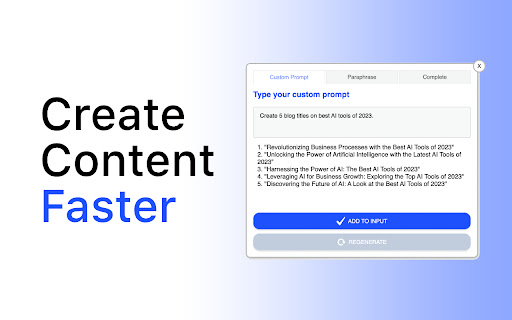


✦ Magic Inputs is a Chrome extension that allows you to generate AI content, complete content, and paraphrase content directly into web pages ✦ ✦ Compatible with popular platforms such as Social Media, Wordpress, and more ✦ Generate AI content in seconds ✦ Complete content with a single click ✦ Paraphrase content to make it unique ✦ Save time and effort ✦ Improve your productivity ✦ Create high-quality content ✦ Get more engagement ✦ Boost creativity and inspiration with AI-generated suggestions 1. Social Media Management: ✦ Effortlessly craft engaging and captivating social media posts with AI-generated content ✦ Save time by automating the creation of content for various platforms like Facebook, Twitter, Instagram, and LinkedIn ✦ Generate catchy captions, compelling ad copy, and persuasive messages to increase social media engagement 2. Blogging and Content Marketing: ✦ Enhance your blog posts and articles with AI-generated content that complements your writing style ✦ Generate topic ideas, headlines, and introductions to kickstart your writing process ✦ Improve SEO by incorporating AI-generated keywords and meta descriptions 3. Website Content Creation: ✦ Instantly populate your website with AI-generated content to fill in placeholder text and save time ✦ Create product descriptions, landing page copy, and call-to-action statements with AI assistance ✦ Maintain a consistent tone and style throughout your website with AI-generated content suggestions 4. Copywriting and Advertisements: ✦ Generate attention-grabbing headlines and persuasive ad copy for digital marketing campaigns ✦ Experiment with different variations of AI-generated content to optimize conversion rates ✦ Create compelling product descriptions and unique selling propositions to drive sales 5. Academic Writing and Research: ✦ Generate research summaries, abstracts, and thesis statements for academic papers ✦ Assist in the creation of bibliographies and reference lists using AI-generated content ✦ Improve the overall structure and coherence of your academic writing with AI-powered suggestions 6. Language Learning and Translation: ✦ Generate example sentences, vocabulary lists, and practice exercises for language learning purposes ✦ Receive AI-powered translations and suggestions to improve your written proficiency in foreign languages ✦ Expand your language skills with AI-generated content tailored to your learning needs Unlock the power of AI-assisted content creation with Magic Inputs AI, and experience a new level of efficiency, creativity, and inspiration. Save time, enhance your writing, and maximize your impact across various platforms and industries.

Zomani: Content Writer
Unlock the power of Zomani and revolutionize your content creation! Wave goodbye to writer's block!!! Unleash the power of Zomani Content Writer and embark on a journey of unrivaled content creation. Tired of staring at a blank page, struggling to find the right words? Say farewell to writer's block as Zomani comes to your rescue! With Zomani Content Writer, you'll effortlessly tap into an endless stream of captivating content. This AI-driven extension combines the brilliance of cutting-edge technology with your creative genius. Seamlessly transform your thoughts into compelling blog posts, engaging articles, and so much more. Harness the unmatched capabilities of Zomani Content Writer to conquer any writing challenge. Need an attention-grabbing blog for your website? Done. Seeking a thought-provoking article to captivate your readers? Consider it done. Zomani has your back, effortlessly generating content that resonates with your audience. Discover a world where writer's block becomes a thing of the past. With Zomani Content Writer, you'll experience the joy of effortlessly crafting high-quality content, while saving valuable time. Let Zomani's AI prowess elevate your writing game, ensuring every piece you create is optimized for search engines and packed with user-friendly appeal. Revolutionize your content creation today with Zomani Content Writer - your trusted companion on the path to writing excellence. Get ready to captivate, inspire, and leave a lasting impression with every word you write.

GimmeThat - Universal Wishlist for Shopping
Simplify shopping with a universal wishlist. Save anything you want to buy from any store globally. See your favorites with a click! Tired of forgetting things you want to buy? Too many open tabs and bookmarked product pages? Give GimmeThat a try! It's a universal wishlist that lives right in your browser. You can save anything you want to buy from any store worldwide. All your favorites in one handy wishlist: see them with one click. Save time and stay organized while shopping. GimmeThat puts a handy button next to your browser's address bar. Seen something you like - but aren't quite ready to buy? Those cool shoes? That new phone? Click the GimmeThat button to add it to your universal wishlist. You can save from any store. Want to see your wishlist? Click the GimmeThat button again. You’ll see all your saved products right away. Ready to buy something? Click on the product, and you'll go straight to its store page. Get started with GimmeThat today. Click 'Add to Chrome' at the top of this page. It's easy, and there's a quick guide to get you started. ➤➤ Your Questions Answered Yes. You can save products from stores worldwide. Just click the GimmeThat button on the product's store page to add it to your wishlist. GimmeThat works its magic and grabs all the product's details from the store page. You can fix things easily if needed. Yes. GimmeThat is free to use. And no annoying ads - we make money from affiliate links. We can earn a commission when you click on product links in your wishlist. There may be paid accounts in future for extra features. ➤ Why does GimmeThat need to "Read and change all your data on all websites"? We need some permissions to work, and only ask for what's needed. When you save a product to your wishlist, this permission lets us fetch the product's image from the website. That's it! Yes. Keeping your data safe and private is top priority. We only store the data needed to work, like your email and products you save. All data is securely stored on our cloud servers. GimmeThat only works for desktop and laptop browsers right now. But we do work to make things better, so watch out for updates. If you have any questions, suggestions or problems, email us at support@gimmethat.me. We're here to help!

Grabber
Grab Transcripts and Meta Data of YouTube Videos and Web Pages Get the transcript and metadata of a YouTube video or of a web page. And then save this information into a choice of different formats: - Text file, - Email, - Markdown file, - and/or Notion database Here are the steps: - Open a browser - Go to a YouTube video or a web page you are interested in - Click on the extension button And within a few seconds you will get: - The transcript of the video, web page, or web page selection - Meta Data: - For a video: - The Video title - The channel - The number of views - The duration - The publish date - The video keywords - The link to the thumbnail - The URL of the video - For a web page: - The page title - The website description - The bounce rate - The world rank - The site rank in its category - The Onsite average time - The monthly visits - The site category - The traffic per source You can also get a summary of the transcript created by AI (Artificial Intelligence) You can adjust parameters for the export of the information: - To a text file: you can provide a string of characters that will be placed at the beginning of the name of the file. This is to help you categorize your files. - To email: you have to specify the email address you want to send the information to - To a Markdown file: like for text file, you can provide a string of characters that will be placed at the beginning of the name of the file. This is to help you categorize your files - To Notion: you need to specify the login to Notion and the name of the database you will save the data to. Save to Notion: Please note that to be able to save to Notion, there are some pre-requisites: 1 - You need to have a login to Notion (www.notion.so) 2 - You need to create in Notion an inline database called Grabber 3 - You need to have the following fields in the database Grabber: - url - text - summary - metadata 4 - You need to authorize Grabber to add to your data in the Grabber database: 4.1 - Install the Grabber extension from the Google Chrome Store (https://chrome.google.com/webstore/category/extensions) 4.2 - Click on the Grabber extension icon (with a smiling crab) 4.3 - Expand the "Parameters" section in the Grabber extension - Fill the login field - In "Database", type Grabber - Click on "Authorize" - A new tab will open - Click "Select Pages" - Tick "Grabber" - And press "Allow Access"

Affiliate Content Pilot
Generate affiliate content using AI from YouTube videos and product pages Turn YouTube Videos into Traffic-Driving, SEO-Powered Content Machines Meet Affiliate Content Pilot - your unfair advantage in affiliate marketing. This Chrome extension doesn’t just simplify your life; it transforms your entire content strategy. In a matter of minutes, you can take any sales page or YouTube video and spin it into 10 high-quality, SEO-optimized articles that draw in organic traffic like a magnet. Forget the late-night grind of content creation—Affiliate Content Pilot handles it all. From One Sales Page or Video to an Entire Content Ecosystem: Why stop at one post when you can dominate the conversation? With content clustering and authority site piggybacking, each article hones in on key angles — product features, user feedback, and expert comparisons — giving you the competitive edge you’ve been chasing. You’ll show up more often in search results, appearing everywhere your audience looks. And here’s where it gets exciting: By leveraging authority platforms like Reddit, Medium, and LinkedIn, you’ll have access to ready-made audiences that are hungry for what you’re offering. Install the Extension: Add Affiliate Content Pilot to Chrome in seconds. Generate Content Effortlessly: Drop in any YouTube video URL or sales page. The extension churns out 10 unique articles - each packed with persuasive elements, SEO-friendly outlines, and feature highlights. Publish and Profit: Upload to your WordPress site or post on high-traffic content platforms like LinkedIn, Quora, Medium, and Google Sites. Every post becomes another pathway to your affiliate offers. You’ll need a license to access the full power of Affiliate Content Pilot. Grab yours here: https://anthonyhayes.me/affiliate-content-pilot/ Take Your Affiliate Marketing to New Heights with These Tools: WP Content Pilot: Auto-blogging made simple. Automatically curate and publish high-quality WordPress posts - complete with your affiliate links. AffiliTap: Your Amazon affiliate game-changer. This free Chrome extension populates your templates with product details in seconds, making your workflow seamless. SEO Minion: An essential SEO sidekick for on-page optimization, link checking, and keyword visibility. Keyword Surfer: A free tool that injects keyword search volumes, related ideas, and traffic insights directly into your Google results. Ready to Scale Without the Grind? Whether you’re building your first affiliate site or scaling your empire, Affiliate Content Pilot is you fast-track to sustainable traffic and commissions. Grab your license and take control of your content strategy today!
