
cecligdiopndkogacbdipaegffjjdgbg

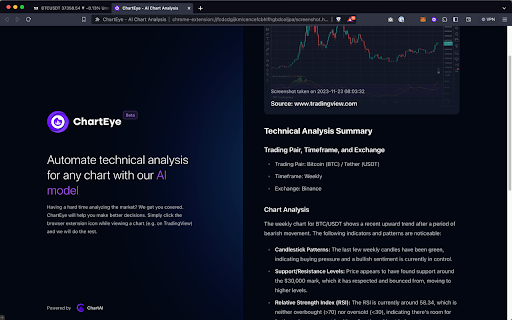
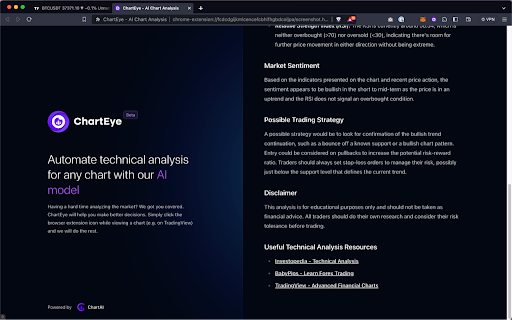


Provides AI-driven technical analysis for any chart with one single click, powered by ChartAI. Having a hard time analyzing the market? We got you covered. ChartEye will help you make better decisions. Simply click on the ChartEye extension icon while viewing a chart (e.g. on TradingView) and we will do the rest. Analyzing charts can be a daunting task, especially for those new to trading. Charts are often cluttered with a myriad of lines, patterns, and indicators, making it difficult to decipher meaningful insights. The volatile nature of the crypto market further complicates this task, as prices can fluctuate wildly in a short period, demanding constant vigilance and quick decision-making. Without proper analysis, traders are at risk of making uninformed decisions, potentially leading to significant losses. This is where ChartEye comes in – a game-changer in simplifying and enhancing the analysis of crypto charts. Our AI-driven tool is designed to tackle the complexities of chart analysis head-on. By employing advanced algorithms, it can quickly identify key patterns, trends, and potential trading signals that might be easily missed by the human eye. This not only saves time but also increases the accuracy of your trading decisions. Whether you're browsing market charts or analyzing potential investments, ChartEye is the perfect tool for quick, accurate, and hassle-free crypto chart analysis. Simplify your trading process, save valuable time, and gain a competitive edge with this must-have extension for any trader. ChartEye supports TA output for the following 21 languages: Arabic, Catalan, Chinese, English, French, German, Hebrew, Indonesian, Italian, Japanese, Korean, Malay, Polish, Portuguese, Russian, Spanish, Swedish, Thai, Turkish and Vietnamese. Disclaimer: when clicking the extension icon, a new tab will open with the technical analysis. On this page there will also be a small advertisement at the bottom.

AI Tab Organizer
Organizes tabs into groups using AI with one click AI Tab Organizer is a powerful Chrome extension that uses AI to intelligently categorize and group your open tabs. With just one click, it analyzes your tabs' content and organizes them into logical groups, helping you maintain a clutter-free browsing experience and improve your productivity. Key features: - AI-powered tab classification - Automatic creation of tab groups - Option to preserve existing tab groups - Custom grouping instructions support - Quick ungroup function for all tabs - Simple and intuitive user interface What's New: Updated to Claude Haiku 4.5 for improved performance and reliability. How it works: 1. Click the extension icon to open the interface 2. Click "Organize Tabs" to start the process 3. The AI analyzes your open tabs and creates logical groups The extension offers flexibility in how you organize your tabs: - Add custom instructions like "group by domain" or "group by topic" - Keep existing groups while organizing new tabs - Quickly remove all groups with one click - Monitor the organization progress with status updates

AI Chart Intelligence - Instant Charts Analysis
Analyze any chart instantly with AI. Get fast insights and summaries, download data,export and share in one click *************************************************************************************** New: Download chart data directly to Excel or CSV — the feature you’ve been asking for! *************************************************************************************** Stop wasting hours preparing presentations, copying dashboards, or trying to interpret complex visuals. With AI Chart Intelligence, you can capture charts from any web dashboard, generate AI-powered insights, and export data instantly — all from your browser. Why You Need It * Spend less time interpreting dashboards. * Build reports, presentations, and QBRs in minutes, not hours. * Get plain-language insights from complex charts and graphs. * Share AI-generated summaries with colleagues instantly. Key Features 📸 Chart Capture: Snap charts, graphs, or visualizations directly from your browser. 🤖 AI-Powered Insights: Get instant explanations, trends, and key takeaways. 🗂 Gallery Mode: Save multiple charts and compare insights side-by-side. 📝 Cross-Chart Analysis: Combine charts to understand the bigger picture. 📋 Export & Share: Copy to clipboard or export to Excel, CSV, or PPT. 🔊 Text-to-Speech (TTS): Listen to insights for hands-free analysis. 🎛 Flexible Panel: Move, resize, and customize the extension panel while working. Works With All Major BI Tools * Microsoft Power BI * Tableau * Looker * Qlik * Any website with chart visualizations Who It’s For * Analysts * Business users * Decision-makers * Anyone who works with dashboards or online reports * Save hours, make smarter decisions, and share insights instantly. Privacy & Security * No browsing history tracking. * Charts are processed locally in your browser. * Data stays on your device unless you choose to reset it. Get Started in Seconds * Install the extension. * Open any chart or dashboard in your browser. * Click the extension icon → Select a chart → Get AI insights, Download, Export & share.

TradeVision AI - TradingView AI Analysis
AI-powered analysis for TradingView charts. Get instant AI insights, trend analysis, and trading signals ⚡Elevate your TradingView workflow with TradeVision AI—the smart chart analysis assistant powered by cutting-edge Artificial Intelligence. Skip the guesswork and get instant, AI-enhanced technical insights on any chart: stocks, crypto, or forex. TradeVision AI becomes your strategic co-pilot, helping you validate setups, uncover hidden signals, and trade with precision. 📈 INSTANT ANALYSIS: One-click breakdown of trends, patterns, and indicators (RSI, MACD, etc.)—just add your strategy to the prompt and get tailored results directly on your chart. 💡 FIND HIDDEN SETUPS: Let AI scan for overlooked opportunities, from classic formations to advanced indicator combinations. ✍️ PROMPT FLEXIBILITY: Use expert-built presets or craft your own prompt to match your trading style and goals. ⚡ MINI-MODE WORKFLOW: Stay focused—get fast insights without leaving your chart or breaking your rhythm. 🔒 PRIVATE & SECURE: BYOK model—uses your own OpenAI API key. No data ever sent to our servers. BUILT FOR: Active traders who want faster learning, sharper analysis, and a reliable second opinion. Whether you're trading stocks, crypto, or forex, TradeVision AI is your edge. ⚠️ DISCLAIMER: TradeVision AI is for educational analysis only. It does not offer financial advice or trading signals. Trading carries risk. Install TradeVision AI today and take your charting to the next level. Now rebranded and upgrated to chartmentor → TRY FREE HERE: https://chromewebstore.google.com/detail/chartmentor-ai-trading-me/neeoehhmfaeoegkhddlbhjnojiabgman

Image to Prompt By Robi Technology
Get AI-powered descriptions for any image on the web. Get AI-powered descriptions for any image on the web instantly! Just right-click on any image and generate an accurate, detailed, and context-aware description powered by advanced AI technology. Perfect for SEO, accessibility, content creation, and social media captions. CREATED BY ROBI TECHNOLOGY
