
cdljdhkbbckpdaicfefghghammobcfhp
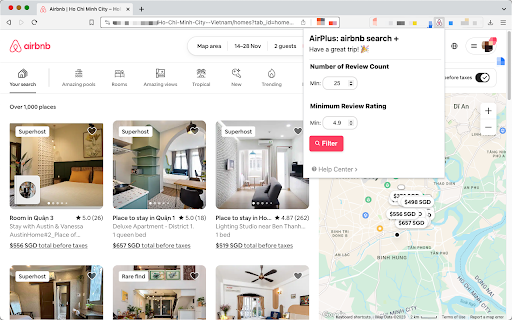

Filter airbnb result by review rating and number of review Filter through Airbnb listings with “Number of Review” and “Review Rating Level”. - Filter by **“Number of Review”** - Filter by **“Review Rating Level”** - $1.9 for year. (1 bottle of water only). Contact helloairplus[at]gmail.com for feedback

PageTrail
This Extension tracks your daily surfing activity PageTrails is designed to enhance productivity by tracking time spent on various websites. It records active browsing time, aggregates it at the domain level, and provides a concise summary of web activity. This extension is ideal for users seeking to monitor their web usage patterns and optimize their online time.

Airbnb Extended
Supercharge Airbnb by hiding listings you don't like. Tired of looking at the same Airbnb listing for the 5th time? Just hide it from all future seach results! This extension adds a small button to each listing that lets you hide it. Preserved across reruns, navigating between pages, changing the map, etc.

Airbnb Sort by Price by Alertstays
Click on the extension icon, then click Sort by price. After a minute, you will see your search results ordered by price. Currently limited to the top 300 or so listings, so be sure to apply filters to narrow down the search to listings that work for you. We're still early, please email us feedback at support@alertstays.com and we'll be sure to improve it quickly for you. And if you like the extension, please consider doing us a favor by leaving a review. DISCLAIMER: we have no affiliation with Airbnb, we're just fans. We disclaim all liability for any impact this extension may have on your Airbnb account.

c! Dynamics 365 Helper
Small and usefull js-functions to manipulate Dynamics 365 [Dyn365] (online). Small and usefull js-functions to manipulate Dynamics 365. You can get information about your user, the environment, the activity-storage-capacity and more. Even the oldschool advanced find is there ;). Also you will get the possibility to manipulate some data, but be aware: Use at your own risk. We do not collect any of your data. Contents of the extension: Area: 'CRM: View': Enabled in Views in Dynamics 365 - '->REST': Open the view-results in REST-Endpoint. Area: 'CRM: Record': Enabled for Records in Dynamics 365 - 'Godmode': Show all fields | No field is required | No field is disabled. - 'SchemaNames': Show all Schemanames of the visible fields on the form. - '->REST': Open in the record REST-Endpoint. - 'Properties': Show the basic properties of a record: CreatedBy and CreatedOn. - 'DirtyFields': Highlight changed fields on the form. - 'Reopen': Reopen a closed activity. - 'All Fields': Show all fields of this record and some metadata of them. - 'Test-Data': Populate all required fields with random data - Good for testing and debugging scenarios. Area: 'Info': Open some usefull links or data. Always enabled. - 'Send Link': Open an email with 2 links directing to the current opened record: One for this app and one teammember-friendly link without an appid. - 'Show my User': Open my User-record in Dynamics 365. - 'adv.Find': Open oldschool Advanced Find. - 'User-Data': Show security-relevant information for your systemuser. - 'open JsAPI': Open external link: Official JS API-Documentation - 'EntityTypeCodes': Show a table of all EntityTypeCodes and -Names (etc, etn) of this organisation - 'Component-Types': Show a table of all Componenttypes. Useful for getting rid of Dependency-errors. Area: 'Admin': Tools to Administrate Dynamics 365. Always enabled. - 'Edit': Pretty oldschool. Open the formeditor of this record in Make.Powerapps. Default Solution. - 'Table' - 'Open': Open the table in Make.Powerapps.com - 'Edit': Edit the table data in Make.Powerapps.com - 'EntityTypeCodes': Show all tables and their ETC. - '#Activities': Count all activities and show them as a table, grouped by year and activitytype. - 'RecordCount': Counts all records from one table. - 'RolesByTable': Get SecurityRoles by table. Filter by user/team. - 'ID': Opens a record with the id only. - 'Copy Roles': Copy BU, Teams, SecurityRoles of one user to another.
