
cdkfhfalbgbjedofghkapcgeodemhghp
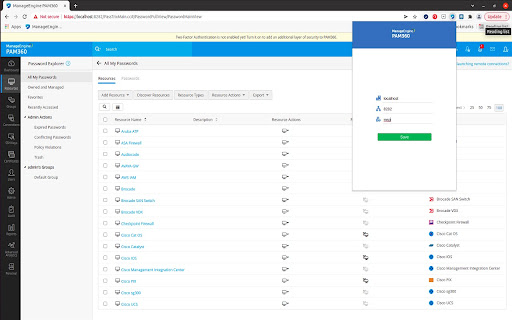


A comprehensive privileged access management software to control, manage and audit the entire life cycle of privileged accounts. A complete privileged access management solution for enterprise IT teams that combines credential vaulting, privileged account governance, remote access management, privileged user monitoring, threat analytics, and web-based SSH Key and SSL certificate management solution, all into a single platform accessible through a central console. Key benefits include: ● Unify the enforcement of privileged access policies for all categories of users. ● Regulate access to critical assets and monitor and audit all subsequent privileged access from a single, central console. ● Delegate just-in-time controls for domain accounts through on-demand, time frame-based privilege elevation. ● Orchestrate complex access management workflows from a unified platform. ● Consolidate privileged access data with endpoint event logs to make meaningful inferences and quicker remedies. ● Integrate password security into your DevOps pipeline, and protect your continuous integration and delivery platforms against credential-based attacks without compromising on engineering efficiency. ● End-to-end management of SSL certificates and SSH keys.

Devolutions Password Manager
Form filler that obtains entries from Remote Desktop Manager, Devolutions Server, and Devolutions Cloud The Devolutions Password Manager extension complements Remote Desktop Manager and Devolutions workspaces such as Devolutions Server and Devolutions Cloud, enabling users to securely inject passwords into websites from entries stored in their vaults, and to view and copy sensitive information like credit card details, contacts, and more. This extension provides users with a simple way to automatically connect to websites without ever having to remember a password.

My Apps Secure Sign-in Extension
My Apps Secure Sign-in Extension This extension is required for both App Proxy link translation and application password-based single sign-on. It may also be optionally used to launch the My Apps portal to search the applications you have access to. With this extension you can: • Sign into password-based single sign-on applications- both directly from the application's login page and from the My Apps portal • Access internal company URLs while remote • Launch into the My Apps portal to search across the applications you have access to THIRD-PARTY SOFTWARE NOTICES AND INFORMATION This software is based on or incorporates material from the projects listed below (collectively, "Third Party Code"). Microsoft is not the original author of the Third Party Code. The original copyright notice and license, under which Microsoft received such Third Party Code, are set forth below. Microsoft reserves all rights not expressly granted herein, whether by implication, estoppel or otherwise. The MIT License Permission is hereby granted, free of charge, to any person obtaining a copy of this software and associated documentation files (the "Software"), to deal in the Software without restriction, including without limitation the rights to use, copy, modify, merge, publish, distribute, sublicense, and/or sell copies of the Software, and to permit persons to whom the Software is furnished to do so, subject to the following conditions: The above copyright notice and this permission notice shall be included in all copies or substantial portions of the Software. THE SOFTWARE IS PROVIDED "AS IS", WITHOUT WARRANTY OF ANY KIND, EXPRESS OR IMPLIED, INCLUDING BUT NOT LIMITED TO THE WARRANTIES OF MERCHANTABILITY, FITNESS FOR A PARTICULAR PURPOSE AND NONINFRINGEMENT. IN NO EVENT SHALL THE AUTHORS OR COPYRIGHT HOLDERS BE LIABLE FOR ANY CLAIM, DAMAGES OR OTHER LIABILITY, WHETHER IN AN ACTION OF CONTRACT, TORT OR OTHERWISE, ARISING FROM, OUT OF OR IN CONNECTION WITH THE SOFTWARE OR THE USE OR OTHER DEALINGS IN THE SOFTWARE. The MIT License Permission is hereby granted, free of charge, to any person obtaining a copy of this software and associated documentation files (the "Software"), to deal in the Software without restriction, including without limitation the rights to use, copy, modify, merge, publish, distribute, sublicense, and/or sell copies of the Software, and to permit persons to whom the Software is furnished to do so, subject to the following conditions: The above copyright notice and this permission notice shall be included in all copies or substantial portions of the Software. THE SOFTWARE IS PROVIDED "AS IS", WITHOUT WARRANTY OF ANY KIND, EXPRESS OR IMPLIED, INCLUDING BUT NOT LIMITED TO THE WARRANTIES OF MERCHANTABILITY, FITNESS FOR A PARTICULAR PURPOSE AND NONINFRINGEMENT. IN NO EVENT SHALL THE AUTHORS OR COPYRIGHT HOLDERS BE LIABLE FOR ANY CLAIM, DAMAGES OR OTHER LIABILITY, WHETHER IN AN ACTION OF CONTRACT, TORT OR OTHERWISE, ARISING FROM, OUT OF OR IN CONNECTION WITH THE SOFTWARE OR THE USE OR OTHER DEALINGS IN THE SOFTWARE.

Delinea Web Password Filler
Access Platform and Secret Server managed credentials directly from your browser. The Delinea Web Password Filler (WPF) browser extension manages credentials for web sites and web applications using Delinea's flagship vaulting solution to save, manage and autofill credentials. WPF can be used by customers that use the Delinea Platform, Delinea Secret Server Cloud or Delinea Secret Server on-premise vaults. WPF supports enterprise single sign-on (SSO) using several mechanisms like Integrated Windows Authentication, SAML, and OpenID. It also supports MFA options such as the Delinea Mobile App, Duo, TOTP authenticator apps, email, FIDO2/YubiKey and others. WPF goes beyond basic password management by seamlessly integrating with the Delinea vault’s advanced credential sharing workflows like approval-before-access, exclusive time-limited checkout/checkin access, MFA-on-access, etc. WPF can also be configured to record user-activity to meet audit and compliance needs.

Secure Shell
Terminal emulator and SSH and SFTP client. Secure Shell is an xterm-compatible terminal emulator and stand-alone ssh client for Chrome. It uses Native-Client to connect directly to ssh servers without the need for external proxies. A SFTP command line client is included. On ChromeOS, you can create SFTP mounts and access them from the Files app! It has been well tested for a couple of years. Please read the FAQ, available here: https://hterm.org/x/ssh/faq. You can also exchange feedback in the chromium-hterm mailing list, available here: https://hterm.org/x/ssh/contact. The changelog is available here: https://hterm.org/x/ssh/changelog
