
cdhnepipgfkfopbjeklcojdfhaheenkh

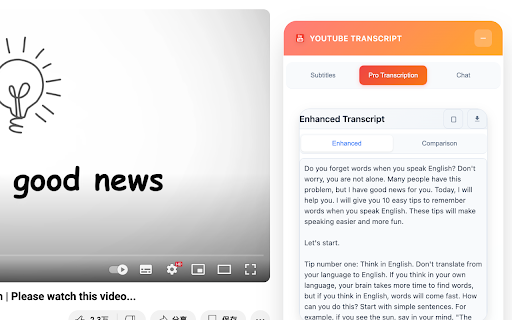

Extract YouTube video transcripts with AI analysis, translation, and multiple format support Extract Any YouTube video transcripts with AI-powered analysis, translation, and multiple format support.

YouTube To Transcript: AI Summarizer & Chat
Get instant YouTube transcripts with AI summaries, insights, and chat features. Ideal for faster learning and note-taking. YouTube to Transcript instantly turns any YouTube video into text you can use. Get accurate transcripts, AI-generated summaries, key insights, timestamps, and even chat with the video’s content. Perfect for learners, researchers, and creators who want to save time and understand videos faster. ⚡ Instant transcripts for any YouTube video 🧠 AI summaries, key points & takeaways 💬 Chat with the video to ask questions or clarify content ⭐ Works directly on YouTube or via popup 📘 Great for studying, note-taking, and research

YouTube Video Transcript
Transcribe youtube videos to text with YouTube Video Transcript. Extract, download, and convert online video transcripts easily. 🔎 Looking for an effortless way to get transcript of video content? Our YouTube transcript extractor is here to help! Transform any video into a readable text format in seconds. Generate full transcript from YouTube video with just a click. Our extension simplifies the process, saving you valuable time and effort. ➤ Instant Transcription: Convert YouTube videos to text in seconds. ➤ Accurate Results: Our advanced YouTube transcript extractor ensures precise text conversion. ➤ User-Friendly Interface: Simple and intuitive, even for beginners. ➤ Multi-Language Support: Generate full transcripts from YouTube videos in multiple languages. ➤ Downloadable Texts: Get youtube video transcript for offline use or future reference. Whether you're a researcher, content creator, or student, this YouTube transcriber is perfect for you. Use it to: 1️⃣ Take Study Notes: Copy text from YouTube videos for study materials. 2️⃣ Create Content: Use YouTube video transcripts to develop blogs or scripts. 3️⃣ Enhance Accessibility: Convert YouTube video dialog to scripts for easy accessibility. 4️⃣ Extract Insights: Use the YouTube video script extractor for research and analysis. 🔹 Save time by getting the key points from lengthy videos. 🔹 Quickly review the main ideas without reading the full transcript. 🔹 Use summaries for research, note-taking, or creating study materials. 🔹 Improve productivity by focusing only on the most important information. With just a few clicks, you can extract transcripts. Here's how to get started: 1. Install the extension and open a YouTube video. 2. Click the extension icon and let it analyze the video. 3. Access the full transcript of the video in seconds. 4. Copy, save, or download the transcription for your needs. ✳️ Save hours of effort with automated YouTube transcripts. ✳️ Get accurate, word-for-word text for any video. ✳️ Convert YouTube video to text for accessibility or study. ✳️ Access a complete transcript of youtube video transcript, even for long content. ✳️ Extract YouTube transcripts without hassle. ❓ Q: How to get a transcript of a YouTube video? 👉 A: Simply install the extension, open your desired video, and let the YouTube transcript extractor do the work for you. ❓ Q: Can I transcribe YouTube video to text in multiple languages? 👉 A: Yes, the tool supports various languages, making it easy to get transcripts for diverse YouTube content. ❓ Q: Is it possible to download YouTube transcripts? 👉 A: Absolutely. You can download the transcript of YouTube videos for offline use. • No more struggling to extract transcript from YouTube. • Easily transcribe YouTube videos for documentation and accessibility. • Convert YouTube video dialog to scripts in real-time. • Generate full transcripts from YouTube videos for content creation. • Seamlessly copy text from YouTube videos for any purpose. 💥 How This Extension Stands Out ▸ Speed: Quickly generate a YouTube video to transcript without delays. ▸ Simplicity: A few clicks are all it takes to get a transcript of a YouTube video. ▸ Versatility: Perfect for students, professionals, researchers, and creators. ▸ Accessibility: Easily transcribe YouTube videos to text, enhancing accessibility for all. 💡 Use Cases for YouTube Video Transcription ☑️ Researchers can extract transcripts from YouTube to analyze data. ☑️ Educators can generate transcripts for YouTube videos to support learning materials. ☑️ Content creators can use YouTube video scripts for new projects. ☑️ Businesses can transcribe YouTube video to text for team collaboration. 💪 Unlock the Power of YouTube Transcripts With this Chrome extension, you can do more than just watch videos. You can transform them into actionable insights, study materials, and creative content. Whether you want to get a transcript for YouTube videos or convert YouTube dialog into text, this tool has got you covered. Don’t miss out on the opportunity to enhance your productivity. Download the extension now and experience the easiest way to transcribe YouTube videos to text. Get started today and discover the difference with this powerful YouTube video transcript generator.

YouTube Summary & Transcript AI | Summarize Long Videos with AI
Summarize Long YouTube videos with AI, generate Transcripts, Summaries & Chat with Transcripts Generate YouTube video summary, Transcript and main points powered by ChatGPT, AI Assistant in one click. Summaries any Podcast or Long Video No need to watch the whole video, one click to get a summary, transcript, and main points we are using AI to generate the summary, Transcript & main points In just opening the extension you will get: - A YouTube video summary in a single paragraph. - Digest the main points with bullet-point summaries. - Download the YouTube video transcript - Copy the YouTube video summary to the clipboard to re-use it - added the option that embeds the extension into YouTube, so no need to click on the extension to open it - Chat with Video & Ask any questions. - Bookmark the notes, or add notes to the video. FAQ: What is the extension about : It Generate Transcript, Main points using AI ChatGPT, is a Chrome extension that generates a summary, main points, and a transcription for a YouTube video, any video can work Do I need a ChatGPT or Open AI account to run this extension? Yes, Bring your own Key, either open AI, Gemini or Claude Does it only work for YouTube? That is correct, but we can extend that. If you have any requests, please add it in the support tab. How can I request adding a new language? Please request the new language from the support tab and we will try to prioritize it. We have one time payment, pay once and use forever, using your own API keys, think Like you bought a car but you need to fuel (your Own API, you take control of what you are using) instead of subscriptions Please if you have any questions feel free, to contact us support@summarizemyvideo.com

DupDub: YouTube Video Transcript & Summary Tool
DupDub: Free YouTube Transcript, Translation, AI Summary, and Text to Speech Transform your YouTube experience with DupDub, a free Chrome extension that automatically converts YouTube audio to text, translates video subtitles into 40+ languages, and generates AI-powered video summaries. Enhance your content with text-to-speech (TTS) , all seamlessly integrated within YouTube. DupDub is the ultimate tool for content creators, educators, and global audiences. 🌟 Why Choose DupDub? - Free Real-Time YouTube Transcript: Automatically convert YouTube audio to text with high accuracy. Download transcriptions in TXT, SRT, or VTT formats. - Multi-Language Subtitle Translation: Translate YouTube subtitles to 40+ languages, making content accessible worldwide. - AI Video Summary: Instantly generate concise video summaries. Save time and improve comprehension. - Text-to-Speech (TTS) Voiceover: Create professional voiceovers from translated text. - User-Friendly and Free: Enjoy unlimited transcriptions and translations without any cost. 🚀 How to Use DupDub: 1. Install the Extension: Search "DupDub" at the Chrome Web Store. 2. Activate the Extension: Click the DupDub Extension while watching a YouTube video. 3. Select Your Language: Choose your preferred translation language from the dropdown menu. 4. Transcribe or Summarize: Click the button to transcribe audio or summarize the video. 5. Download and Use TTS: Save the output in TXT, SRT, or VTT format, or generate a voiceover with TTS. 💡 Perfect for: - YouTube Content Creators: Automatically generate transcripts and subtitles to improve accessibility. - Educators and Students: Save time by generating video summaries and converting lectures to text. - Global Viewers: Watch videos in your native language with real-time translation. - Social Media Managers: Repurpose video content with AI-generated transcripts. - Podcasters: Convert spoken content into written format for easy editing and publishing. 🔒 Privacy and Security: DupDub processes your data locally, ensuring privacy and security. No data is stored or shared externally.
