
cddphjncbagpiodhpbfnkfmhcckkepeg
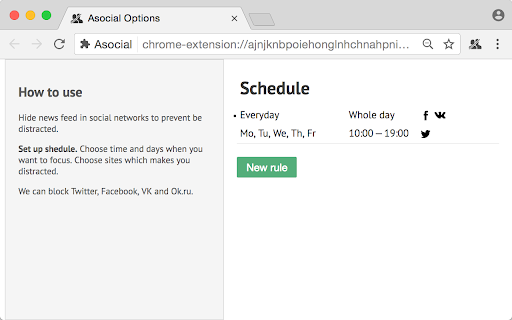


Make you more concentrated. Hide newsfeed of popular social networks on schedule. Supported sites: Facebook, Twitter, Vk.com, Ok.ru This extension hide newsfeed of popular social networks to prevent you being distracted. Private messages in this networks is still available. You may setup your custom schedule for blocking. E.g. Facebook and VK distract me really hard, so I disable facebook feed all time: 24h per day, 7 days per week. I usually read tech news on Twitter, but don’t want to be distracted at work. So I set up following schedule: Every day, Whole Day, Facebook and VK; Every day, 10am...7pm, Twitter.

Left Unread
Show only unread conversations on Facebook, Messenger and Twitter Do you find yourself overwhelmed with countless messages and struggling to stay on top of all your unread conversations? Do you wish you could easily find your unread conversations in your inbox? Are you missing on opportunities because a conversation slipped at the bottom of your inbox? If so, then here's the good news: Left Unread is a free Chrome extension that filters your inbox and displays only the conversations that haven't been read, putting them at the top of your inbox. You no longer have to worry about missing out on important messages. As someone who relies on daily Facebook, Messenger, or Twitter conversations to engage with prospects or subscribers that enjoy freebies, you know how overwhelming inbound messages can be. With Left Unread, you'll quickly and effortlessly catch up on important messages without the distractions of old or irrelevant conversations. It's the perfect time-saving extension for entrepreneurs, founders, creators or even sales representatives who rely on DM conversations. With just one click, Left Unread can transform your relationship with inbound messages, giving you a sense of relief knowing that you can easily find unread conversations. Whether you chat with your prospects using DMs or subscribe to lots of freebies, it'll transform your relationship with inbound messages and keep you on top of your inbox. Try Left Unread today and take control of your inbox. It's free and requires no payment.

PromptEasily ChatGPT - HDTeam
PromptEasily ChatGPT - HDTeam adds a list of curated prompt templates for SEO, SaaS and more to ChatGPT. Try today. PromptEasily ChatGPT - HDTeam adds a list of curated prompt templates for SEO, SaaS and more to ChatGPT. Try today.

Social Attache
Automate your social media prospecting and messaging with the only tool that covers all the bases. Social Attaché is the world's only social CRM... with automation! Work your business directly within your social media accounts instead of having to copy/paste between social and CRM. - prospecting made easy through one-click import of a social profile as a contact - one-click import the email sender from your Web based email - automatically import profiles of people who've messaged you on social - watch posts and automatically import profiles of those who comment - auto-respond to post comments with a social message - automatically accept new group members and import their answers to the group questions - set up automated follow ups via email, SMS text and social messaging - curate content with one-click post download - schedule your content for auto-posting on all your social platforms - schedule your content once for repeating parties or challenges that take place within Facebook groups or Messenger group chats

OpenText Core SCA Select Extension
Open Source Select will help developers find and use the right open source and reduce friction between organisations and developers Open Source Select helps you find and use policy compliant and great open-source for any development project. The OpenText Core SCA Select Extension is a free plugin created with developers in mind, enabling you to check the health metrics and license information of an open source project at a glance. If you need more granular data, the extension can lead you to Open Source Select for more detailed information. The three types of metrics you can examine are: Community - How healthy the community around a project is. Popularity - Is it used by many? Is the usage declining? Security - How well does the maintainers apply security best practices. The extension now supports Start Left Policies. This lets you immediately see if the open source you are browsing is compliant with your company’s open source policy, without the need to import and scan code with Software Composition Analysis tools and common source code repositories and package registries such as GitHub, pypi, npmjs, nuget and many others are supported.
