
cdallinjehmniibnfcmbejbpngmjlgib
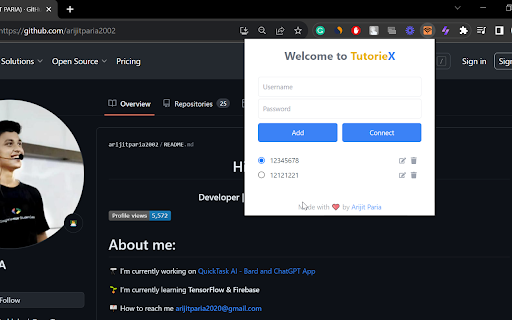
Introducing the LPU Wireless Auto Connect extension - your ultimate solution for uninterrupted internet connectivity at LPU. Have you ever been frustrated with the constant need to manually connect to the LPU Wireless Network every time you open your browser? Say goodbye to those tedious steps! With the LPU Wireless Auto Connect extension, you can ensure a seamless and automatic connection to the LPU Wireless Network, enhancing your online experience. Automatic Connection: Once set up, enjoy an instant connection to the LPU Wireless Network every time you launch your browser. User-Friendly Interface: Simple and intuitive design ensures that even non-tech-savvy users can set it up in minutes. Secure & Reliable: Built with the latest security protocols to ensure your connection remains safe and stable. Why Install LPU Wireless Auto Connect? Save Time: No more manual configurations or repeated logins. Get connected in seconds! Enhanced Productivity: With a stable connection, you can focus on your tasks without any interruptions. Optimized for LPU: Designed exclusively for LPU students and staff, ensuring compatibility and efficiency. In today's digital age, uninterrupted internet connectivity is crucial for academic and professional success. The LPU Wireless Auto Connect extension is tailored to meet the specific needs of the LPU community, ensuring you stay connected whenever you need it. Boost your online experience at LPU. Install the LPU Wireless Auto Connect extension today!

HTML5 Universal Speed Hack
Speeds up or slows down browser games, HTML5 and more... HTML5 Universal Speed Hack Take full control over HTML5 and Unity WebGL games, as well as interactive websites. This extension allows you to accelerate, pause, or manipulate time-related functions used by scripts in your browser — perfect for gamers, developers, QA professionals, and automation users. ⚙️ What does this extension do? The extension gives you the ability to override or disable JavaScript time-related functions used by web pages and browser games. This allows you to speed up or control how fast animations, events, timers, and game logic are executed. 🆓 FREE VERSION ✅ Basic access with: 💎 VIP VERSION – EXCLUSIVE ON PATREON 🔥 Unlock turbo mode with up to 100x speed boost by becoming a VIP supporter on Patreon! Early access to updates and priority support 🔓 Become a supporter and unlock the VIP version: 👉 patreon.com/c/html5universalspeedhack 🎯 Who is this for? HTML5 and Unity WebGL players who want to speed up gameplay, skip wait times, or fast-forward progression. Developers and testers needing to simulate different time environments for debugging and analysis. Automation users and browser power-users seeking full control over in-page execution timing. 🧠 What does each function do? setTimeout Runs a function once after a set delay. Commonly used for animations and delayed actions. setInterval Repeats a function at fixed intervals. Often used in loops and recurring events. requestAnimationFrame Schedules a function to run before the next screen repaint. Essential for smooth animations and games. Date.now() Returns the current time in milliseconds since Unix Epoch. Used for basic timing. performance.now() Returns a high-precision timestamp. Useful for performance measurement and benchmarking. 💬 With this extension, you control the flow of time in the browser — play, test, and develop at your own pace. 📥 Try the free version now. Upgrade to VIP and unleash full speed control! 👉 patreon.com/c/html5universalspeedhack 🔗 Connect with the developer for updates, support, and more projects:

Video Playback Speed (2x-4x-16x)
Control video playback speed from 0.25x to 16x on any website. Modern dark UI with slider and manual input controls. Take full control of your video playback speed! This simple yet powerful extension lets you adjust playback speeds beyond the usual limits — 2x, 4x, 8x, or even 16x. Perfect for fast learners, video reviewers, or anyone who wants to save time. Change video speed instantly with one click Lightweight and easy to use

Enable Copy Everywhere
Allow right-click for copying text from restricted web pages. Enable copy-paste on all the websites. Unlock the freedom to enable copy-paste on websites with the Enable Copy Everywhere Chrome extension in 2025! This powerful text copy unblocker Chrome tool empowers users to bypass copy restriction Chrome on popular websites, allowing seamless text copying, even from protected websites that have disabled the right-click function. Perfect for researchers, students, and anyone needing to capture content without limitations, this easy-to-use tool makes copying restricted text as simple as a single click. Bypass Restrictions: Effortlessly copy text from protected websites with disabled right-click or copy functions. One-Click Enable/Disable: Instantly turn the extension on or off with a single click from your toolbar. Simple and Free: A free copy-paste Chrome extension that is user-friendly and completely free to install and use. Cross-Browser Support: Available on Chrome and Edge for maximum compatibility. Install the "Enable Copy Everywhere" Chrome extension by clicking on "Add to Chrome." Activate the extension by selecting the icon in your Chrome toolbar. Allow copy-paste everywhere and enjoy unrestricted access to text across the web with Enable Copy Everywhere. This disable copy protection extension is the ultimate Chrome extension for copying restricted text, giving you the power to enable right-click on restricted websites and bypass copy restrictions Chrome effortlessly. 1. What does the Enable Copy Everywhere Chrome Extension do? The extension allows users to copy text from any website, even if the site has disabled right-clicking or copy functions. It's ideal for accessing content without restrictions. Yes, Enable Copy Everywhere is entirely free to download and use. The extension is designed to work on most websites with copy restrictions, though a few heavily protected sites may still block copy functions.

Enable Copy Paste - E.C.P
- Click on the extension icon - After a popup is opened, use the “Enable copy paste for all websites” checkbox. - Manually refresh the page and see if the extension has successfully enabled copy paste functionality on the website. - Use "Aggressive Mode" if default mode does not enable copy paste on websites. This extension may not work for websites that use extremely sophisticated methods for disabling copy paste functionality. Privacy notice: This software neither collects nor transmits any personally identifiable information. This software does not track your browsing behaviour. Information necessary for functioning of this software is stored on the devices of the end user, our servers do not have access to this information.
