
cclbddkpmiogcjpaoimgehjgeekcfean
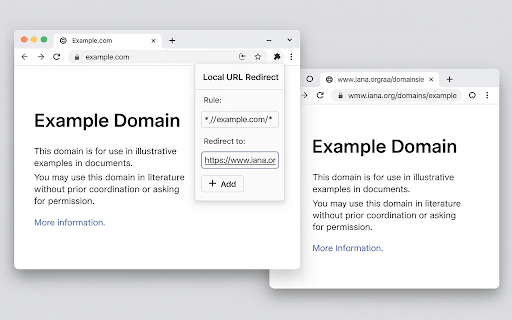
URL Redirect is a lightweight browser extension that gives you fine-grained, rule-based control over where every link and navigation request actually lands. Instead of passively accepting the web’s ever-growing maze of tracking hops, vanity domains, and staging URLs, you can declare your own mapping—“if a URL matches X, seamlessly open Y instead”—and the browser will enforce it instantly inside its network stack. Real-world scenarios you’ll wish you’d solved sooner Privacy front-ends at scale. One rule blocks a dozen trackers by sending any Reddit URL to libreddit. Another negates YouTube’s autoplay by hopping over to an Invidious instance. The difference in CPU load on low-end Chromebooks is startling. Speed-up link previews. Replace every https://news.ycombinator.com/item?id=* with a text-only reader view to load articles instantly on a metered connection. Nail-free micro-blocking. Rather than bulkier ad blockers, a single wildcard rule can sinkhole the half-dozen redirect domains used by your region’s top ad network.

simple URL replacement
URLの文字列を部分的に変換する ▼使い方 1. 拡張機能のアイコンを押下(ポップアップ表示) 2. 「変換したい文字列」と「変換後の文字列」に任意の文字列を入力 3. 「登録する」ボタンを押下(「変換したい文字列」と「変換後の文字列」を登録) 4. 「URLを変換する」ボタンを押下(登録した内容を基にURLの一部の文字列を変換する) ▼例 変換したい文字列: aaa、変換後の文字列: bbb (aaa → bbb) 変換前のURL:https://google.com/aaa 変換後のURL:https://google.com/bbb ▼補足 誰でも簡単に利用できるように、とてもシンプルな拡張機能にしています。 情報量を減らすため、テキストやボタンなどを最小限に収めている影響で、登録できる文字列セットは1組のみとなっています。

URL Swap (Dev Helper)
**Instant URL redirects for web developers** URL Swap is a lightweight Chrome extension that helps developers redirect matching URLs to another host, port, or scheme directly in the browser. Debug production builds against localhost, switch between staging and development, test new backends, or route requests to mock APIs without changing application code. ### No code changes required Test different backends without editing frontend code, environment files, reverse proxies, or your hosts file. ### Fully client-side No external proxy, no SaaS dependency, and no traffic sent through third-party infrastructure. ### Built for modern web apps Works well for React, Next.js, Vue, Angular, Svelte, and other frontend or full-stack setups. ### Keeps path and query parameters intact Only the scheme, host, or port changes, so your request structure stays the same. ### Quick enable or disable toggle Turn rules on or off with one click without losing your saved configuration. ### Chrome Sync support Keep your rules available across Chrome devices where sync is enabled. - Redirect `api.example.com` to `http://localhost:8080` - Point a production frontend to a local backend - Test staging APIs without rebuilding the app - Route requests to mock servers during frontend development - Switch between API versions during migrations - Test microservices in different local or remote environments - Debug WebSocket connections in development ## Works with ## Great for - Frontend development - Full-stack development - Localhost debugging - API testing - Staging environment testing - Mock backend workflows - Migration between backend services - QA and developer testing flows 1. Open the extension 2. Enter a URL fragment, host, or path to match 3. Enter the destination host, port, or scheme 4. Save and enable the rule 5. Reload your site Matching requests are now redirected directly in your browser. - Editing the hosts file - Rebuilding with different environment variables - Running a reverse proxy for simple redirects - Changing app code for temporary backend switching Whether you are testing a new API, debugging localhost integrations, or switching between development and staging, URL Swap helps you move faster. Chrome extension for URL redirect, URL rewrite, backend switching, localhost debugging, local API proxy, staging server testing, mock API testing, frontend testing, React development, Angular development, Vue development, Next.js development, WebSocket redirect, developer productivity tool. **Install URL Swap (Dev Helper) and redirect URLs on the fly.**

Advanced RegEx URL Redirector and Text Replace
Redirect URLs and replace text or links on web pages using Regular Expressions. Advanced RegEx URL Redirector and Text Replace Redirect URLs and replace text or links on web pages using Regular Expressions. Syncs across devices. Detailed Description: Powerful tool for developers and power users to automate web browsing tasks. Use Regular Expressions (RegEx) to redirect URLs, replace text content, or modify links on any website. L - Link Replacement: Modify href, src and other attributes dynamically. Fix broken links or swap resource URLs on the fly. T/t - Text Replacement: Replace visible text on webpages. Supports both Case-Sensitive (T) and Case-Insensitive (t) matching. Live Preview: Test your Regular Expressions with real-time validation and result preview before saving. Excluded Domains: specific domains or URLs where rules should not apply. Sync & Backup: Your rules are automatically synced to your Google account. Easily Import and Export settings as JSON. Performance: Optimized with Mutation Observers to handle dynamic content efficiently without slowing down your browser. Perfect for SEO testing, environment switching (prod/dev), or simply customizing your web experience.

URL Redirector
Redirect URLs to another domain while keeping the path Easily switch between development, staging, and production environments without manually editing URLs. URL Redirector lets you instantly redirect any webpage to a different domain while keeping the original path, query parameters, and hash fragments intact. **Path-Preserving Redirects** - Automatically carries over the full URL path (e.g., `/products?id=123#reviews`) - Works with query strings (`?search=term`) and hash fragments (`#section`) **Developer-Friendly** - Perfect for testing across environments (dev → staging → prod) - No more manual URL editing or complex proxy setups **Lightweight & Secure** - No tracking or external dependencies - All data stored locally in your browser **Use Cases** ✅ Developers: Test code on localhost while retaining the full URL structure ✅ QA Teams: Switch between production and staging in one click ✅ Content Managers: Preview pages on different domains **How It Works** 1. Enter a target domain (e.g., `preprod.example.com`) 2. Click "Redirect Current Tab" 3. The page reloads on the new domain with the original path preserved
