
ccklmambcfmhahigkfmpmcafjlbjnnha
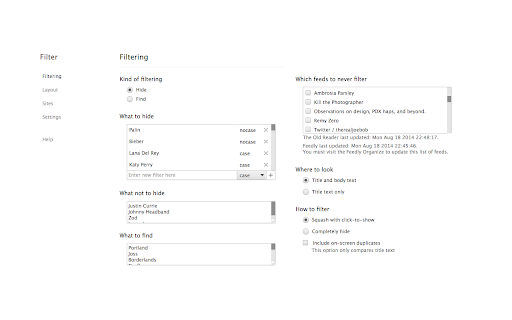

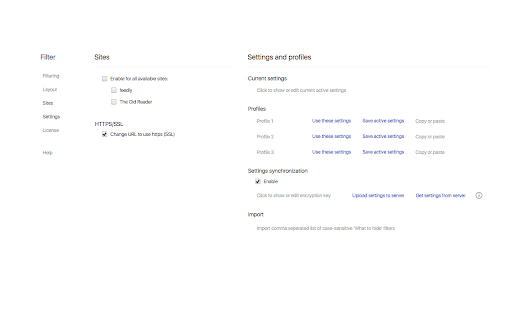

Control the way you read RSS news online. SPOI Filter - lets you hide and highlight RSS news items in feedly and The Old Reader by keyword or regular expression. Filter is based on a paid subscription model. Licensed users will be billed $0.99 monthly. Six month and twelve month subscriptions are also available, as is a trial license. We all like to use our new readers to get our RSS news, and we all subscribe to the feeds that we want, but sometimes we get tired of reading about the same vapid celebrities or the same iPhone killer. Using SPOI Filter, you input a name or a word, and BLAM any news item that contains it is reduced to a fancy coloured bar that you can scroll on by or click on to reveal the hidden gem. Or you can completely hide it and your life will be all the better. You can even choose filter based on text found in the body and the subject, or in the subject line only. Filtering logic includes case-sensitive, not case-sensitive, and regular expressions (regex/regexp). Tired of duplicate items? You can make them never exist! Think that a particular feed should never be filtered? Add them to an exempt list! Want to highlight specific words, you can do that too! Want to only read news that has your keywords and skip everything else? Done. Want to securely sync all your settings and filter between different browsers on different machines? Even more done. There is a handy popup menu to enter new filters or highlights on-the-fly as you are reading. You can also use it to un-hide or re-hide all hidden news items, hide the header, and hide the navigation pane sidebar. And do not forget about the Layout tweaks. Hide all sorts of stuff around the page and fix some spacing while you are at it. You can even change the font. Please see the "Extension support" link for responses to comments and emails.

LOVE-G RSS Reader2
* Supported Feeds: RSS 1.0, RSS 2.0, ATOM * Automatic updates every 5 minutes. * How to add RSS feeds * Select from candidate feeds found on visited websites. * Specify URL directly * Secret mode setting for articles *Open the article in incognito mode when you open it * Exporting and importing settings * Page Layout Settings

CommaFeed
CommaFeed browser extension The extension will show an action next to the address bar with the count of your unread articles. Clicking the button will either:

Scraper
*** Features *** 1. Find the RSS/Atom address by entering the website URL 2. Register keyword to display specific text notifications 3. Creating a Site Web crawler that does not support RSS 4. View other people's web crawlers

SPOI Options
Control the way you watch video online. SPOI Options gives you the power to customize your on-line video watching experiences. MAIN FEATURES: • Disable pre-roll and in-video ads, annotations, and auto-play • Hide page parts like the suggested videos, comments, descriptions, etc. • Specify desired video quality / resolution • Add keyboard controls to change video size, video quality, and hide page parts • Add mouse controls to change your video size, volume, and scrub forward or rewind • Change window and video display size • Change video audio volume • Set video start and end time, and loop or replay videos • Synchronize your Options settings across different browsers and platforms • Save bandwidth by blocking images, scripts, and fonts • Create RSS links for keeping track of the latest media postings SUPPORTED WEBSITES: Options works with 11 major video sites and embedded videos, including YouTube™ and Vimeo™. OFFICIAL WEBSITE: For a full list of features, sites supported, and a detailed product description please visit https://spoi.com/options/
