
cckkplppiiolngadmgbblplhikfgkglc

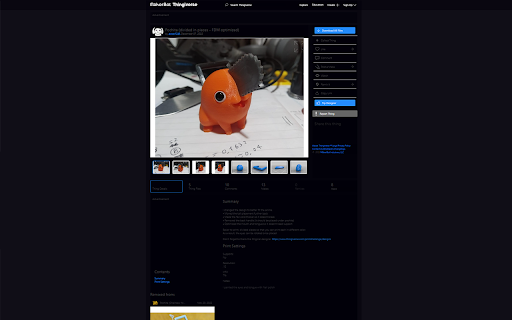
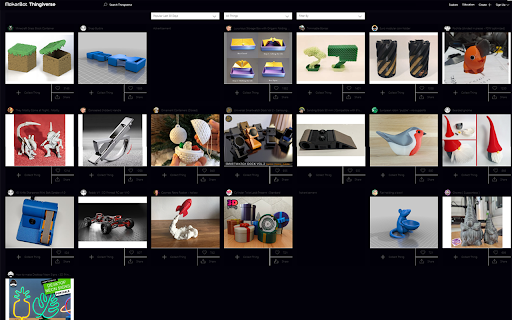
This is a simple script which overwrites the elements on Thingiverse to make the background colors darker. The code was written by a 17 year old developer (hey that's me) in like two hours, and hopefully won't be necessary for long because Thingiverse should just make one themselves. All Source Code for this project is listed here: https://github.com/LuckDuracell/ThingiverseDark/ Feel free to make any revisions or changes as you see fit.

Amazon Dark Mode
Use Amazon Dark Mode to enable sleek browsing. Wondering, "Does Amazon have a dark mode?"—this Chrome Extension is your solution. Elevate your browsing experience with Amazon Dark Mode, the perfect Chrome Extension for anyone wondering, "does Amazon have a dark mode?" Designed for both casual shoppers and dedicated users, this extension transforms your browsing into a comfortable night-time experience. 🌙 Experience Dark Mode on Amazon You can easily switch your usual interface to a sleek theme that's easier on the eyes during nighttime or in low-light environments. Whether you're shopping late at night or simply prefer another color schemes, this tool is the perfect solution. 🖥️ Does Amazon have a dark mode PC? Yes! Our extension is fully compatible with desktop browsers, ensuring that you can enjoy dark mode Amazon website browsing from any PC. Simply install the extension, and toggle on and off as needed. 🌑 Benefits: 1. Reduces eye strain in dim lighting. 2. Saves battery life on mobile devices. 3. Offers stylish aesthetic that's easy on the eyes. 💼 For Professional Use: Amazon Dark Mode isn't just for personal use. If you prefer a darker workspace, our tool ensures that your tasks are more comfortable. From managing AWS console dark mode settings to browsing extensive catalogs, everything becomes easier on the eyes. 🌚 How to enable Dark Mode on Amazon: - Download and install the Chrome Extension. - Click on the extension icon in your browser. - Switch the theme from light with just one click. 🌜 Alexa Night Mode Compatibility Incorporate with your Amazon Alexa themes for a complete experience across all your devices. Adjust settings like how to make Alexa screen dark at night to ensure your entire digital environment is consistent and comfortable. 🌉 Various Supported Themes: - Amazon shopping dark mode - AWS dark mode for developers - Amazon Alexa night themes 🛒 Features: 🔹 Easy toggle on/off switch right in your browser. 🔹 Auto-sync across multiple devices where you're logged in. 🔹 Lightweight design that doesn't slow down your browsing. 👀 Why choose Amazon Dark Mode? If you've been asking "is there a dark mode for Amazon?" or "can you make Amazon dark mode?" then this extension is the definitive answer. It not only provides night mode functionality but also enhances your overall user experience by making navigation smoother and visually more appealing. 🛠️ Future Customization Options: 🔸 Choose from several shades and themes to match your style. 🔸 Set automatic activation times based on your local sunset times. 🔸 Customize text and background colors to suit your preferences. 🌌 Beyond Amazon: Alexa Dark and Night Mode Extends beyond just the shopping interface. For those using devices, integrating night mode settings is seamless, ensuring that your smart home devices don't disrupt your evening ambiance. 🎁 For Night Owls: If you often find yourself shopping late at night, Amazon night mode will transform your late-night shopping sprees into a more delightful experience. Say goodbye to harsh, bright screens and hello to a more comfortable, stylish shopping experience. 🌟 Essential for: - Night-time shoppers - Users with light sensitivity - Professionals working in different environments 📲 How to put Amazon in dark mode: Simply click the extension icon and toggle the theme. For detailed settings like setting specific themes or automated switching, access the extension's custom settings menu. 🎓 Learning and Support: Our detailed FAQ section provides easy-to-follow guides and tips on maximizing your another mode experience. Whether you're curious about specific features like Amazon Dark Mode Windows or general usage tips, our support resources are there to help. 🌠 Join our community: By downloading, you not only enhance your browsing experience but also join a community of users who prefer the aesthetic and practical benefits of different interfaces. Enjoy browsing, shopping, and working on the Amazon website dark mode. Download now for a transformative mode experience!

Thingiverse STL Downloader
Download STLs from Thingiverse -- without the ads. Skip the forced ads on Thingiverse and get right to the good stuff.

3D Printable Alternatives
Wish you could 3D print an object at home instead of buying it online and waiting to have it delivered? Wouldn't it be nice if you could easily see relevant 3D printable objects when shopping on Amazon? Well, that's exactly what this plugin does. Please share feedback and send requests here: https://www.reddit.com/r/3Dprinting/s/hhxNpaEvo7

Font Style Identifier
Use Font Style Identifier to analyze letter style effortlessly. AI font detector reveal typefaces names and details on any webpage. Font Style Identifier, a powerful Chrome extension designed to help you identify the typeface effortlessly. With its cutting-edge technology, you can identify a font on website pages, web designs, and graphics with just a few clicks. Whether you're a designer, developer, or typography enthusiast, this tool makes font identifier from text simple and accurate. ✅ With this extension, discovering lettering has never been easier. This powerful Chrome extension uses advanced AI technology to help you identify font on website, web page, and text in seconds. Whether you're a designer, developer, or just curious about typography, this tool is a must-have. ➽ Quick and Accurate Results: the AI typeface detector delivers and precise typeface recognition for text. ➽ User-Friendly Interface: the extension is designed to be intuitive and easy to use for everyone. ➽ Versatile Functionality: identify letter type, text appearances, and letter styles from any website or online text. ➽ Comprehensive lettering Insights: get detailed information about typefaces, including types, weights, and foundries. ⏺️ AI-Powered typeface Detection: the AI font identifier uses smart algorithms for precise recognition. ⏺️ Works on Any Website: quickly identify print from website, even complex designs. ⏺️ Detailed Insights: learn about the typeface, letter style, and more. ⏺️ Fast Results: no more guessing; find font in real time. ⏺️ Design Matching: the extension helps you find similar ideas to match your needs. 💼 Use cases for Font Style Identifier: ◾ Identify print on websites for web design inspiration. ◾ Learn the typeface used in your favorite blogs. ◾ Explore letter styles and find what's typeface in creative banners. ◾ Simplify your search for the perfect design with a reliable font finder. ◾ Compare ideas, choose the best one specifically for you ➤ Install the Chrome extension. ➤ Hover over the text you want to analyze. ➤ Get instant details about the text, including its name, wide, and size. ➤ Save time and enhance your workflow with accurate results. 🖥️ Extension advantages: ➡ Save time on recognition tasks. ➡ Gain inspiration by exploring typeface on leading websites. ➡ Match designs perfectly for your projects with tool functionality. ➡ AI detection ensures high accuracy every time. ◼️ Designers: identify typefaces for branding, websites, or creative projects. ◼️ Developers: easily identify font in website code for quick updates. ◼️ Marketers: match design with campaigns for consistent branding. ◼️ Typography Enthusiasts: satisfy curiosity about letter style and what's typeface on any site. ❔ What this extension do? ✔️Font Style Identifier is a Chrome extension that helps you identify typefaces, designs, and letter styles on any webpage with ease. ❔ How do I install the extension? ✔️ Find it on the Chrome web store and click add to Chrome. ❔ Can extension find my font name of any website? ✔️ Yes, this tool can do it on any website with precision. ❔ Does it support non-English texts? ✔️ Extension supports a wide range of languages, including non-English and special characters. 📝 Get started with Font Style Identifier 1️⃣ Visit the Chrome Web Store. 2️⃣ Add the extension to your browser. 3️⃣ Start using it to font identify and text typeface instantly. 4️⃣ If you have any problems, please contact us. 💻 Improve your level Found a new typeface? With this tool, you can effortlessly identify this font, explore design, and discover the perfect letter styles for your projects. This Chrome extension is the ultimate typeface finder, paragraph style detector, and web page text print identifier all in one. With its advanced ai text style detector, you can identify font on a website easily. Install it today to unlock a new level of efficiency and inspiration. Whether you’re building a website, designing a logo, or curating a marketing campaign, this typeface app helps you stay consistent and innovative. Font Style Identifier isn’t just a tool - it’s your creative ally. Take the guesswork out of typeface recognition and elevate your designs with style identifiers. Ready to find designs that transform your projects? Add this extension to your browser now and see the difference.
