
cchhnocflgfioicpcefcbbfbpgohgdkn
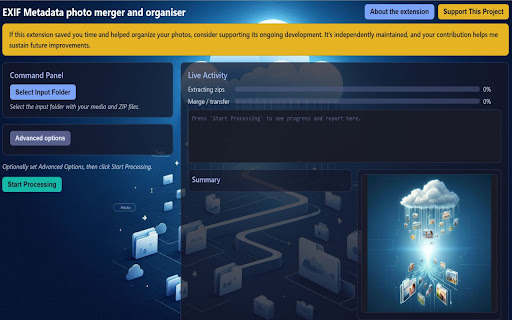


Photo Metadata Fixer for Google Takeout. Extract zips, merge EXIF/JSON into photos, organize files, build maps locally. Did you export your library using Google Takeout only to find a mess of ZIP files, and photos missing information such as the captured location and the time/date it was taken? Unfortunetly, Google often strips metadata from your images and hides it in separate JSON files. When you move these photos to a new service or hard drive, your timeline breaks, and your GPS data vanishes. "EXIF Metadata photo merger and organiser" is the all-in-one solution to repair your library. It automates the heavy lifting: extracting zips, matching metadata, merging EXIF data, and organizing your files into a beautiful, searchable archive. 🚀 Key Features 📦 Automatic ZIP Extraction & Pair Matching: No need to manual unzip dozens of files. The extension scans your Takeout ZIPs, finds the scattered photos and JSON pairs (even when they are randomly distributed), and matches them instantly. 📸 Metadata Merging (EXIF): Embeds capture dates, GPS coordinates, and descriptions directly into the JPEG/HEIC files. Your media becomes self-contained and compatible with any photo app. 📂 Smart Organization: Automatically sorts your media into a clean, structured folder hierarchy (e.g., Processed/2024/). 🔄 Incremental Processing: Have a massive library? Process your exports in stages. The extension remembers what you’ve already done, accumulating data across multiple runs without duplicates. 🗺️ Interactive Photo Maps: Generates beautiful, offline-accessible world maps with clustering. Explore your life’s journey through your photos’ locations. 🎥 Video & Album Support: Keeps your videos + Jsons organized alongside your photos and preserves your original Google Photos album structures. 📊 Local Media Database: Generates a searchable JSON manifest of your entire library (paths, dates, locations) for your own future use. 🔒 Privacy First: 100% Local We never see your photos. This extension uses the File System Access API to process everything directly on your machine. No uploads to the cloud. No data tracking. Your memories stay where they belong: with you. Who It’s For Google Takeout Users: Anyone struggling with the "JSON mess" after a library export.

QuickClone for GitHub
• One-Click Cloning: Instantly copy the full git clone command to your clipboard • Beautiful Design: Stunning gradient button with smooth animations • Dark Mode Support: Automatically adapts to GitHub's light and dark themes • Visual Feedback: Clear confirmation with animated "Copied!" message • Native Integration: Seamlessly blends with GitHub's UI • Zero Configuration: Works immediately after installation • Privacy Focused: No data collection, no tracking, minimal permissions 1. Visit any GitHub repository 2. Look for the purple gradient "Quick Clone" button next to the Code button 3. Click once to copy the git clone command 4. Paste into your terminal and start coding! 💡 PERFECT FOR • Vanilla JavaScript (no frameworks) • Minimal resource usage • Works with GitHub's SPA navigation • GPU-accelerated animations • Manifest V3 compliant • Works on all public and private repositories • Supports both light and dark GitHub themes • Clean, maintainable code

PromptLens — Image to AI Prompt
Turn web or local images into structured JSON prompts for AI image generators. Powered by OpenRouter. PromptLens is a lightweight utility designed for digital artists, creators, and AI enthusiasts who need to translate visual content into machine-readable data. Integrated directly into your browser, PromptLens can analyze images in two ways: • Right-click any image on any website • Click the extension icon to upload, drag-and-drop, or paste your own local images, including screenshots, personal reference images, and photos transferred from your phone It generates a clean JSON prompt ready for AI image generators and LLMs. 🖼️ Local Image Upload — Upload your own images directly from your computer, or drag-and-drop / paste them into the extension popup. 📋 Structured Output — Clean JSON with style, subject, setting, lighting, mood, colors, tags, and negative prompt. 🔌 OpenRouter Powered — Access vision AI models through your own OpenRouter API key, usually at a very low cost per image. 🤖 Smart Model Routing — OpenRouter can automatically select an available vision model for each request. No manual model configuration needed. 🔒 Privacy-First — Your API key stays in your browser. No middleman servers, ever. Images are sent directly to OpenRouter only when you explicitly analyze them. 1. Install PromptLens and enter your OpenRouter API key in the options page. 2. Right-click any image on any website and select "PromptLens — Generate JSON Prompt". 3. Or click the extension icon to upload, drag-and-drop, or paste your own image. 4. The JSON is copied to your clipboard — paste it anywhere. Note: The AI model used may vary per request based on OpenRouter's automatic routing. Results may differ slightly between analyses of the same image. Requirements: A free or paid OpenRouter account and API key (openrouter.ai).

GeoFinder - Photo Location Detector
Features: - Upload images, load from URL, or capture screenshots - Right-click any image on the web to analyze - Get location predictions with confidence levels - Direct Google Maps links for each result

CommandDeck - Extension Manager
Extension Manager with Profiles: enable, disable, search, and organize extensions with profiles and keyboard shortcuts. CommandDeck is a Chrome extension manager that helps you quickly enable, disable, search, and organize extensions with profiles, bulk controls, and keyboard shortcuts. Create setups for Work, Dev, Personal, or clean browsing, then switch between them instantly without opening chrome://extensions. Key features: - Extension profiles: save sets of enabled extensions and switch in one click - Bulk controls: disable all extensions and restore them instantly - Fast search and filters: find the extension you need in seconds - Keyboard-first workflow: '/' to search, arrows to navigate, 'Enter' to toggle, 'Esc' to close - Developer tools: clear DEV badge for unpacked extensions and one-click reload - Quick actions: jump to options, details, or the store page - Private by default: no tracking, minimal permissions - Sync across devices: keep your setups available wherever you use Chrome If you use a lot of extensions, CommandDeck gives you a faster, cleaner way to manage them.
