
ccfeocaphcnobhoieomkgflenhkjgpcd
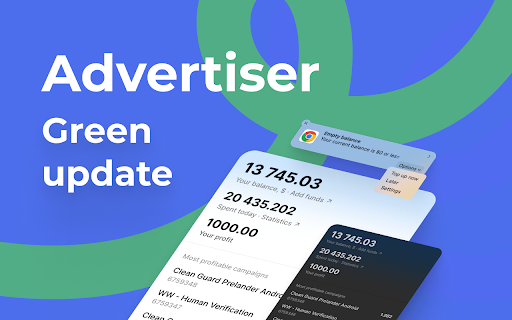


Keep track of your balance, spending, and profits. The extension shows your balance, daily profits and expenses, and shows the most profitable and most expensive campaigns and campaigns with low daily budgets.

CleanVid
Elevate and personalize your streaming journey, save time and money. Watch what you want, automatically skip what you don't. Take control of your viewing experience with CleanVid, the next generation Chrome extension designed to elevate and personalize your streaming journey. Are you tired of unexpected jump scares, explicit content, or those annoying breaks in the middle of your favorite video? CleanVid is here to help! Watch content from your favorite streaming service while automatically skipping the parts you don't want to see. You also can mute or blur out parts of a video, movie, or series based on your preferences. Download now and start watching only the content you want to see. We use ClerkJs for our authenciate platform, ClerkJs is a powerful authentication tool that allows developers to easily integrate user authentication into their applications.

Topicflow Chrome Extension
View and edit Topicflow meeting notes in Google Meet. Transcribe meeting in Topicflow to enable AI summarization and suggestions. - Prepare: Prepare for meetings with AI summarization of past meetings and templates. - Meet: Run effective meetings and capture the next steps with transcription. - Act: Drive accountability by tracking action items and progress on goals / OKRs. - Assess: Gain insights into your team's performance and coach them for success.

Gympass ScreenSaver
Gympass, the ultimate chrome extension that keeps you on track and energized! Stay active with the "Gympass" Chrome extension! With Gympass, you'll receive friendly reminders to take short breaks and engage in exercise every hour. Let Gympass be your wellness companion while you work. Stay healthy, stay productive!

PPC SideClick
A second screen for the Amazon Advertising which helps you to rapidly supercharge your campaign management. NOTE: This extension is an add-on to the service "PPCProphet", if you do not have an account with PPCProphet it WILL NOT WORK. It is NOT a stand-alone extension. PPC SideCLick is a "second screen" tool to help you supercharge your Amazon Advertising campaign management. You can perform hours of Amazon Advertising optimisation and analysis in just a few minutes. The way it works is simple: When you're in the Amazon Advertising Console, the extension keeps an eye out for two pieces of information: the account you're working with, and the campaign name you're viewing. Then on a second screen, either on your same computer or even a totally different machine, PPC SideClick (powered by PPCProphet) gives you a wealth of options and analysis about that account (or campaign). You can at the account or campaign level - view all of the keyword performance - view all the search term performance - see your top performing keywords, targets, - see your conversion rate, budget performance and more. If you've added your Weekly Checklists / or Standard Operating Procedures, this would allow you to perform bulk operations in just one -click. (This is the part where you save hours of time every single week) For example: Say every week you want to Negative Exact every Search Term with 20 clicks and no conversions. Rather than using bulk files or having to click into every campaign on Amazon to analyse and find those search terms, you can use PPC SideClick. 1. Visit the Account 2. Choose your SOP "Neg Exact 20 clicks, 0 conversions" 3. Click "Negative Exact" Done. This would negative exact any search term across the entire account.
