
bppalpbpcmnmioibjlejdnipbiocpahj
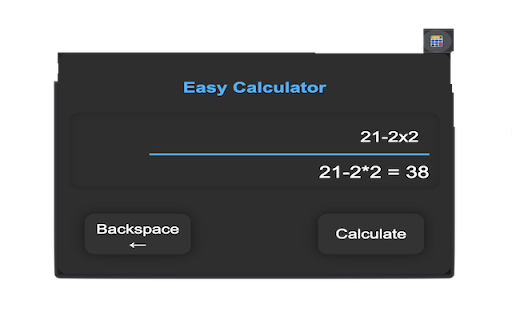
A simple calculator for basic arithmetic operations. With Easy Calculator, you can perform simple arithmetic operations with ease, all within your Chrome browser. No need to open a separate calculator app or leave your current tab. This lightweight extension offers a simple and user-friendly interface, with an input field and output display. It supports basic operations such as addition, subtraction, multiplication, and division, as well as the use of decimals. This extension also includes a backspace button for easy correction of input mistakes. In addition, the state of your calculation is saved automatically, so you can pick up right where you left off, even after closing and reopening your browser. Easy Calculator is perfect for students, professionals, and anyone who needs quick access to a reliable calculator. Install it today and simplify your calculations in seconds!

Simple Calculator
A sleek, modern calculator with scientific functions Simple Calculator - A lightweight, privacy-focused calculator extension that performs basic arithmetic, percentage calculations, and scientific functions entirely locally on your device.

Simple Calculator
This is a simple calculator that can be easily and quickly accessed from your extension bar. This is a simple calculator that can be easily and quickly accessed from your extension bar. It supports basic operations such and addition, subtraction, multiplication and division, with results being rounded to 2 digits. For ease of use it supports keyboard input for all operations including for deleting inputs. Known bugs: for big calculations it will not wrap the text to the input field.

Calculator Extension
Your calculator - Get Instant Results for calculations on Chrome and be able to search using Microsoft Bing search engine Calculate on the fly with our Chrome extension - Our Chrome extension provides a fast and easy-to-use calculator directly in your browser when opening a new tab. Solve Math Problems With Ease Using Our Chrome Extension. My Simple Calculator is the perfect tool for anyone who frequently works with numbers. Our calculator is accessible directly from your browser, so you no longer need to waste time switching between tabs or apps. Our calculator is easy to use and intuitive, making it simple to complete even the most complex calculations. A powerful calculator that provides fast and accurate calculations directly in your browser. With this tool, you no longer have to switch between tabs and apps to complete math problems or crunch numbers. Our Chrome extension is designed for anyone who needs to work with numbers on a regular basis, whether you are a student, professional, or just someone who needs to complete quick calculations from time to time. It's a convenient and efficient way to save time and streamline your workflow, without the need to download and install a separate program. In addition to the ability to calculate math, the extension also includes a search function that uses the Microsoft Bing search engine. This allows users to quickly search for information on the internet without having to open a separate tab or window.

One Quick Calculator
A simple calculator extension for quick calculations. 🧮 Streamline your calculations with One Quick Calculator! 🧮 Effortless Calculations Anytime within Your Browser ➕✖️➖➗🟰 Experience the ultimate in fast, accurate, and effortless mathematical solutions directly within your browser. Whether you’re balancing budgets, tackling homework, or diving into complex equations, One Quick Calculator is your reliable ➕➖✖️➗ companion. One Quick Calculator is designed to provide a seamless, efficient, and user-friendly experience for all your calculation needs directly within your browser. Here’s a closer look at what makes it stand out: ✨ Key Features • Cross-Device Syncing ☁️: Seamlessly syncs your calculation history, saved items, and settings across any device where you are logged into Chrome. • Advanced History Management: Hover over calculation logs to instantly "Bookmark/Save" items to a dedicated Saved list, selectively delete rows, or copy pure results to your clipboard. • One-Click TXT Export: Download a clean `.txt` file copy of your entire mathematical history or the saved items directly to your computer. • Dark Mode Toggle: Easily switch to dark mode from the settings modal. Designed with a clean, modern look for comfortable use in low-light environments. • Real-Time Calculations: Get instant results as you type, with real-time evaluation of expressions for a quick and responsive calculation experience. • Virtual Numpad (Touchscreen Optimized): Easily use the on-screen numpad for quick access, especially on touchscreen devices. Plus, toggle it off via the top menu when you prefer using your keyboard, keeping your workspace clean. • Pop-Out Window: Keep the calculator accessible even when your browser is minimized, allowing you to multitask with ease. • Enhanced Usability: With automatic input focus, start typing as soon as you open the extension, cutting down on extra clicks and improving workflow. 🆕 What's New in Version 1.7: • Chrome Cross-Device Syncing: History and settings now reliably save and sync across all your desktop devices. • New History Actions: Added hover controls to individual history logs so you can Copy, Save (Bookmark), or Delete specific lines. • Saved Items View: Easily toggle between viewing your entire calculation history and a curated list of saved items. • History Log Export: Added the ability to download your history or saved list directly to a local .txt file. • UI improvements: Relocated the Keypad toggle to the top menu, and applied structural UI fixes for fluid resizing in pop-out window. 🆕 What's New in Version 1.6: • Added Dark Mode with toggle in Settings. • Refined styles for a cleaner dark mode experience. • Improved icon alignment and visual consistency. 🆕 What's New in Version 1.5.1: • Round-Off Feature: Added based on user feedback, allowing customization of decimal places in calculations. Applies to the Input Field (for real-time calculations), Result Display, and History Log. 🆕 What's New in Version 1.4.0: • New Icon: Updated the icon to a calculator symbol based on user feedback for better visual recognition. • Enhanced User Experience: The input field now automatically focuses when the extension window opens, allowing for immediate input. • Bug Fix: Fixed an issue where pressing the Delete (Del) key did not properly clear the input. The key now clears the entire field and resets the result to 0. • UI Adjustment: Resized the pop-out window to ensure proper display when the keypad is expanded. 🆕 What's New in Version 1.3: • Instant Result Display: Get real-time evaluation of your expressions as you type, with instant results displayed for seamless calculations. • UI Improvements: Enjoy a cleaner, more intuitive interface designed for better visibility and ease of use. • Virtual Numpad: Optimized for touchscreens, making calculations on your touchscreen computer a breeze. • Toggle Numpad Button: Hide the numpad when using your keyboard for a streamlined workspace. • Minor Bug Fixes: We've squashed some bugs to enhance your experience. 🆕 What's New in Version 1.2: • Icon Display Fix: Resolved issues with icon visibility for a polished look. 🆕 What's New in Version 1.1: • Layout Enhancements: Minor layout tweaks for improved user experience. • Bug Fixes: Addressed various minor issues for smoother operation. • Pop-Out Window Feature: Keep your calculator handy even when your browser is minimized. ➕➖✖️➗🟰 With 'One Quick Calculator', complex calculations are made simple and efficient. Download now and transform the way you compute!
