
bpjfgniflcdjodppkodbcmdleafknoed
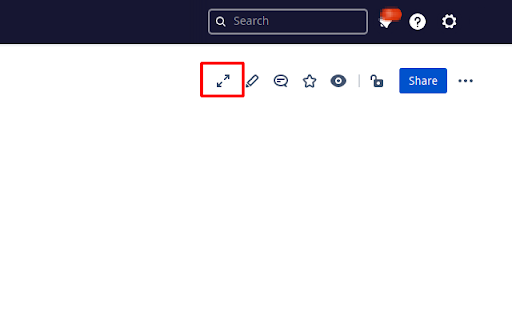
Generates a button that allows users to expand all expandable boxes at once on the Confluence page. Generates a button that allows users to expand all expandable boxes at once on the Confluence page. Alternatively, you can press Ctrl + E

Expand All Accordions
Expand all accordion and dropdown sections on any webpage with a single click. Expand All Accordions lets you instantly open every collapsible menu on a webpage with a single click. Perfect for websites with hidden sections, FAQs, product pages (like Amazon), technical documentation, dashboards, and any interface that uses accordion-style menus. Open all accordion or collapsible menus with one click Compatible with most websites Zero resource usage: runs only when you activate it Clean and extremely simple interface Click the extension icon → press the “Expand All” button. The extension will automatically expand: elements with aria-expanded="false" This extension does not collect, store, or transmit any personal data. All operations happen locally in your browser. 💡 Ideal For anyone who wants to save time dealing with hidden sections If you find it helpful, please leave a review! ⭐

Organyz Web Clipper
Save from the web right into Organyz project folders - in just two clicks. Capture photos, graphics, video, and rich text from the web right into the folders in your projects. Seamlessly connects you to Organyz a personal content manager/organizer with a new way to speed up tasks that you do everyday with all the digital media and information you collect, use and share. You'll get access to six powerful tools that work together with the Web Clipper, all included in one app: 1. CONTENT COLLECTOR - A super-fast way to grab content of any type from anywhere. 2. ORGANYZ CLOUD- Automatically syncs all your devices and saves everything to your own private cloud that you control. Makes your phone, tablet and desktop act like one. 3. ORGANIZER - Conveniently organize your activities, hobbies, work, and play into Boards with folders. 4. ORGANYZ WORKSHOPS- Turns the folders you make right into great-looking Sparks that you share. 5. PiCO FIND - a fast powerful search engine that makes sure you never lose anything again. 6. ORGANYZ SHARING MANAGER- Stay right on top of the things you publish - make live changes, pause the share, make versions, and more. Easy, fast, convenient, rewarding - and free until you feel you need more. Go ahead - let Organyz put your captures exactly where you need them in any of your folders.

LinkedIn Expand All
Expand All Comments and Replies on LinkedIn Get the full context of a LinkedIn comment thread with ease! Ever wish you could just get a summary of a LinkedIn comment thread without having to read everything? Are you frustrated that in the world of LLMs that you can't get all the content of the LinkedIn comment thread at once to feed it to AI and get a simple summary? Finger hurt from clicking load more and all replies and everything that is required to see what everyone is saying? Now there's a solution! Install this extension, go to LinkedIn, click it, and PROFIT! Now you have the whole content of the comment thread at your disposal! Want to use an LLM built into your browser? Go for it! It's all there now! Want to feed it into the LLM of your choice? Print the page to a PDF and compare the results from multiple tools! It's so simple, you'll wonder why LinkedIn hasn't implemented it for themselves! And best of all, there is no AI or tracking or anything! It's just javascript! You can go look at the code if you want! Seriously! https://github.com/mkane827/linkedin-expand-all. That's it. That's everything it does. It's open source! Don't trust me? Just download it from GitHub and run it yourself! Have fun! Learn lots! Make your life on LinkedIn just a little bit easier!

Confluence Quick Search
Quickly search team knowledge with the press of a button Free and open-source add-on to speed up your ability to find information in Confluence. Open a search box using a keyboard shortcut (assigned in chrome://extensions/settings) or type "con " in your browser's omnibox to launch a search in a new tab. No ads!
