
bpdlmgcppibimacfcohjehofcfejeoeg
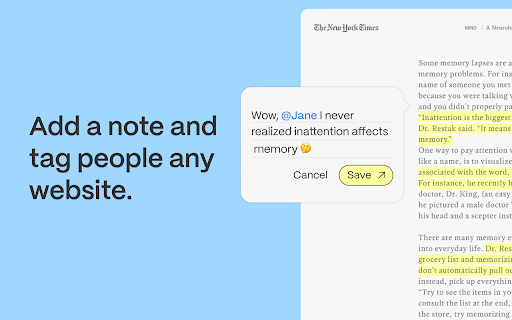


Highlight, add notes, and start discussions on any website. Recall lets you highlight and add notes to any website. Keep your notes private, or tag others to start a discussion right on the page. *Collaborate* - Tag others in a note, or share a link that allows others to reply to your note directly on the page. *Search* - Notes are stored and searchable, letting you maintain a history of highlights that you can easily find later. *Publish* - Notes can be grouped into Reading Lists, which you can publish privately or publicly. You readers can read your notes directly on the page, and respond to you in the margin. How people are using Recall Students - Using Recall to capture notes across different sources during a research project. Podcasters - Using Recall to highlight articles to reference during an episode. Journalists - Using Recall to share highlights with colleagues that are relevant to their reporting.

Session Manager Pro - Save Tabs, Restore Sessions, Crash Recovery & Backup
Save all your browser tabs with one click. Restore sessions instantly. Auto-backup protects against crashes. Never lose tabs again! You have 30 tabs open across multiple windows. Your browser crashes, your laptop restarts, or you just need to switch tasks. Without a session manager, those tabs are gone and you are left digging through history trying to piece your workflow back together. Session Manager Pro gives you full control over your browser sessions. Save everything with one click, restore it later, and never lose your tabs again. • SAVE SESSIONS INSTANTLY — Capture all open tabs across every window into a named session. Save as many sessions as you need, with no limits. • ONE-CLICK RESTORE — Reopen an entire session exactly as you left it. All tabs, all windows, right where they were. • AUTOMATIC SAVES — Set an interval and let Session Manager Pro save your tabs in the background. Walk away knowing your work is protected. • CRASH RECOVERY — If your browser or system goes down unexpectedly, your most recent session is already saved. Just open the extension and restore. • EDIT YOUR SESSIONS — Add, remove, or reorder individual tabs within any saved session. Keep your sessions clean and organized. • SEARCH ACROSS SESSIONS — Find any tab by title or URL across all your saved sessions. No more scrolling through long lists. • IMPORT AND EXPORT — Back up your sessions as JSON files. Move them between computers, share them with colleagues, or keep an archive. • KEYBOARD SHORTCUTS — Save and restore sessions without reaching for the mouse. Configurable shortcuts for the actions you use most. 1. Click the Session Manager Pro icon in your toolbar. 2. Tap "Save Session" to capture all your current tabs. Give it a name you will recognize. 3. Close tabs freely, switch tasks, or restart your browser. 4. Open Session Manager Pro again and click "Restore" on any saved session to bring everything back. 5. Use auto-save for hands-free protection, or export sessions for backup. WHO IT'S FOR • Researchers managing dozens of reference tabs across projects • Developers juggling multiple environments, docs, and tools • Students organising study materials by subject or assignment • Professionals who switch between different workflows throughout the day • Anyone who keeps too many tabs open and needs a safety net PRIVACY AND DATA Session Manager Pro stores all data locally on your device. There is no account to create, no cloud sync, and no tracking. Your browsing data stays on your machine and is never sent anywhere. This extension requests access to your tabs so it can read and restore your open browser tabs. No other permissions are required. Install Session Manager Pro and stop losing your tabs.

PatchTagger - Save Videos by Adding Tags
Create collections of videos for inspiration. Categorize and search later. This chrome extension allows you to add tags to videos that you want to save for inspiration. The extnesion adds a sidebar on supported websites. So just click it and save the video. ✨ Search, sort and randomize We provide a simple and intuitive interface for you to search through your library of videos.

Markwise - Save, Organize & Find Anything Online
Save anything from the web—links and videos with timestamps—and find it instantly with AI. Your searchable knowledge base. Stop losing your bookmarks and ideas in a sea of open tabs. Markwise is your AI-powered second brain that helps you save, organize, and find anything on the web instantly. Markwise transforms your browser into a powerful knowledge base. Whether you're researching a project, saving tutorials, or curating resources, Markwise keeps everything organized and instantly accessible. 🧠 AI-POWERED ORGANIZATION Forget about manual tagging. Markwise uses advanced AI to automatically categorize and summarize every link you save. Your knowledge base stays organized effortlessly, so you can focus on reading and learning, not managing files. 🎥 YOUTUBE MOMENTS & TIMESTAMPS Never lose a key insight from a video again. With Markwise, you can snap timestamps on any YouTube video while you watch. Create a personal library of video highlights and jump back to the exact moment you need with a single click. Perfect for tutorials, lectures, and podcasts. ⚡ BRAINBAR COMMAND PALETTE (Cmd/Ctrl + Shift + K) Speed up your workflow with the BrainBar. Access your entire knowledge base from any tab. Search for saved pages, create new notes, or organize your spaces without ever touching your mouse. It’s the fastest way to navigate your digital memory. 🔍 SEMANTIC SEARCH & RECALL Find what you need, even if you forget the title. Markwise’s semantic search understands concepts and ideas. Searching for "coding tips for beginners" will find that article about "React Best Practices" you saved months ago. It feels like magic. 📂 SMART SPACES FOR PROJECTS Group your bookmarks, videos, and notes into dedicated Spaces. Keep all your research for a specific project, client, or hobby in one focused view. Switch contexts instantly without losing your flow. 📝 HIGHLIGHTS & SMART NOTES Don’t just save links—save insights. Highlight important text on any webpage and it automatically syncs to your Markwise dashboard. Add quick notes to give context to your bookmarks, linking your thoughts directly to the source. 🚀 PRIVACY & SECURITY FIRST Your knowledge is personal. Markwise is built with privacy at its core. Your data is encrypted, secure, and never sold to third parties. Only you have access to your second brain. Toggle Brain Bar: Cmd/Ctrl + Shift + K Save Focus Session: Alt + Shift + S Join thousands of users who are reclaiming their browsing history and building a smarter digital life with Markwise. Install Markwise today and turn your browser into a superpower.

Notion Tools
Make your Notion experience a little bit better with some QOL including colored headings, folded sidebar buttons and more. This extension provides a group of options that aim to improve your experience with the Notion website. These include: + ⭐ Automatically highlighting every heading across all your Notions. + 🔥 Having more vertical space in the sidebar by folding the "Search", "Inbox", and "Settings" buttons into horizontally lined icons (the notification counter also works). + Additional headings indication by adding # symbol at the end of it. + More horizontal space for your database board view. + Slightly more vertical space on page by reduced margin above it icon/name. + Ability to hide "invite members" button from sidebar. Every option can be disabled, if you want. I will continue adding more features over time. Hope you like it! ♥ UPDATE 1.2.2 - Added support for dark theme.
