
bpciannhcoipobpfeofondnhiadfcbib
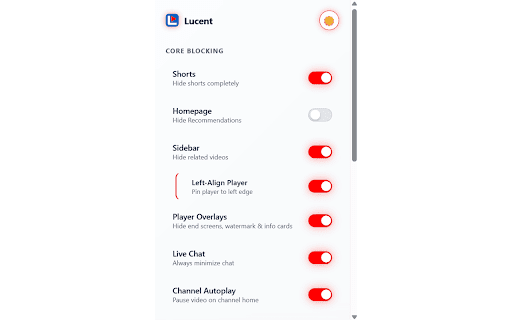


Remove YouTube Shorts and all other distractions. Automatically set video quality & playback speed. Privacy-first, zero tracking. No tracking. No analytics. No external servers. All settings are stored locally in your browser.

InfoSE
Quickly access relevant information for selected word Introducing "InfoSE," the ultimate extension for lightning-fast access to relevant information right at your fingertips. With InfoSE, effortlessly explore top relevant results for selected word, neatly organized within accordion-style panels, each offering a concise summary for quick insights. Key Features: Effortless Access: Simply highlight any word or phrase on your browser, and InfoSE springs into action, fetching relevant information instantaneously. Accordion Interface: InfoSE presents search results in a sleek accordion format, allowing you to expand and collapse each panel effortlessly. This intuitive design enables efficient browsing without cluttering your screen. Comprehensive Summaries: Dive into succinct summaries within each accordion panel, providing essential details without overwhelming you with excessive information. Whether it's definitions, explanations, or background context, InfoSE delivers the highlights at a glance. Wikipedia Integration: Seamlessly explore Wikipedia entries directly within InfoSE. With a single click, delve into comprehensive articles, gaining in-depth understanding on your chosen topic without leaving your browsing session.

Kloser
Close all tabs and open default tab Simple extension for closing all tabs in active window and opening New Tab Page or your selected page. You can edit settings of this extension, such as you can choose preferred tab which will be opened after using the extension and you can set will be extension close pinned tabs. Use the shortcut: Ctrl + Q

Active Tab Tools
The easiest way to manage active tab local storage, behavior and other actions. The easiest way to manage tabs local storage, behavior and other actions 1. Install the Tab Tools extension in your browser -- To uninstall the extension -- - Right click on the extension icon and select "Remove from Chrome" - Is Tab Tools backing up my local storage automatically? No, your local storage data is only backed up when you choose to export it. - What type of file does Tab Tools use for import? Any text based file containing a typical JSON object - I imported my local storage file, what's next? Local storage content are instantly available to use on the website pages - A tab is refreshing or closing without asking me, what should I do? Make sure you have engaged with the tab and applied the rule to it or all tabs. Rule only works for tabs that has had at least one user interaction. - ActiveTab - to access background setting for the current tab you are on. - Scripting - to create and manage file export and import for local storage data. - Storage - to store and manage the tab specific settings and rules.

CineMan AI: IMDb & RT Ratings on Netflix, Prime & Disney+
Stop the endless scrolling! Personalized movie & TV recommendations powered by your taste profile. Stop guessing what to watch. Know before you press play. You open Netflix, something looks interesting… and then you hesitate. Is it actually good? Is it your kind of movie? IMDb scores, Rotten Tomatoes ratings, and personalized recommendations — all directly on the page, exactly where you’re browsing. IMDb scores. Rotten Tomatoes. Audience ratings. Right where you need them. 🧠 RECOMMENDATIONS THAT ACTUALLY MATCH YOUR TASTE Most platforms recommend what’s popular. CineMan recommends what you’ll like. Using your viewing history (stored locally), CineMan builds a personal taste profile and gives every title a Taste Match score. A movie that’s “8/10” globally might be a 95% match for you — or not your vibe at all. Every recommendation tells you why: • “Because you watched Arrival” • “Matches your Sci-Fi + slow-burn preference” ⚡ DECIDE FASTER — WITHOUT LEAVING THE PAGE Hover over any title and preview trailers instantly. No switching tabs. No falling into YouTube loops. 🔍 CHECK ANY MOVIE BEFORE YOU COMMIT Paste any title into CineMan and instantly see: • Your personal Taste Match score • IMDb & Rotten Tomatoes ratings • Streaming availability • Why it fits (or doesn’t fit) your taste CineMan finds similar titles — then re-ranks them based on your taste, not generic similarity. Swipe through movies. Rate what you like. Every interaction sharpens your taste profile — making recommendations smarter over time. 🔒 YOUR DATA STAYS PRIVATE CineMan runs entirely in your browser. 🍿 BUILT FOR PEOPLE WHO CARE ABOUT WHAT THEY WATCH If you just hit play on anything, this isn’t for you. If you care about finding the right movie — CineMan is. 🚀 GET STARTED IN 30 SECONDS Install CineMan Open Netflix (ratings appear instantly) Click the extension for personalized picks (Optional) Sync viewing history for deeper recommendations
