
bolmmhkapeekgcjopdmnbmnhgaapbpdb
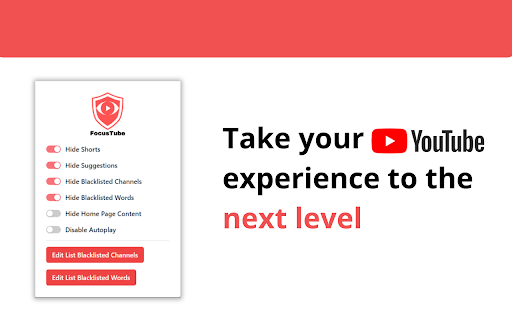

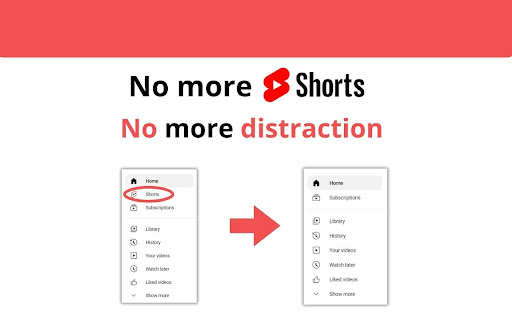


Hide YouTube Shorts, recommendations, suggestions, and comments. Block channels and words. The ultimate distraction-free tool. 🚀 TRANSFORM YOUR YOUTUBE INTO A PRODUCTIVITY POWERHOUSE 🚀 Transform YouTube into a focused, distraction-free, and dopamine-free space. FocusTube is a powerful, community-driven tool that empowers you to reclaim your attention and use YouTube for learning, not just scrolling. 🎥 HIDE YOUTUBE SHORTS Block YouTube Shorts with a single click. Say goodbye to addictive, endless scrolling and reclaim your time. 🔍 HIDE RECOMMENDATIONS Remove YouTube suggestions and related videos. Stay in control, avoid rabbit holes, and keep your attention on what truly matters. 💬 HIDE COMMENTS Eliminate distractions and negativity. Enjoy a cleaner, more peaceful interface—ideal for a "Zen Mode" experience. 🙈 CHANNEL BLACKLIST Personalize your feed by blocking unwanted channels. Build your own blacklist to align with your personal goals. ⛔ KEYWORD FILTERING Filter out videos by keywords in the title. Block clickbait, spoilers, or any content that hinders your wellness journey. 🚀 ZEN MODE (NEW!) Activate total focus by hiding the entire YouTube homepage feed. Keep only the search bar—perfect for deep work and mindful browsing. 🚫 STOP AUTOPLAY Disable YouTube’s autoplay to prevent binge-watching. Take back control of your habits. FocusTube is built on the principles of transparency and collaboration. We believe in building the BEST open-source tool to eliminate digital distractions. Are you a developer? We love contributions! Our entire codebase is public on GitHub. If you want to improve the code, add a new feature, or fix a bug, feel free to launch a Pull Request (PR) or suggest features. Let's build the future of mindful browsing together! FocusTube is designed for productivity, digital wellness, and dopamine detox. We help you create an environment that supports deep focus and learning. WHY CHOOSE FOCUSTUBE? 🎯 Productivity Booster: Use YouTube as a tool for growth. 🧘 Zen Mode: Enjoy a minimalist, calm, and clutter-free UI. 🔧 Fully Customizable: You decide exactly what to hide. 🚀 Lightweight: Fast and optimized for a seamless experience. Open the extension menu to toggle features. Add channels or words to your blacklist. Join our Open Source community and unlock the most peaceful, personalized YouTube ever!

Ad Blocker: Stands AdBlocker
Stands AdBlocker – it's a free ad blocker for YouTube, Twitch, Pop-Ups, Video Ads, and websites. Block ads everywhere with Stands! Stands is the best free adblocker for Chrome that eliminates ads on YouTube, Twitch, pop-ups, video ads, and banners. Download the top-rated adblock Chrome extension and enjoy faster, interruption-free browsing today! 🚀 Why Choose Stands adblocker for Chrome? ✅ Block ads – pop-ups, video ads, banners, and auto-playing videos disappear from every site you visit. ✅ Watch YouTube and Twitch without interruption – no pre-roll, mid-roll, or live stream ads ever again. Skip ads automatically with our built-in ad skipper. ✅ Faster page loading – blocking ads reduces data usage and makes sites load up to 50% faster. ✅ Protection from malicious ads – Stands blocks dangerous ads carrying viruses, malware, and phishing attempts that could harm your device. ✅ Auto-hide cookie banners – say goodbye to annoying pop-ups asking you to accept cookies on every site. ✅ Customize your blocking preferences – you decide which sites can show ads to support your favorites, and which can't. 🎯 What does Stands AdBlocker block? 🎥 YouTube ads – removes all video ads instantly 🎮 Twitch ads – watch streams without interruptions 🍪 Cookie banners – automatic blocking of cookie notification pop-ups 📱 Social media ads – block ads on Facebook, Instagram, Twitter, and LinkedIn 🌍 Pop-ups – a true website blocker for pop-ups across every site 📥 How to remove ads? Install in 3 steps: 1. Download Stands from the Chrome Web Store 2. Install with one click 3. Done! Your Google Chrome ad blocker activates automatically – block ads for free from the very first second Also available for Microsoft Edge, and Opera. ⭐ Why is Stands the best adblocker for Chrome? Stands starts blocking the moment it's installed, letting you browse free from annoying interruptions. As a trusted adblock Chrome extension, it stands out for stability, effectiveness, and fast performance: 🔹 Lightweight – won't slow down your browser 🔹 Regular updates – always up-to-date protection against new ad formats 🔹 All-in-one protection – one extension instead of multiple add-ons 🔹 No hidden costs – completely free, forever Stands delivers superior performance compared to alternatives like Adblock Plus, AdGuard, and uBlock Origin. ❓ Frequently Asked Questions What is the best adblocker for Chrome? Stands AdBlocker is the superior choice when considering top add blockers like Adblock Plus, AdGuard, AdBlocker Ultimate, uBlock Origin, and the Pie Adblock extension. Stands effectively blocks ads and speeds up page loading times. How to enable ad blocking? To enable Stands, simply install it from your browser’s extension store. Once installed, access the settings through your browser’s menu to customize your preferences. Can I choose which ads to block? Absolutely! You can customize your settings and add exceptions for specific sites you want to support. 🔐 Your Privacy What personal information do we collect on our users, and how do we collect it? We will collect information about the websites visited by our users, search engine results pages, click stream data, and information about the content that you viewed in order to ensure the ad-blocking, and anti-malware protection are all working properly. We also provide Browsing Data to third parties for their own use, such as for market analytics purposes. All Browsing Data is filtered to remove any personal data before it is processed and provided to third parties. For detailed policies on privacy and user terms, please refer to the Privacy Policy and End User License Agreement available on the website. PRIVACY POLICY: https://www.standsapp.org/privacy-policy/ END USER LICENSE AGREEMENT: https://www.standsapp.org/end-user-license-agreement/ These documents ensure transparency and trust by choosing Stands, demonstrating our commitment to efficiency and protecting your online privacy. 📧 Support For additional support or feedback, users are encouraged to visit the Support Center or contact via email at support@standsapp.org. Get started with Stands and join millions of users worldwide!

Superpower YouTube - Disable YouTube Shorts & Comments + Content Filter
Make YouTube less distracting. Hide YouTube Shorts, comments, recommendations, autoplay, and block channels, keywords, and users. Remove YouTube Shorts, recommendations, comments, autoplay, and other distractions. Use YouTube for learning, work, and research without falling into rabbit holes. Superpower YouTube is a distraction-blocking extension that helps you create a cleaner, calmer, and more productive YouTube experience. Hide distracting sections, block unwanted YouTube channels, keywords, and users, export or import blocked items, start focus sessions, schedule distraction-free hours, and protect your settings from impulsive changes. • 🏠 Hide Home Feed — start YouTube with a cleaner page • 🎬 Hide Shorts — remove Shorts from Home, Search, channel pages, and recommendations • 📺 Redirect to My Subscriptions — go directly to channels you chose • ⭐ Hide Most Relevant — remove the “Most relevant” section from Subscriptions • 👁️ Hide Video View Count — reduce social proof and click pressure • 🔎 Hide Explore — remove trending discovery pages • 🎮 Hide Playables — hide YouTube games • 📰 Hide Breaking News — remove news distractions • 📚 Hide Sidebar — reduce visual clutter • 🧭 Hide Recommendations — avoid “watch next” rabbit holes • 🔚 Hide End Screen Feed — finish videos without more suggestions • 💬 Hide Comments — avoid comment distractions • 💬 Hide Live Chat — remove live chat distractions • 🖼️ Hide Thumbnails — reduce clickbait • 🌫️ Blur Thumbnails — make YouTube less visually addictive • ⛔ Disable Autoplay — stop the next video from starting automatically • Block YouTube channels • Block keywords from video titles • Block users from comments • Quickly block channels or users with Block buttons • Export blocked channels, keywords, and users anytime • Import blocked channels, keywords, and users • Imported blocked items are merged with your current list, and duplicates are ignored • Works across Home, Search, Watch pages, Related videos, and comments • Protect Filters — choose an unblock click count to make blocked items harder to remove impulsively • ⏱️ Focus Session — start a focus timer that automatically hides YouTube distractions • 🕒 Recurring Session — schedule distraction-free YouTube during specific hours and days 🛡️ Protect YouTube Controls — make selected YouTube Controls harder to turn off • ✍️ Require typing the distraction name before turning off a YouTube Control • ⏳ Lock YouTube Controls for a set time period, such as 1 hour, until tomorrow, 3 days, or 7 days • 🔒 Lock Settings — make distraction-blocking settings harder to change impulsively 💎 Free and Pro Pro tools are available with a 7-day free trial and include advanced controls like Content Filter, Import blocked items, Focus Session, Recurring Session, Protect Filters, Protect YouTube Controls, and Lock Settings. YouTube does not provide a simple built-in way to fully remove Shorts, recommendations, autoplay, comments, and other distractions. Superpower YouTube helps you use YouTube intentionally instead of getting pulled into endless feeds, clickbait thumbnails, and “just one more video” loops. Use it for: • Studying and learning • Work and research • Deep focus sessions • Content creation • Digital wellbeing • Reducing time wasted on YouTube Study and learning Hide Shorts, recommendations, comments, and autoplay so lectures, tutorials, and educational videos stay front and center. Work and research Use YouTube for research without being pulled into unrelated videos, clickbait thumbnails, or endless recommendations. Content creation Keep your YouTube workspace cleaner by hiding distracting feeds, comments, recommendations, and visual noise. Digital wellbeing Reduce binge-watching and create calmer YouTube habits with scheduled focus sessions, autoplay blocking, and protected settings. Start a focus timer, such as 25 minutes of focus followed by a 5-minute break. During focus time, Superpower YouTube can automatically hide distractions like Home Feed, Shorts, Explore, Sidebar, Recommendations, End Screen Feed, and Autoplay. Choose specific days and hours when YouTube distractions should stay hidden automatically. For example, create a distraction-free YouTube setup during work hours, study time, or evening routines. Use Protect YouTube Controls to make selected distractions harder to turn back on. You can require typing the distraction name before disabling a YouTube Control, or temporarily lock YouTube Controls for a set time period such as 1 hour, until tomorrow, 3 days, or 7 days. Use Protect Filters to make blocked channels, keywords, and users harder to unblock impulsively. Choose how many times you must click UNBLOCK before a blocked item is removed, helping protect your Content Filter from quick changes during moments of distraction. Use Lock Settings to protect your YouTube Controls with a password and make it harder to turn distractions back on impulsively. 🧭 Tips for a calmer YouTube • Enable Hide Shorts + Hide Home Feed for a cleaner start • Use Redirect to My Subscriptions to focus only on channels you chose • Combine Disable Autoplay + Hide End Screen Feed to prevent “just one more video” • Use Hide or Blur Thumbnails to reduce clickbait • Use Content Filter to block distracting channels, keywords, and users • Export your blocked items anytime as a backup • Import blocked items to merge saved channels, keywords, and users with your current list • Use Protect YouTube Controls to make it harder before turning distractions back on • Use Focus Session or Recurring Session when you need YouTube for learning or work 👥 Who it’s for • Students using YouTube for lectures, tutorials, and studying • Professionals and researchers who want fewer distractions • Creators who need a cleaner YouTube workspace • Anyone who wants to stop wasting time on Shorts • Anyone who wants to make YouTube less addictive and more intentional Take control of YouTube. Keep the value. Remove the distractions.

Clean YouTube: Block Shorts, Hide Comments & Feeds
YouTube Distraction-free. Remove Shorts, Recommended Videos, Thumbnails, Comments and other Distractions. Clean YouTube is a browser extension that removes distractions from YouTube, including recommended videos, shorts, video suggestions at the end, comments, the homepage, the popular tab, disabling autoplay or annotations, and much more. Toggle settings via a pop-up window to personalize YouTube! Focus on the YouTube content you love without distractions! Make your YouTube clean and minimalistic. Clean YouTube — the ultimate YouTube Enhancer for focus and productivity. With Clean YouTube, you can: 💪 Remove Distractions: Hide shorts, comments, and recommended videos that take away from your viewing pleasure. 🧩 Customize Your View: Use only one video player without any distracting elements on the page. Try a Clean Mode in which there is only a video player on the page. Remove YouTube distractions and customize the user interface with options. Features: ✅Clean Mode - Show only Video Player on Page ✅Black and White Mode ✅Hide Home Feed ✅Hide or Blur Thumbnails ✅Hide Related (Recommended) Videos ✅Hide Explore, Trending ✅Hide Shorts ✅Hide Comments ✅Hide Subscribe Button ✅Hide Likes ✅Hide Views ✅Hide Playables ✅Hide Live Chat ✅Hide Top Header Bar ✅Hide the Top Bar including Search Box ✅Hide Subscriptions ✅Disable Autoplay ✅Disable End Screen Cards Streamline your YouTube experience with Clean YouTube – the essential extension for a cleaner, more enjoyable video watching experience. Feel free to contact me if you want to see any features in the next releases. Extension doesn't track any information about you and does not send data anywhere.

UnHook YouTube
Use UnHook YouTube tool to hide shorts, comments, remove recommendations, related videos. Get distraction free and focusing youtube. Introducing UnHook YouTube – Your Gateway to Distraction Free Viewing! 🚀 Did you know that recommendations are responsible for over 70% of time spent on the platform? Take back your time and install Unhook Youtube. This tool is fully customizable! Just tap on it in the toolbar and choose the options you want to remove. 🧑💻 How to Make the Most of It: 1. Install extension by pressing the button Add to Chrome. 3. Click on the UnHook YouTube icon in the toolbar. 4. Choose which distractions to remove from these options: hide homepage recommendations, hide explore, hide subscriptions, hide shorts, hide related videos on the video page, hide comments, hide video endscreen, hide thumbnails. Are you tired of feeling like you're in a never-ending loop, constantly bombarded with shorts, trending videos, and endless distractions? It's time to take back control of your online experience with unhooked YouTube – the ultimate Chrome tool designed to help you focus on what truly matters. With UnHook YouTube, you can customize your environment to suit your needs, enabling you to get distractions free youtube and create a space where you can concentrate on the content that aligns with your goals and interests. Let's dive into the features that make unhooked Youtube the must-have tool for anyone seeking a more focused browsing experience: 1️⃣ Disable YouTube Shorts: Say goodbye to those addictive short videos that keep pulling you away from your tasks. With unhooked youtube, you can easily disable shorts and regain control of your viewing habits. 2️⃣ Hide youtube comments: Say farewell to the endless scroll of comments that can distract you from the video content. unhook youtube lets you disable comments, giving you a cleaner and more streamlined viewing experience. 3️⃣Hide youtube Explore: Keep your homepage clutter-free by hiding the explore tab. Say goodbye to irrelevant recommendations and hello to a personalized feed that caters to your interests. 4️⃣ Hide YouTube Related Videos: Put an end to the cycle of clicking from one video to the next. With UnHook YouTube, you can hide related videos on the video page, allowing you to focus on the content at hand without getting sidetracked. 5️⃣ Hide youtube Subscriptions: Keep your subscription feed clean and clutter-free by hiding subscriptions. UnHook YouTube ensures that you only see the channels and content you truly care about. 6️⃣ Hide Youtube Homepage Recommendations: Take control of your homepage by hiding recommendations that don't align with your interests. UnHook YouTube lets you customize your feed, ensuring that you only see content that matters to you. 7️⃣ Hide Youtube Thumbnails: Say goodbye to distracting thumbnails that lure you into clicking on videos you don't need to watch. unhook youtube allows you to hide thumbnails, so you can focus solely on the titles and descriptions of videos. 8️⃣ YotTube Unhooked: Take control of your watching experience in a whole new way with unhook YouTube. Say goodbye to distractions and hello to a focused browsing experience that allows you to make the most of your online time. Stay tuned for future updates, where we plan to introduce enhanced hiding options and new features for staying focused. 💡 Unhook youtube is a chrome extension that allows you to remove distractions: youtube comments, youtube explore, youtube related, block youtube shorts, subscriptions, video endscreen, thumbnails. 📌 Can I use it for free? 💡 To install unhook youtube, press the button "Add to Chrome". 📌 Can extension hide anything on the platform? 💡It can remove most of the distractions available there. Soon we'll add more options. 📌 Is it safe for my privacy to use this extension? 💡 Yes, this tool operates locally within your browser, ensuring the privacy and security of your personal information. It does not collect or store any user data. 📌 Is it available on iOS, Android, Windows, and Mac? 💡Development for these platforms is in progress, and soon you'll be able to enjoy our tool on multiple platforms. UnHook YouTube fast isn't just a tool – it's a game-changer for anyone who wants to make the most of their time online. Whether you're a student trying to study, a professional trying to work, or just someone who wants to enjoy distraction free youtube, Unhook youtube is the solution you've been searching for. So why wait? Install unhook youtube today and experience the freedom of distraction free Youtube. Take control of your online experience and unlock a world of productivity with our focus youtube tool! 🌟
