
bogkphfdgobbdiapedfgjmdibojjnppa
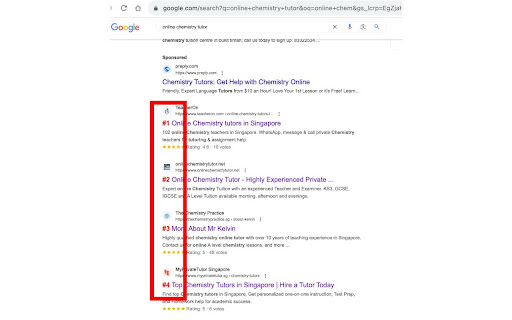
Free SERP checker + counter tool to count the rankings And yes, this even works for continuous scrolling of Google Search Results (or infinite scrolling if you prefer to call it that). Boost your SEO and search analysis workflow with the 'SERP Counter and SERP Checker' extension. Ideal for SEO professionals and digital marketers, this tool provides a comprehensive SERP numbering solution, ensuring each search result is effortlessly counted and tracked. Plus, with the advanced SERP Checker feature, verify the authenticity and relevance of each SERP entry. Whether you're an SEO expert, content creator, or a digital marketing enthusiast, get unparalleled insights into your SERP data and optimize your search strategy with precision.

GMB Everywhere - GBP Audit for Local SEO
Find GMB categories, GMB Audits, Review audit, and Post audit. Spy, audit, and crush your GMB competitor with this Local SEO tool. Your personal Google Business Profile tool that works on the browser. You will now be able to see Google My Business categories, do basic audits, do Review audits, do Post audits, check location ranking and many related GMB audits directly on Google itself. Now you can turbo charge your Google Business listing, GMB spy on your competitor, get google business analytics and win on Local SEO. 🚀 How to use it? - Install the extension from this page. - Go to Google, and you will see the GMB categories and audit buttons shown on every business page and search result page by default. It also works on Google, Local finder and Google Search result pages. 🚀 About us? GMB Everywhere is a extension that lets you view Google My Business categories on maps. We let you spy on your Google Business competitor and rank better on Local SEO. 🚀 Our features? Design and value to the customer is the number one parameter we aim for when we get our extension in public. Local SEO ranking can make or break your GMB listing. At present extension features includes. ⭐GMB Categories: The categories you assign to your Google listing is one of the top parameter when it comes to Google map business ranking. With our extension you can see the categories directly on Maps and Local Finder. The pages it shows up include: - Google Business Page - Google Search Result Page - Google Business Page with bottom selector. - Local Finder Page - Local Finder Search Result Page These categories automatically updates as you move from one page to another on these GMB resources above. ⭐Highlighting categories: Among the categories that you assign to your business, it is the primary category that is the primary mover. It makes the difference between being on the 3 pack or in the bottom. Our extension marks the primary category with a '⭐'. This way you can ideally differentiate between what is shown as the main category on google and what is the primary category. Unlike commonly believed, the default category shown is not always the primary category. ⭐Basic GMB Audit: This will allow you to do a basic audit on the business. This will give you a ton of details about the business. This includes: - Business claimed status. - Location information. - Place ID - CID - Business Profile Id - Knowledge Panel Link - GMB Review Request Link - GMB Review Display Link - Post Link - Other businesses at the same address - Other businesses using the same website - Many website auditing shortcuts. ⭐Teleport: You local ranking is very much dependent on the location from which your customer is searching. With our Teleport feature, you can now simulate a search from a particular location. The features include: - Adding a term and select and location and find the rank at the particular location. - Get the competition you have at that particular location. - You can draw and calculate the distance of your business from that particular location directly. ⭐GMB Review Audit: Quantity and quality of reviews are a very important parameter in GMB ranking. With this business review analysis, you would get vital information about the health of the GMB reviews. With this feature, you can find the following information about reviews: - Graphical representation of reviews with time. - Calculating rating of the reviews. - Get analysis of content of their reviews. - Get analysis of quality of their reviews. - Get valuable information about the strategy you would need to follow to be effective. ⭐GMB Post Audit: This feature will let you analyze the posts of a business on GMB. This uses the latest public data. This will give you a very accurate sense of the health of the posting frequency and other GMB Post parameters. With this feature, you can find the following information about posts: - Graphical representation of their post strategy. - Post frequency analysis. - Post content analysis. - Get valuable information about strategy you would need to follow to be effective. ⭐Category Finder: This feature will allow you to find the most relevant category and services for your business. This includes: - Find related category by providing a category. - Find search traffic associated with that category. - Find services associated with a category. - Shortcut to compare seasonal change in category search with external tool. ⭐ Local Scan: This is our most powerful feature for side-by-side competitor analysis. Local Scan allows you to compare multiple businesses in the search results with a single click, giving you a practical roadmap to outrank them. The insights include: - Category Analysis: Compare your categories against competitors to spot what you are missing. - Service Analysis: Discover service gaps and opportunities your competitors are leveraging. - Review Comparison: See exactly where you stand against the competition in terms of review quantity and rating. - Location & Proximity: Understand how location advantages are affecting the rankings in that specific area. ⭐Other features: - Transparent description about how we calculate data. - Show all the result in Maps Search, Google and Google Local Finder. 🚀 Some things to note: ⭐ We are not related to Keyword Everywhere, Keyword Surfer or PlePer. This extension can be used in addition to these extensions on Google. ⭐ We are also not related to GatherUp Google Review Link Generator or UberSuggest. They are just external links given in the audit result. ⭐ This is an independent extension that works on Maps and other Google resources. 🚀 Contact us: In you have any questions, you can contact us using the chat option on the bottom right of www.gmbeverywhere.com.

SERP Counter - SEO Free SERP Checker Tool & Domain Highlighter
Adds numbers to Google search results and highlights specific domains. The SERP Counter Chrome extension is a powerful tool for optimizing your Google search experience. With this extension, you can easily track and navigate the search engine results page (SERP) to find the information you need more efficiently. ➣ SERP Highlighting: Type the domain you want to highlight in your Google search results and press Enter. The extension will automatically add a customizable counter next to each search result that matches your specified domain. ➣ Quick Navigation: Use the hotkey Ctrl+Shift+H to jump to the highlighted result. If multiple results are highlighted, each press of the hotkey will take you to the next one in sequence, saving you time and effort. ➣ Customizable Colors: Choose the color for the numbers displayed next to the search results, allowing you to personalize the look and feel of the extension. ➣ Increased Productivity: Quickly identify and navigate to the most relevant search results, saving you time and effort. ➣ Better Visibility: The customizable counters make it easier to identify your target domain among the search results. ➣ Improved Efficiency: The Ctrl+Shift+H hotkey allows you to jump directly to the first highlighted result, streamlining your research and decision-making process. ➣ Personalized Experience: Customize the color of the counters to match your preferences and improve the overall user experience. ➣ SEO Professionals: Monitor the ranking of your website or client's website in Google search results, making it easier to track and analyze performance. ➣ Researchers: Quickly identify and navigate to relevant sources when conducting research on the web. ➣ Online Shoppers: Easily find the best deals by highlighting your preferred retailers or brands in the search results. ➣ Anyone Who Uses Google Search: Enhance your overall search experience and save time by using the SERP Counter extension. Install the SERP Counter Chrome extension today and take your Google search experience to the next level!

NoFollow
Outline nofollow links, detect nofollow and noindex meta tags on webpages. Features website filtering and custom CSS outline styles. :: Features ★ supports NOFOLLOW, UGC, and SPONSORED attribute values ★ supports search engine specific robot meta tags ★ disable or enable extension for defined websites v6.0.0 - switched to extension manifest V3 - added export and import - added keyboard shortcuts - removed "Remember minimised state" setting - now it always remembers minimised state across browser restarts - misc code improvements v5.3.3 - fixed visual issues in extension options for high pixel density screens v5.3.2 - trying a fix for errors on Mac OS v5.3.0 - ignore certain errors in logger - added CSP for better security v5.2.2 - fixed issue where extension would not mark links with image nested more than one level deep v5.2.0 - support for UGC and SPONSORED attribute values (there is no way to visually distinguish it from NOFOLLOW value at this time) - replaced facebook and twitter share links on options page v5.1.0 - improved the way injected script communicates with background script - fix: improved error logging v5.0.0 - new: added outline for links without nofollow attribute ("DoFollow" links) - new: added outline for external links - new: added "D" button next to each style input so you can easily restore default style value - new: inject content scripts to already opened browser tabs on extension start, this should improve user experience on extension install and update - change: updated minimum requirements to Chrome v39 - change: updated default outline styles (this will be noticed only by new users) - change: merged content scripts into one script, should use less resources now - change: made sure that extension doesn't try to load itself into pages from web store to avoid "no permission" errors - change: improved error logging - change: removed Google+ icon and updated Facebook and Twitter icons ===> Full changelog on the website

MASTER SEO Tool- SERP Counter & Meta
Our SEO Tool check website and displays all kind of important meta data information like Title,Description,Canonical etc. Our SEO Tool display all important meta information like title with it's length , description with it's length, keyword with it's length, canonical URL , word length, character length etc. and we focused on these features like header tag display , all kind of images display with download button and much more...... Main Features: ✔ SERP COUNTER TOOL ✔ H TAG INFORMATION ✔ IMAGE DETAILS DISPLAY WITH DOWNLOAD ✔ MULTI URL OPENER ✔ INTERNAL LINKS HIGHLIGHTER ✅ SERP Count display on search ✅ All H tag (H1,H2,H3,H4,H5,H6) details display. ✅ Title display with it's length ✅ Description display with it's length ✅ An analysis of the number of images with and without ALTs, Title, ✅ Allow Image Download in an easy way ✅ URL - Canonical URL display ✅ Open Multi URL at a time. ✅ Highlight all internal links ✅ The list goes on and on......
