
bodigfghdmaefehhkndaekbmffobmppb
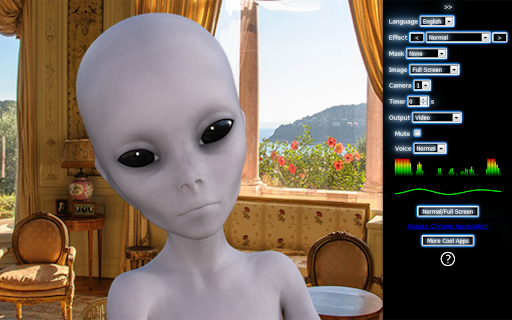


Take photos with your webcam, record videos, create GIF animations, add effects and masks. - Take pictures online with your webcam - Create GIF animations - Record videos - Apply live filters - Add amazing cool effects - Add real-time masks - Transform the way you look - Selfies are easy and fun - You only need a web browser - Cross-platform and mobile-friendly - All features are completely free - Registration is not required

Snapchat Camera for Chrome - Public Preview
Introducing the public preview of Snapchat Camera for Chrome! Elevate your webcam experience with Snapchat Lenses. Whether you're in professional meetings using Google Meet, catching up with friends, or live streaming, our extension brings the creativity of Snapchat Lenses directly to your webcam. During this public preview, Snapchat Camera for Chrome supports many popular video and streaming platforms, including: Have a site to suggest or another idea? Send us your feedback and requests: https://forms.gle/u11hjDi2hckHT6cp9 🎭 Explore an Array of AR Lenses: Access a vast collection of Snapchat Lenses, including the latest trends and festive themes, to make every interaction unique. ✨ Use Your Own Lens Creations: Add a personal touch by integrating Lenses you've designed and published. 🔗 Seamless Integration: Enhance your video interactions on numerous platforms across the web with ease. 1. Install the Snapchat Camera extension from the Chrome Web Store. 2. Sign in with your Snapchat account. 3. In the camera settings of your chosen web app, select "Snapchat Camera" as your camera. 4. Click the Snapchat Camera icon in the Chrome extension menu to open the extension pane. 5. Select a Lens and start using Snapchat Lenses in Google Chrome! Experience the magic of Snapchat Lenses and bring your creativity to life in every interaction. Download the public preview of Snapchat Camera for Chrome now!

System Scanner - Check Your Computer Specs
Shows Hardware and Network Information. Find your computer (PC, Mac, Linux computer, laptop, etc) specs and get detailed information about your network connection. System Scanner is a fast, lightweight system information tool that gathers information on some of the main devices of your system: - processor name, architecture, capabilities, temperatures, usage, cores number; - memory (RAM) size and usage; - graphics card; - internal hard disk drives and devices with removable storage. Need to find out what’s inside your computer? How powerful is your CPU? How much RAM do you have? What is your Graphics card? System Scanner has all the information you need! In addition to your hardware specs, System Scanner displays information about your network connection, including local and public IP addresses, Internet service provider and other information. Also, this extension complements the functionality of our web service, available at https://system-scanner.net. It allows the service to display more information about your system on the service page.

OPTIC - Webcam Control and Optimization
An extension to control and configure hardware settings of webcams from Chrome on Windows A Chrome extension that allows users to control the hardware settings (brightness, contrast, saturation, etc.) of their webcams directly from Chrome on Windows. This extension bridges the gap between browser-based applications and native webcam controls, offering a seamless experience for users who require precise control over their video inputs. Features - Adjust Camera Settings: Easily adjust common camera settings extended by your connected webcams including Brightness, Color Temperature, Contrast, Exposure, Focus, Frame Rate, Saturation, Sharpness, and more. - Built-In Configurations: Set common configuration settings including black and white, sepia, and camera defaults. - Custom Configurations: Save up to four custom camera specific configurations into templates for future access. - Cross-Application Compatibility: Works across multiple Windows applications, allowing for consistent webcam settings. - User-Friendly Interface: Simple and intuitive UI for quick adjustments. - Real-Time Updates: See the effects of your changes in real-time. Usage - After installing the extension, click on the OPTIC Iris icon in your Chrome toolbar. - Click the settings button to enable camera permissions, toggle camera auto-connect, and set appearance preferences - Open the Extension to connect your webcam - Use the lower dropdown, slider, and toggles to change camera settings - Navigate through templates using the top dropdown and use the Save button to save custom configuration settings after changing webcam settings - Change template names in the Settings window to customize user experience Compatibility Operating System: Windows 10 and above Browsers: Google Chrome (latest version) Issues If you encounter any problems, please open an issue on GitHub https://github.com/ethanedson/Optic/issues

Online Alarm Clock
- alarm clock; - calendar; - stopwatch; - timer; - kitchen timer; - countdown timer to any date; - Christmas countdown; - metronome; - widgets for embedding into other websites and blogs. All applications are very simple to use and at the same time have a lot of options. The alarm clock features includes: - built-in radio with many stations; - various kinds of clock (digital, LED, analog, flip); - multiple alarm signals, including video (YouTube-based) and talking wake up voice; - flexible configuration; - the set of background images and sounds; - cuckoo; - full-screen mode; - the ability to automatically open Web pages; - if your internet connection fails, the alarm clock will still work; - remembers the settings; - do not require registration; - absolutely free. This extension allows you to open Onlive Clock not only in the usual way, but also using the Alt + 3 hotkey. If you wish, you are free to assign a preferred key combination using the UI exposed at chrome://extensions/shortcuts Also, users who have installed this extension receive an additional level of reliability in case the online alarm clock sound does not go off. This is extremely unlikely, but if for some reason the sound in the alarm clock web app does not work, the audio signal will be played using the extension.
