
bobpaofofhjkhpfdnmpkmdebchbbdbkp
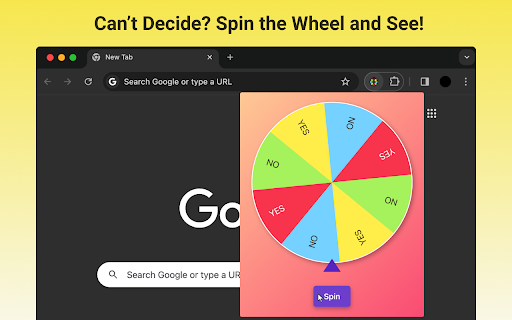
Spin the Yes or No Wheel - Make decisions with a spin! Randomizer, generator and a picker wheel spinner for yes/no choices. 🎡 Introducing the Yes or No Wheel - the ultimate decision-making tool that takes the stress out of making choices with a simple spin! Are you tired of endlessly debating between "yes" and "no"? Let the Yes or No Wheel decide for you! This handy Chrome extension is designed to help you make decisions quickly and easily, acting as your personal decision maker. 🌀 How does this decision wheel work? It's a piece of cake! Open the extension, give the wheel a spin, and watch as it spins faster with each click. Let fate choose between "Yes" and "No" for you! The wheel of yes or no is the perfect choice wheel for all your decision-making needs. The Yes or No Wheel spinner is ideal for: - Deciding whether to go out or stay in - Choosing between two options - Adding excitement to your decision-making process - And so much more! Q: How many sectors are on the Yes or No Wheel? A: The Yes or No Wheel spinner features 8 alternating sectors, 4 "Yes" and 4 "No". Each spin of the wheel randomly lands on one of these sectors, leaving your decision up to chance! Q: Can I customize the Yes or No spin wheel? A: While the Yes or No spinning wheel doesn't offer customization options, its sleek and simple design is perfect for quick and easy decision-making. Plus, the alternating "Yes" and "No" sectors add a fun element of surprise to each spin of the wheel! 🎠 With the Yes or No Wheel, you'll never have to spend hours agonizing over a decision again. Simply give this picker wheel a spin and let fate take the reins! Looking for more features? Check out these amazing benefits of the Yes or No wheel spin: ➤ Simple and intuitive design ➤ Easy to use with just a click ➤ Alternating "Yes" and "No" sectors for balanced decision-making ➤ Helps you make decisions quickly ➤ Perfect for indecisive people Q: Is the Yes or No Wheel just for yes or no questions? A: Absolutely! The Yes or No spin the wheel is designed specifically for binary decisions. Whether you're trying to choose between two options or just need a simple "Yes" or "No" answer, the Yes or No Wheel has got you covered. 🎉 Ready to start making decisions the easy way? Download the Yes or No generator today and let the power of chance guide you! Using the Yes or No decision maker wheel is a breeze: 1️⃣ Open the Chrome extension 2️⃣ Give the wheel a spin 3️⃣ Click multiple times to make the wheel spin faster 4️⃣ Watch as the wheel lands on "Yes" or "No"! Q: Is the wheel of fortune yes or no suitable for all ages? A: Yes! The Yes or No Wheel is a family-friendly tool that can be used by anyone. Its simple design and easy-to-use interface make it perfect for kids and adults alike. 🥳 So what are you waiting for? Download the Yes or No Wheel today and start making decisions with a fun and exciting twist! Still not convinced? Here are a few more reasons why you need the Yes or No randomizer wheel in your life: ▸ It adds an element of chance to your decision-making ▸ It's perfect for those "I don't know, you choose" moments ▸ It's a fun way to break the ice and start a conversation ▸ It's completely free to use! Q: Can I use the Yes or No tarot wheel offline? A: Yes! The Yes or No Wheel is a Chrome extension that works seamlessly both online and offline. Whether you have an internet connection or not, you can always rely on the Yes or No Wheel to help you make decisions. 🌍 Life is full of choices, but with the Yes or No Wheel, decision-making has never been easier or more fun! Give this wheelspin a try today and see where fate takes you! Q: How does the Yes or No facade ensure fairness in its results? A: The Yes or No Wheel uses a random number generator to determine which sector the wheel lands on. This ensures that each spin is entirely fair and unbiased, giving you a truly random "Yes" or "No" answer every time. Q: Can I spin the Yes or No Wheel multiple times for the same question? A: Of course! If you're not satisfied with the first result, feel free to spin the wheel again. Keep in mind, though, that the more times you spin, the more likely you are to get a different answer. It's all part of the fun and unpredictability of the Yes or No Wheel! 🌀 So why wait? Add a touch of excitement to your decision-making process with the Yes or No Wheel! Download this decision-making wheel today and let the spinning begin!

MAJIQ Wheel
A multipurpose wheel. Originally intented for randomly selecting an answer for multiple choice questions. Works like MAJIQ! A spinning wheel that allows the user to randomly generate an answer when faced with many choices. The MAJIQ Wheel can be used individually when unsure about the answer of a multiple choice question. Or it can be used collectively with a group of friends when deciding the order of players in an online board game. Users can select between answers of numerical or alphabetical format, and can select up to 4 options. For example, the user can select the alphabetical format and the following options: second, third, fourth. When the user presses the spin button, the MAJIQ Wheel will update its display to randomly select between values: b, c, d. Users spend most of their time online, whether that's to play games or to write exams. The MAJIQ Wheel, as a Chrome extension, gives the user convenient access to a randomizer tool that can be applied to a multitude of online tasks.

Yes or No Wheel
Introducing the "Yes or No Wheel" Google Chrome Extension - the efficient decision-making tool you've been waiting for! Tired of wasting time pondering simple yes or no questions? Simplify your choices with the "Yes or No Wheel" extension. It's quick, easy to use, and designed to streamline your decision-making process. Instant Decision-Making: Stop overthinking and get immediate answers. Enter your question, spin the wheel, and let the "Yes or No Wheel" make the choice for you. User-Friendly Interface: The "Yes or No Wheel" offers a clean and intuitive interface. It's easy to navigate, ensuring a smooth and hassle-free experience. Privacy and Security: Your privacy matters. Rest assured, the "Yes or No Wheel" extension prioritizes data security, keeping your information confidential. Make decisions effortlessly and confidently. Install the "Yes or No Wheel" Chrome extension now and let it handle your dilemmas with a spin!

Spin The Wheel Random Picker
Create customizable spinning wheels for games, activities, chores, prizes, and more! Spin The Wheel - Random Picker is your ultimate tool for making decisions fun and easy. Create customizable spinning wheels for games, activities, chores, prizes, and more! With a user-friendly interface, unique themes, and true randomness, it's perfect for any occasion. Available on desktop and mobile. Try it now! Make Decisions Fun and Easy!: Struggling with tough decisions? Transform the way you choose with an engaging and entertaining experience! Discover the Power of Spin The Wheel Random Picker: Revolutionize decision-making with our app, bringing adventure and fun to every choice. Use customizable spinner wheels for dinner options, game character names, random activities, chores, or even lucky number selections. Find Answers with Ease: Got burning questions? Our advanced spin-the-wheel feature has you covered. Create uniquely designed wheels with personalized themes and music selections tailored to your style. Global Accessibility, Zero Cost: Our app is free and available worldwide. Join a diverse community of decision-makers and make your choices enjoyable. True Randomness Every Time: Every spin delivers a genuinely random result, ensuring fairness in your decision-making process. Unleash Your Creativity: Customize your wheel with unique color palettes using our Wheel Color Management. Adjust slice sizes with the 'Weight' feature for precise control. Effortless Slice Management: Enable or disable slices quickly without altering your original wheel options. Convenience at its best! Last Man Wins Spin Mode: Experience the thrill of "Last Man Wins" mode, where the wheel spins multiple times, eliminating slices until the ultimate winner is revealed. Flexible Display Support: Designed to scale seamlessly across phones, tablets, and desktop devices for a responsive user experience. Your Sound, Your Style: Enhance your wheel with custom Music Backgrounds, Decision Sounds, Effects, and Fonts to match your preferences. Winner Voice Announcer: Select your preferred language, and the wheel will announce the winner's name aloud for an exciting finish.

Decision Picker Wheel
A customizable wheel to make quick, random decisions. Perfect for random choices, games, and resolving indecision. Decision Picker Wheel is the perfect Chrome extension for those moments when all your options are great, but you just can’t decide! Whether you’re choosing a restaurant, deciding on game rules, or making life’s tougher choices, let fate take the reins. Customize your options, spin the wheel, and let it guide you to what could be your best decision yet. Sometimes, the best choice is the one left to chance—so why not give it a spin? ## v1.1 Update - Option Deletion: You can now easily delete options by clicking the visible delete button next to each item. - Clearer Result Display: After spinning, the selected option is shown clearly in a pop-up dialog. ## Main Features: - Random Decision Making: Quickly generate random decisions, perfect for group activities, games, or when you're stuck on a choice. - Customizable Options: Easily add or remove options from the wheel to fit your needs. Clean and Simple Design: The modern, flat design is easy to use and aesthetically pleasing. - Keyboard Shortcut: Quickly add new options to the wheel by pressing Ctrl + Enter for a more efficient experience. - Eliminate Indecision: Whether for daily decisions, team choices, or fun events, this tool helps you overcome indecision with a quick spin. ## How to Use: - Add Options: Type your choice into the input box on the right side of the wheel, then click the green "+" button or press Ctrl + Enter to quickly add it to the wheel. - Spin the Wheel: Click the blue "SPIN" button in the center of the wheel to randomly spin it. The wheel will stop on one of the options, giving you your random decision. - Edit Your Options: You can easily modify the options by adding or removing them from the list. ## When to Use It: - Make decisions for family or group gatherings (e.g., "What should we eat tonight?") - Use it in classrooms or team settings for interactive activities. - Great for random choices in games (e.g., to determine turns, tasks, or actions). - A helpful tool for daily decision-making when you're stuck. ## Keyboard Shortcut: Ctrl + Enter: Quickly add new options to the wheel with this shortcut.
