
bnfcponljligkhgljinnbnhkhiopkobc

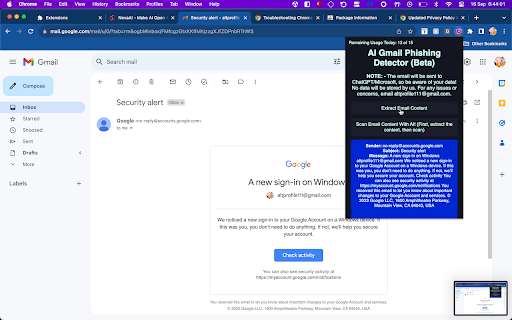
Extracts Gmails from Gmail pages and then feeds it to GPT-3, checking for anything suspicious! AI Phishing & Malware Detector Gmail - Your Ultimate Email Guardian In today's digital age, email security is paramount. Protecting your Gmail inbox from phishing attacks and malware threats is not just an option; it's a necessity. Enter AI Phishing & Malware Detector Gmail, the all-in-one Chrome extension that empowers you with cutting-edge technology to keep your Gmail account safe and secure. This powerful Chrome extension seamlessly integrates into your Gmail interface, providing you with unparalleled email security features: Phishing Detection: Our advanced AI algorithms are trained to recognize phishing attempts, even the most sophisticated ones. AI Phishing & Malware Detector Gmail scans every incoming email, flagging suspicious messages and keeping your personal information out of harm's way. Extracts Email: Simply click a button and extract the email sender, subject, and content onscreen. It is that simple! User-Friendly Interface: Designed with simplicity in mind, this extension is easy to use for all levels of users.

AI PhishNet
AI PhishNet is a Chrome extension that helps you to protect yourself and your organization from Phishing attacks. It uses Prosfinity unique AI technology to detect Zero Day Phishing URLs, including Phishing attacks. [PhishNet AI One and PhishNet AI Two] AI PhishNet uses two different AI models to analyze different aspects of a URL, in order to better detect Phishing attacks. PhishNet AI One focuses on the domain name, while PhishNet AI Two focuses on the pattern and signature. [Manage Whitelist] You can whitelist domains and URLs that you trust, so that they are not flagged as Phishing sites. [Warning Alert Page] AI PhishNet has an alert page that will show you a warning if you visit a Phishing site. The alert page will provide you with information about the Phishing site, such as the type of Phishing attack it is attempting to carry out and the potential consequences of falling victim to the attack. [Neutral Alert Page] AI PhishNet also has a neutral page, which is shown if AI PhishNet is matched one of our AI. The neutral page will provide you with more information about the site. [Login for Company-Level Protection] Businesses can log in to AI PhishNet with their Company ID to get company-level protection. This will allow you to manage whitelists, set alert settings, view reports on Phishing activity. [Intensive Mode] In Intensive Mode, AI PhishNet will analyze the entire URL, including the domain name, the path, and the query string. This mode is more secure, but it may also result in more false positives. [Alert Mode] In Alert Mode, AI PhishNet will show you a warning for any site that it suspects may be Phishing. This mode is the most secure, but it is also the most likely to result in false positives. [Phishing User Awareness Training] AI PhishNet also implements Phishing User Awareness Training on the Alert Page. This training is designed to teach users about the different types of Phishing attacks and how to spot them. The training also includes tips on how to avoid falling victim to Phishing attacks.

Remote Desktop Blocker
The goal of this extension is to block any remote desktop applications scammers may use to get to you or a loved one. This… The goal of this extension is to block any remote desktop applications scammers may use to get to you or a loved one. This extension is simple. If it detects the user is navigating the web to a remote desktop platform; it will block it.

Stop Malware Content
Alerts you when you attempt to visit suspicious or harmful websites. The Stop Malware Content browser extension, as the name suggests, stops malware content by preventing you the user from visiting malicious and potentially unwanted websites. What are malicious and potentially unwanted websites? Malicious websites is a websites that directly promote malware, or try to steal your credentials (phishing websites) or perform any other illegal activities. But potentially unwanted websites are different, they may not try to directly throw viruses at you, but they may try to promote their adware extension, for example: Remember websites that try to install their suspicious search engine? We flag them as potentially unwanted, as they may not directly harm your computer. However we also block websites with specific reasons, for example we can block specific URLs, like GitHub repositories that contain viruses, or another example, we can block specific YouTube video that promotes malicious content. We made this all for your privacy and safety. About privacy, we don't store your personal information or track websites that you visit, we only gather information like your browser, operating system, etc. for the purpose of analyzing and improving our services. Stop Malware Content is completely free and open source, licensed under GNU General Public License v3.0 license. Visit our GitHub repository to learn more: https://github.com/StopMalwareContent/Extension.

FDev Security
You are protected absolutely with our awesome features: Realtime protection, block seen and typing indicator, blur messenger! # INTRODUCTION You are often afraid about "malicious" websites on the internet. It seems that you cannot know when your sensitive data was stolen by attackers. And when your information, data is hacked by someone (such as banks account, Facebook, ...), you just realized that your data is very importance and you begin to care about the security when you browsing in the Internet. Let's CoderDocs Security protect you with real-time protection feature. And we also has another awesome features like: Facebook (+Zalo) privacy, Privacy Web Experience, Blur Messenger, Malware URL scanning, .... # FEATURE 1: REAL-TIME PROTECTION When you install CoderDocs Security extension successfully, this feature will enable real-time immediately. This feature is the most important, so you cannot disable it. When you visit a malware site, the warning popup will be displayed to warning you about this malicious site. # FEATURE 2: FACEBOOK (+ZALO) PRIVACY You can easily enable / disable this feature by check or uncheck the checkbox of every small functions. This feature includes: - Block "Seen" indicator: When you receive a Facebook message, you click to view this message, the sender will see the status "seen" in their message space. But if you enable this function, the sender can not see the status "seen" any more. They never know whether you saw the message or not. - Block "Typing" indicator: Similar with block "seen", the sender can not see the "typing" indicator when you compose the message in Facebook message space (the three dots indicator "..."). - Block "Seen" status in Story: When you click to view the Story of someone, they will know that you have seen their Story. But with this function, nobody can know that you saw their Story. You can click and see your ex-girlfriend any time. - Block "Typing" indicator in Comments space: When you are typing the comment in any post. People can see the indicator "Someone are typing ...". But if you enable this function, this indicator will be disappear forever. - NOW, it support block seen and typing indicators in Zalo web version. Note: Block "Seen" status in Story and block "Typing" indicator in Comments are disable now because some technical problems. # FEATURE 3: PRIVACY WEB EXPERIENCE You can also easily enable / disable this feature by check or uncheck the checkbox of every small functions. This feature includes: - Block important sites when you absent: When you go out, you forgot to lock your computer, someone can open you browser, they can open some important site such as Facebook, Gmail and see your sensitive information. If you don't want that thing happen. Let enable this function. It allow you to block some importance sites that you don't want anyone access to if you have to lend your computer or you go out. - Block tracking Ads Scripts: This function allow you to block the tracking scripts like Facebook, Google. For example, you go to an e-commerce website, when you comeback to Facebook, the previous items in e-commerce website will be display. You can enable this function to block them. - Browser for kids: This function allow you to block almost porn sites in the world. If your kids uses your computer, let enable this function. # FEATURE 4: URL MALWARE SCANNING This is a feature that allow you to operate directly on the user interface. Let go to menu path: TOOLS / SECURITY / MALWARE SCAN and explore this feature. This feature allow you to analyze any URL and inform for you if the URL will be redirected to the website that contains any malware/virus. # FEATURE 5: BLUR MESSENGER This feature allow you to hidden all information when you chat with someone in the Messenger (messenger.com). Just don't care anyone who often peek at your messages. It only work with Messenger - Open Messenger (messenger.com) - Click Settings Icon in the left side bar. - Enjoy the new Messenger feature. More information about CoderDocs Extension: https://lenhatthanh.com/en/coderdocs-security/
