
bnbggajnleefogbinpgehjfckbimhfgk

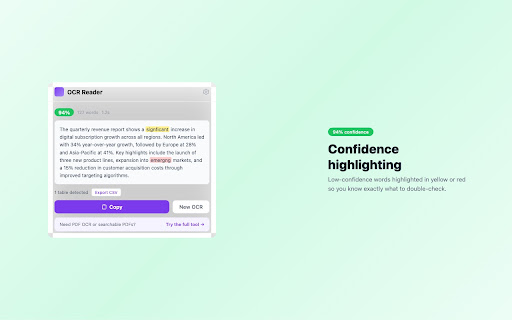


Extract text from any image or screenshot. Works offline. Your images never leave your device. Extract text from any image, screenshot, or region on any webpage — instantly, privately, and completely offline. OneClickPDF OCR Reader uses Tesseract.js WebAssembly to run OCR entirely in your browser. No images are uploaded to any server. Ever. • Click the extension icon → drop or browse for an image → get text • Right-click any image on a webpage → "Extract text from image" • Right-click a page → "Screenshot & OCR this page" • Right-click a page → "OCR selected region" → draw a rectangle around text ✦ 4 ways to capture text Upload an image, right-click any image on a page, screenshot the visible tab, or draw a region to OCR just part of a page. ✦ Auto language detection Not sure what language the image is in? Hit "Auto" and the extension detects the script for you. ✦ Table detection & CSV export Automatically detects table structures in OCR results. Export detected tables as CSV with one click. ✦ OCR history Your last results are saved locally. Recall, copy, or delete them anytime. Configurable limit (10–100 entries). ✦ Editable results Edit the recognized text directly in the results panel before copying. • All OCR processing runs locally using WebAssembly. No images or text are sent to any server. • Language packs (other than English) are downloaded from jsDelivr CDN on first use and cached locally. • History and settings are stored in chrome.storage.local on your device only. • No analytics. No tracking. No ads. • The extension contains links to oneclickpdf.net but does not transmit any data to our servers. • activeTab — capture the current tab for screenshot OCR • contextMenus — add right-click menu items • storage — save your settings and OCR history locally • offscreen — run Tesseract.js WASM in a hidden document (Chrome requires this for Canvas/WASM) • clipboardWrite — copy results to your clipboard • scripting — inject the region selection overlay when you choose "OCR selected region" Built by the team behind OneClickPDF (oneclickpdf.net) — 59 free browser-based PDF tools. Same privacy-first philosophy: your files stay on your device.

chg-sf-highlighter
Highlights useful salesforce fields for CHG healthcare employees

YouTube Speed Per Channel – Auto Playback Memory
Auto-saves your YouTube playback speed per channel. Never manually reset speed again. Never Reset Your YouTube Playback Speed Again. YouTube Speed Per Channel automatically saves and applies your preferred playback speed for every YouTube channel — so you never have to adjust it manually again. 🎯 Who This Is For • You watch tutorials at 1.75x but podcasts at 1.25x • You're tired of resetting speed every time you open a new video • You want a smarter, cleaner YouTube experience ⚡ Key Features ✅ Per-Channel Speed Memory Each YouTube channel remembers its own playback speed. Switch between channels and your speed switches automatically. ✅ Auto Apply on Every Video The moment a video loads, your saved speed is applied instantly — no clicks, no delays. ✅ Focus Mode Block distractions and stay in your optimal watching zone. Watch more, scroll less. ✅ Lightweight & Private No bloated permissions. No data collection. Runs silently in the background. ✅ Premium Unlock Upgrade to save unlimited channels, export/import your speed settings across devices, and get priority support. 💡 Why It Works Better Than YouTube's Built-In Speed YouTube's native speed setting resets constantly. It doesn't remember your preference per channel — it barely remembers it per session. YouTube Speed Per Channel fixes exactly that with zero effort on your part. 🚀 How It Works 1. Install the extension 2. Open any YouTube channel and set your preferred speed 3. Done — it's saved forever for that channel Every time you return, your speed is already set. It just works. 🔒 Privacy First All your speed settings are stored locally on your device. Nothing is sent to any server. No account needed. Built for anyone who's tired of resetting their YouTube speed manually. Install free. Upgrade when you're ready.

Kickoff — Resale Seat Price Tracker
Track every resale seat and price as you browse the official FIFA World Cup 2026 ticket site. Built for fans, not flippers. Kickoff turns the official FIFA World Cup 2026 resale ticket site into a data-driven hunt. As you browse any match, a floating panel mounts on top of the page and lists every available seat, sorted cheapest-first, filtered by category and by how many seats you need together. No more clicking one block at a time hoping you get lucky. You see the whole match on one screen. Every scan also syncs to a private dashboard that is yours alone (no accounts, no emails — just an anonymous UUID generated on your device). Over days and weeks you build a real-time ledger you can use to actually decide when to pull the trigger: ✓ Min, max, and average price charts per match — all time, last 7 days, or last 3 days ✓ Tickets-available chart so you can see when inventory is thickening up or drying out ✓ Price vs 24h ago, and % vs the 2nd cheapest block, so bargains jump out ✓ A transaction history log: every new listing, every seat sold, every price change ✓ Mobile-friendly — open the same dashboard on your phone or tablet Optional: link the dashboard to the companion Telegram bot and get a ping the moment a seat drops below your target price. Filter by category, filter by group size, and Kickoff will message you instantly. BUILT FOR FANS, NOT FLIPPERS Kickoff is designed for one person trying to get to one match — not for bulk buying and not for reselling. We do not help anyone corner a category, we do not expose other users' data, and we do not sell or share what you collect. • All scan data is tied to an anonymous UUID generated on your device — no email, no name, no account • The extension only activates on *.tickets.fifa.com • We do not store your IP, your FIFA credentials, or any identifying information • You can request deletion of your UUID and scans at any time • Full details: https://fifa-kickoff.pages.dev/privacy.html Prices shown include the platform's 15% service fee so you see what you'll actually pay at checkout. Kickoff is independent and not affiliated with FIFA, the FIFA World Cup, Secutix, or any official ticketing partner.

Screenova
This tool captures screenshots and uses AI to quickly provide insights, summaries, and solutions. Screenova is a Chrome extension that enhances your browsing experience by allowing users to capture web page screenshots and use advanced AI and Optical Character Recognition (OCR) technology to extract, analyze, and transform text. Key features include generating explanations, summaries, and action items from screenshots, solving questions efficiently, and offering model selection from tools like ChatGPT 3.5 and 4. This tool simplifies workflow and boosts productivity by providing quick insights and text extraction from images.
