
bmphfemmbimfpeelociakliamncpafia
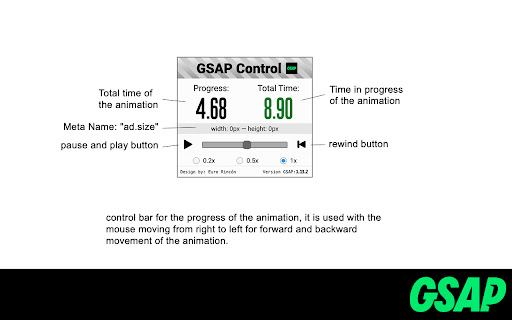

Inspect & control GSAP banner animations. Verify timings, dimensions & scrub timelines. Essential for Devs & QA. NOW with dark mode. Inspect and control your GSAP banners with total ease before every delivery. "Banner Animation QA & Dev Tool (GSAP)" gives developers and QA teams the precise tools to verify timings, dimensions, and manipulate animation playback without hassle. Stop wasting time with manual screen captures or video recordings just to check banner specs! This extension integrates directly into your browser, providing an intuitive control panel the moment a GSAP animation is detected. ⎯⎯⎯⎯⎯⎯⎯⎯⎯⎯⎯⎯⎯⎯⎯⎯⎯⎯⎯⎯⎯ 🛠️Key Features:🛠️ 1️⃣ Effortless Playback Control: Instantly play, pause, and restart your GSAP banner animations with a single click. Perfect for detailed inspection and repeated testing. 2️⃣ Precise Timeline Scrubbing: Easily scrub through the animation timeline to examine specific frames or transitions. 3️⃣ Real-time Speed Adjustment: Fine-tune animation speed (e.g., 0.2x, 0.5x, 1x) on the fly to catch subtle details or review overall flow. 4️⃣ Instant Dimension & Time Display: Immediately see the banner's dimensions, total duration, and current playback time, ensuring compliance with ad specs. 5️⃣ Intuitive, Integrated Panel: A clean and straightforward control panel that appears directly on your banner, providing essential controls without leaving your page. 6️⃣ Automatic GSAP Detection: Intelligently finds and connects to GSAP timelines (TimelineMax/TimelineLite for v1/v2, and gsap.core.Timeline for v3+) in most banner setups. 👁️ Boost QA Efficiency & Accuracy: Empower your QA team to thoroughly test banner animations with precise controls. Easily verify compliance with ad specifications and identify issues early in the process. 🖌️ Improve Creative Collaboration: Facilitate clearer communication between designers, developers, and non-technical stakeholders. Provide an easy way to review and approve animations with full control. 💻Quick Tip for Developers: For best results, ensure your main GSAP timeline instance (e.g., `TimelineMax`, `gsap.core.Timeline`) is assigned to a global variable on the `window` object. Our tool automatically scans for these! Ready to streamline your banner testing and review process? Add "Banner Animation QA & Dev Tool (GSAP)" to Chrome today!

Congree Web Interface
Write according to your company's Style Guide This extension helps you to integrate your company's Congree Authoring Server into specific websites. Research Meets Practice Content optimization solutions based on scientific insight and long-standing industry experience Higher text quality with less effort Apart from the reuse of sentences and consistent use of terminology, Congree offers a comprehensive Language Check that covers 98 percent of the English and German languages. The Congree Authoring Server is scalable and thus supports the editorial work in small, medium-sized, and large enterprises. Rule-Based Language Check Apart from the spelling, grammar, and terminology, the rule-based Language Check also checks the style. Predefined rule sets cover most application cases; additional company-specific rules can be added as needed. Authoring Memory The Authoring Memory serves as a sentence repository, which shows all text segments that are similar to your text and that were written and approved in the past. You can apply these text segments with a click. New sentences are included in the Authoring Memory after they are checked and approved. Congree Data Grooming can help to maintain and improve the quality of your Authoring Memory. Terminology Component The connection of third-party terminology software enables access to a wide range of information on terminology hits. The terminology component in Congree delivers definitions and usage information on specialized terms – including preferred terms, admitted terms, and deprecated terms.

Official GSAP Sniffer
Detects if a website uses the GSAP animation library This is the official GSAP sniffer extension that detects if GSAP (GreenSock Animation Platform) is used on a given webpage. If so, the icon becomes green and shows the version of GSAP on hover. If GSAP is not used, the icon stays grey.

BBR Helper
This provides some advanced stats (game score, simple player rating and game box plus-minus) on multiple pages for NBA, WNBA, G-League, international leagues and college basketball. Including: - average stats by season on the player page - average stats by playoff series on the player page - average stats by player on the team_season page - average stats by player on the team_player page - average stats by player on the season_player page - single game/half/quarter stats by player on the game_boxscore page - single game and average stats on the gamelog and split pages - top 5 and top 20 average stats players on the season page - top 20 average stats players on the team_season page - top 20 average stats seasons rankings on the player page - top 50 career stats rankings on the player page - multiple stats rankings on the leader page - player awards column on team season page gBPM = (-0.55 * fga + 1.04 * fg3 + 1.39 * fg - 0.25 * fta + 0.79 *ft + 0.17 * orb + 0.27 * drb + 0.24 * (trb - orb - drb) + 1.34 * stl + 0.43 * ast + 0.64 * blk - 0.34 * pf - 0.95 * tov) / g """ , where orb is treated as 0.3 * trb and drb is treated as 0.7 * trb approximately when stats are not complete in early years.

CastLists by Casting Workbook
CastLists Chrome Extension Casting Workbook members can import public actor information from different websites and use inside CastLists in order to manage and share lists
